Teltonika is the most widely used device protocol on the flespi platform, making improvements in its onboarding beneficial for a large share of our users. At the time of writing, Teltonika accounts for 582,786 connected devices, or 32.3% of all devices on the platform. If API integrations such as HTTP and MQTT are excluded, the share is even higher. In fact, Teltonika alone exceeds the combined number of devices connected through the next five hardware vendors. There's no doubt that making this one protocol better for our customers pushes the whole platform forward with an amplified effect.
Problem statement
One of the most common automation requests from users is the ability to create a Teltonika device automatically while assigning the correct device type from the very first connection.
Before we dive into the solution, here are a few implementation details that explain why this problem is harder than it looks:
- The parsing scheme and a set of settings depend on the device type specified in the flespi configuration.
- If a device with the correct type is not created and the model is not known for the given device, the flespi parsing engine automatically sends the getver command after connection initialization. The response contains the hardware model, which is remembered under the hood, tied to the IMEI, and used to parse the parameters correctly. But this mechanism is hidden and cannot be utilized by the users. What’s more, sending commands to the devices is not available on the channel level: a registered device is required.
- Regularly (at least once a year when we within our team discuss the future roadmap and directions to develop) we raise the question of automatic device creation. It is usually turned down because for the majority of the protocols on flespi there is no unified standard way to sync device type.
Teltonika is one of the few exceptions. There is a reliable way to determine the correct device type automatically, although the implementation is not as straightforward as it might seem.
The paradox of getting the correct device type
The standard workflow:
device connects to the channel for the first time
=>
Webhook: register a new device with the pre-defined type
The obvious caveat is the predefined device type. If there are 2 or more device types trying to reach the same channel, the scheme fails. How to get the correct device type? By sending the “getver” command. But the command can only be sent once the device is registered. Luckily, this is a solvable paradox: first register a device with an incorrect device type. The best candidate for this device type is “generic”, which has exactly one setting called “getver” containing 3 fields that are common for all Teltonika device types: firmware version, IMEI, and hardware model, which is exactly what we need. The resulting workflow looks like this:
device connects to the channel for the first time
=>
Webhook: register a new device with the generic type and settings polling “once”
=>
device connects to the channel for the second time
=>
flespi triggers automatic setting synchronization command: setting.getver.get
=>
device replies with the actual hardware model
=>
flespi updates the getver setting with the received value
=>
Webhook: modifies device configuration with correct type
Implementation
The first webhook creates a generic Teltonika device when it connects for the first time:
{
  "triggers": [
    {
      "filter": {
        "payload": "$device_id==0"
      },
      "topic": "flespi/state/gw/channels/<channel-ID>/idents/+"
    }
  ],
  "name": "Auto-create Teltonika generic device",
  "configuration": {
    "body": "[{\"name\":\"%topics[6]%\",\"device_type_id\":19,\"configuration\":{\"ident\":\"%topics[6]%\"}}]",
    "method": "POST",
    "type": "flespi-platform",
    "uri": "/gw/devices"
  }
}
The only thing you need to change is replacing <channel-ID> with your own channel ID. The logic is: if there is an MQTT message in the topic that lists idents and there is no field device_id in the payload, then create a device with device_type_id=19 (which is the hardcoded ID of the Teltonika generic device type) and ident taken from the last word of the topic.
The second webhook updates the generic device with the correct Teltonika device type:
{
  "triggers": [
    {
      "topic": "flespi/state/gw/devices/+/settings/getver"
    }
  ],
  "name": "Update Teltonika generic device type to retrieved from getver command",
  "configuration": [
    {
      "method": "GET",
      "type": "flespi-platform",
      "uri": "/gw/devices/%topics[4]%?fields=device_type_id",
     "validate_response": {
        "action": "break",
       "expression": "json(responses[0], '/result/0/device_type_id') == 19"
      }
    },
    {
      "method": "GET",
      "type": "flespi-platform",
      "uri": "/gw/channel-protocols/name=teltonika/device-types/%{urlencode('{name~\"' + json(payload, '/hardware_model') + '\"}')}%?fields=id",
     "validate_response": {
        "action": "break",
       "expression": "json_array_count(json(responses[1], '/result')) > 0"
      }
    },
    {
      "body": "{\"device_type_id\":%json(responses[1], '/result/0/id')%}",
      "method": "PATCH",
      "type": "flespi-platform",
      "uri": "/gw/devices/%topics[4]%"
    }
  ]
}
This webhook works out of the box, but its logic deserves a closer look. The webhook subscribes to the topic flespi/state/gw/devices/+/settings/getver; thus, it is triggered every time the getver setting is updated. After that, the chain of 3 REST API calls is executed.
- Verify the device type: get device_type_id of the device that triggered the MQTT message and stop further execution if it is not a generic device; we only need to process the devices that were created as generic via the previous webhook.
- Resolve the correct Teltonika device type: get device_type_id by the model name received in the MQTT message payload. It is a special request GET gw/channel-protocols/device-types with interesting use of an expression in devtypes.selector: {urlencode('{name~\"' + json(payload, '/hardware_model') + '\"}')} . Here ~ is a case-insensitive string comparison; it is needed because flespi-native device model names have lowercase letters, while the device usually answers its hardware_model with capital letters. Anyway, kudos to the versatility of flespi expressions! And validate_response ensures that the third request won’t be executed if the response does not contain the required device_type_id.
- Update the device: modify device_type_id for the device that triggered the MQTT message using the number from the response of the previous API call.
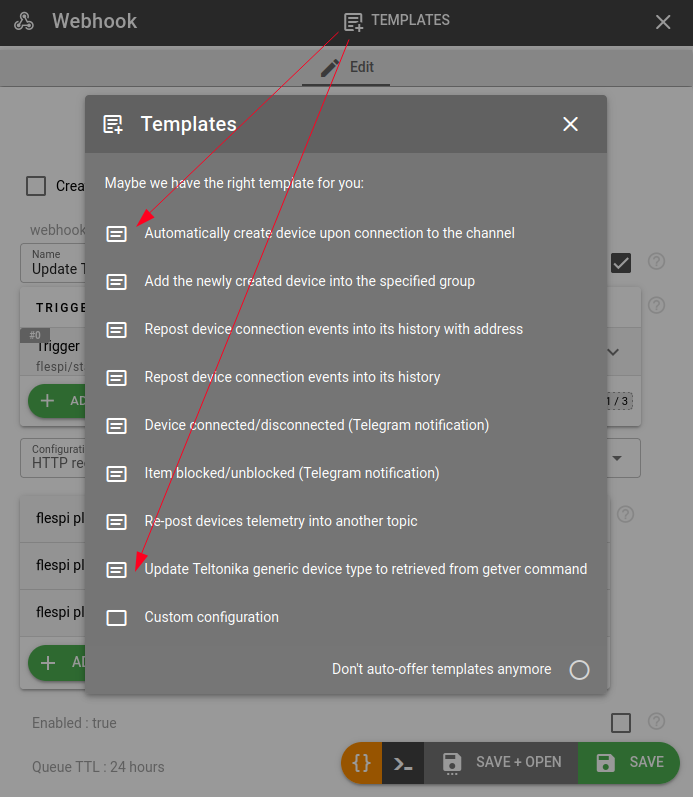
Both webhooks are available in the Templates section when creating a webhook, so you can deploy the complete workflow without recreating it manually.