This MQTT-based protocol with JSON payload is used by Teltonika Gateway Wi-Fi devices to effectively parse the data about anchors and tags in Wirepas Mesh network.
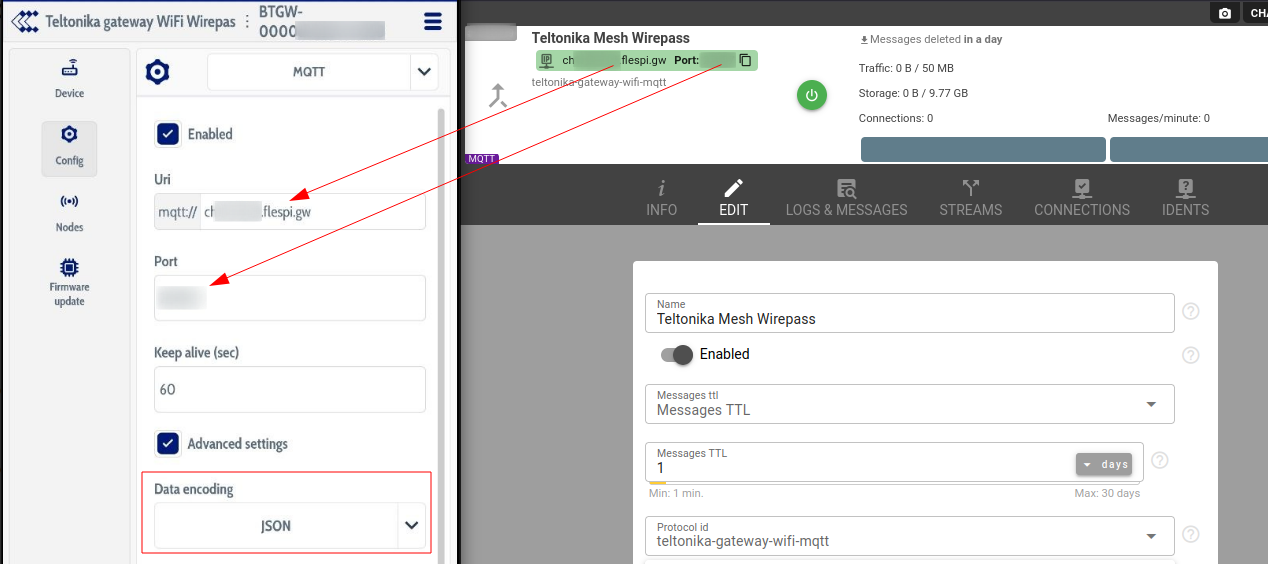
To connect your Gateway Wi-Fi, you need to create teltonika-gateway-wifi-mqtt channel, and use its URI and port in the device's Config->MQTT set up and select JSON as Data encoding.
There are 3 device types available for the protocol:
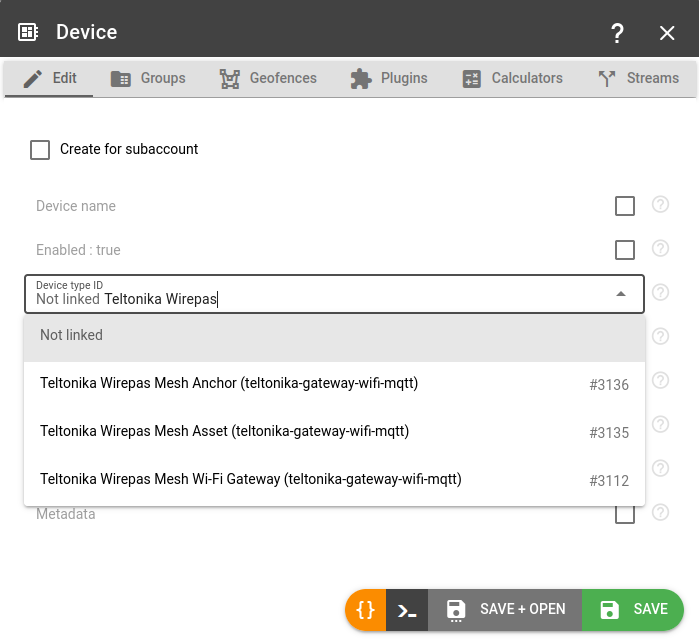
Wi-Fi Gateway device type is identified by the serial number (e.g. BTGW-00000000deadbeef) and stores one valuable parameter event.payload: it is the copy of JSON object with all the data received as MQTT payload. It is used for debug purposes.
Tag device type is the virtual representation of the moving tag, it is identified by the 10 digit serial number (e.g. 1234567890) and stores the valuable array parameter "anchors" that looks like [{"id":"1234567","rssi":-104},{"id":"7654321","rssi":-73}] that displays the list of anchors seen by the tag and the signal strength to it. Tag data is transmitted to the gateway over the anchor's mesh network, thus the tag also has parameters the signal.hop.count (number of the nodes in the Mesh network used to transfer the signal to the gateway) and signal.travel.time, together with the standard parameters like message.seqnum and battery.voltage.
Anchor device type is used to track the anchor devices to effectively answer the question "which tags were seen by the specific anchor device". It is identified by the 7-digit identifier (e.g. 1234567) and it stores the array parameter "tags" that looks like [{"id":"1234567890","rssi":-104}]
ain
number
volts
Voltage on the analog input
anchors
array
Array of visible mesh anchors with RSSI
battery.voltage
number
volts
Internal battery voltage
channel.id
number
ID of channel that received a message
device.id
number
ID of device that received a message
device.model
string
Device model ID string
device.name
string
Name of device that received a message
device.static.status
boolean
Device reports itself static, it runs its static reporting period
device.type.id
number
ID of device type of device that received a message
din
number
Digital inputs bitmask
din.count
number
Digital input event counter reported by the device
dout
number
Digital outputs bitmask
dout.count
number
Digital output event counter reported by the device
event.payload
object
Raw Wirepas packet_received_event object from gateway
firmware.version
string
Firmware version
gateway.id
string
Identifier of the gateway that relayed the message from the device
hardware.type
string
Hardware type
ident
string
Device unique identifier like serial number, IMEI, etc
message.seqnum
number
Sequence number of the message
message.type
string
Message type
message.type.enum
number
Message Type
movement.count
number
Movement event counter reported by the device
movement.detection.status
boolean
Motion detection is enabled on the device, when disabled the device reports no movement state of its own
movement.status
boolean
Current movement state
node.class
string
Wirepas mesh node class, the configuration records a node applies are the ones addressed to its class
node.mode
string
Wirepas mesh node operating mode, the positioning role the node runs in
peer
string
IP:port from which device connecting to the channel
pitch.angle
number
degrees
Pitch angle relative to horizontal plane
protocol.id
number
ID of protocol
protocol.version
string
Protocol version string
report.interval.time
number
Report interval time
roll.angle
number
degrees
Roll angle relative to horizontal plane
sensor.humidity
number
percentage
Humidity sensor value, i.e. relative air humidity level
sensor.magnet.count
number
Magnetic field detection counter reported by the sensor
sensor.magnet.status
boolean
Magnetic field detected by sensor
sensor.presence.count
number
Presence detection counter reported by the sensor
sensor.presence.status
boolean
Presence detected by the sensor
sensor.temperature
number
celsius
Temperature sensor value
server.timestamp
number
seconds
Timestamp when server received a message
signal.hop.count
number
Number of mesh network hops traversed by the message
signal.travel.time
number
seconds
Message transit duration through the mesh network
sink.id
string
Identifier of the gateway sink that relayed the message from the device
software.version
string
Software version string
tags
array
Array of visible mesh tags with RSSI
timestamp
number
seconds
Message timestamp
x.acceleration
number
g
Accelerometer value X
y.acceleration
number
g
Accelerometer value Y
z.acceleration
number
g
Accelerometer value Z
Properties
Send custom command to gateway as MQTT publish packet to specified topic
custom
Publish an arbitrary payload to a topic of your choice on the gateway connection. A publish to a json-gw-request topic waits for the gateway answer on the matching json-gw-response topic and returns it as the command result, a publish to any other topic finishes as soon as the gateway acknowledges it
Set what the nodes do with the scratchpad of the sink
otap_set_target
Changes the action the sink propagates without uploading a scratchpad again: start a rollout the upload left alone, move it to a delayed one, or stop it with no otap
crc: Target CRC
seq: Target sequence number
delay: Processing delay
action: Action
sink_id: Sink id
Read the otap state of the sink
otap_status
Asks the sink which scratchpad it holds, which one it has processed and what it tells the nodes to do with it. The same state arrives unasked in every gateway status event
Upgrade the firmware of the mesh nodes
otap_upgrade_nodes
Uploads an otap scratchpad to the sink and tells the nodes to take it into use. The sink copies it to its neighbours and they to theirs, so the rollout lasts as long as the mesh needs and the command result only reports that the sink accepted it. Follow the rollout with otap_status. Every node of the network receives the same scratchpad, the images inside it decide which of them can apply it
seq: Sequence number
delay: Processing delay
action: Rollout action
sink_id: Sink id
file_uuid: CDN File UUID
Switch the led of a tag or anchor on
set_tag_led
Lights the led of one node for the given number of seconds through the application configuration of the sink, 0 switches it off. The node reacts when it next receives the configuration, so a sleeping tag lights up on its next report
tag: Node address
sink_id: Sink id
duration: Duration
Set the reporting period of a positioning tag
set_tag_report_interval
Writes the positioning update period of one tag into the application configuration of the sink. The configuration holds every tag set this way, 4 tags at most, and is replaced as a whole, so tag periods written by other tools are dropped
tag: Tag address
period: Reporting period
sink_id: Sink id
Set the reporting periods of a positioning tag separately
set_tag_report_intervals
Writes the static, dynamic and offline positioning update periods of one tag into the application configuration of the sink, a period left out keeps its current value on the tag. The configuration holds every tag set this way and is replaced as a whole, so tag periods written by other tools are dropped
tag: Tag address
static: Static period
dynamic: Dynamic period
offline: Offline period
sink_id: Sink id
