Wirepas protocol connects Wirepas mesh network gateways to flespi over MQTT using the standard gateway-to-backend API published by Wirepas, in its protobuf encoding on the gw-event and gw-response topics or in the JSON encoding of Teltonika Gateway Wi-Fi on the json-gw-event and json-gw-response topics. Any vendor's gateway implementing this API can stream mesh data to flespi without vendor lock-in. flespi decodes received packet events and Wirepas positioning application payloads, registering separate messages for mesh tags and anchors with RSSI measurement arrays for indoor positioning, battery voltage, and mesh diagnostics such as hop count and travel time.
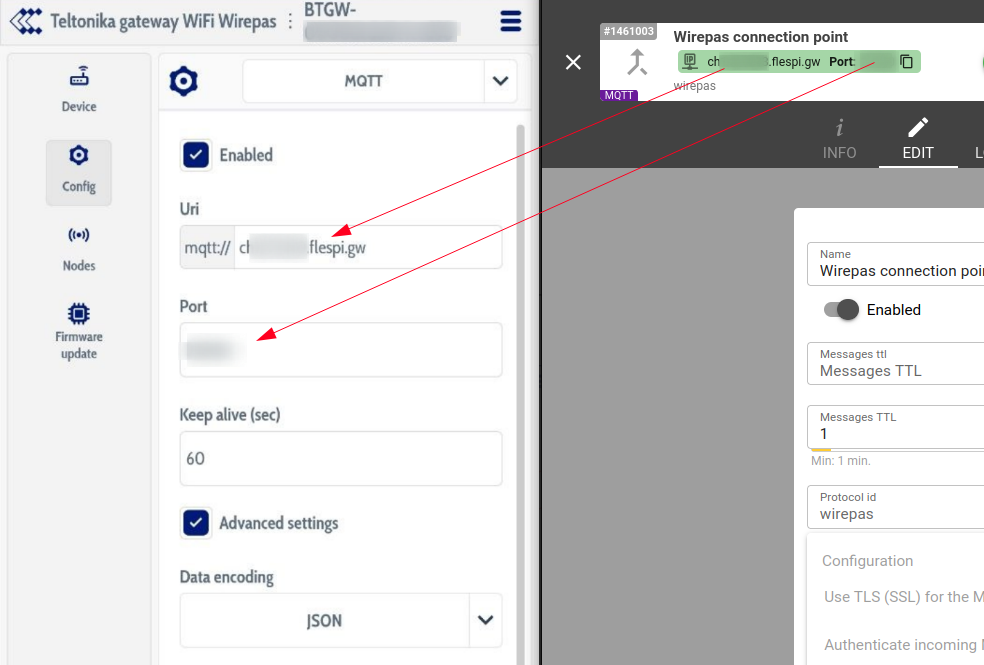
To connect a Teltonika Gateway Wi-Fi, create a wirepas channel and use its URI and port in the device's Config->MQTT set up. Both JSON and Protobuf data encodings are supported: the encoding is recognised from the topics the gateway publishes on, and commands and settings are sent back in the same encoding.
Messages are registered per mesh node, not per gateway: each node's message uses its Wirepas network address as the ident and carries the relaying gateway's identifier in the gateway.id parameter and its sink in sink.id, while every anchor that saw the node additionally receives its own message with the observed asset and RSSI in the tags array. Nodes are automatically classified as tags or anchors by the type of RSSI measurement they report, and message timestamps come from the event generation time reported by the gateway. Every node message names the Wirepas endpoint it was received on in message.type.enum and its family in message.type: positioning, status or sensors.
There are 4 device types available for the protocol:
Wirepas Mesh Gateway device type is identified by the gateway serial number (e.g. BTGW-00000000deadbeef). It stores the gateway status events and the gateway answers to requests, with event.payload holding the copy of the JSON object received as MQTT payload from a JSON gateway and payload.hex the raw bytes received from a protobuf gateway. The commands and the settings of the protocol are sent to the gateway device: tag reporting periods and tag led are written into the application configuration of the sink, the diagnostics interval of the mesh is a setting, and the OTAP commands upload a firmware scratchpad to the sink and control its rollout.
Wirepas Mesh Tag device type is the virtual representation of the moving tag, it is identified by the 10 digit Wirepas network address (e.g. 1234567890) and stores the array parameter "anchors" that looks like [{"id":"1234567","rssi":-104},{"id":"7654321","rssi":-73}] that displays the list of anchors seen by the tag and the signal strength to it. Tag data is transmitted to the gateway over the anchor's mesh network, thus the tag also has parameters the signal.hop.count (number of the nodes in the Mesh network used to transfer the signal to the gateway) and signal.travel.time, together with the standard parameters like message.seqnum and battery.voltage. The positioning report also carries device.static.status, true while the tag runs its static reporting period, and the sensors report of a Teltonika EYE Sensor Mesh tag adds temperature, humidity, movement, magnet and other sensor values.
Wirepas Mesh Anchor device type is used to track the anchor devices to effectively answer the question "which tags were seen by the specific anchor device". It is identified by the 7-digit Wirepas network address (e.g. 1234567) and it stores the array parameter "tags" that looks like [{"id":"1234567890","rssi":-104}].
ELA Wirepas Mesh Tag device type is for the tags of ELA Innovation. Their 11/11 endpoint carries the battery voltage in the same 4 byte frame a Teltonika EYE tag uses for its sensors, so an ELA node must be registered with this device type to be decoded correctly; everything else, including its role and its sensor endpoints 100 to 200, is recognised automatically.
ain
number
volts
Voltage on the analog input
anchors
array
Array of visible mesh anchors with RSSI
battery.voltage
number
volts
Internal battery voltage
channel.id
number
ID of channel that received a message
device.id
number
ID of device that received a message
device.model
string
Device model ID string
device.name
string
Name of device that received a message
device.static.status
boolean
Device reports itself static, it runs its static reporting period
device.type.id
number
ID of device type of device that received a message
din
number
Digital inputs bitmask
din.count
number
Digital input event counter reported by the device
dout
number
Digital outputs bitmask
dout.count
number
Digital output event counter reported by the device
event.payload
object
Raw Wirepas packet_received_event object from a JSON gateway
firmware.version
string
Firmware version
gateway.id
string
Identifier of the gateway that relayed the message from the device
hardware.type
string
Hardware type
ident
string
Device unique identifier like serial number, IMEI, etc
message.seqnum
number
Sequence number of the message
message.type
string
Message type
message.type.enum
number
Message Type
movement.count
number
Movement event counter reported by the device
movement.detection.status
boolean
Motion detection is enabled on the device, when disabled the device reports no movement state of its own
movement.status
boolean
Current movement state
node.class
string
Wirepas mesh node class, the configuration records a node applies are the ones addressed to its class
node.mode
string
Wirepas mesh node operating mode, the positioning role the node runs in
payload.hex
string
HEX Payload received from device
payload.text
string
Text Payload received from device
peer
string
IP:port from which device connecting to the channel
pitch.angle
number
degrees
Pitch angle relative to horizontal plane
protocol.id
number
ID of protocol
protocol.version
string
Protocol version string
report.interval.time
number
Report interval time
roll.angle
number
degrees
Roll angle relative to horizontal plane
sensor.humidity
number
percentage
Humidity sensor value, i.e. relative air humidity level
sensor.magnet.count
number
Magnetic field detection counter reported by the sensor
sensor.magnet.status
boolean
Magnetic field detected by sensor
sensor.presence.count
number
Presence detection counter reported by the sensor
sensor.presence.status
boolean
Presence detected by the sensor
sensor.temperature
number
celsius
Temperature sensor value
server.timestamp
number
seconds
Timestamp when server received a message
signal.hop.count
number
Number of mesh network hops traversed by the message
signal.travel.time
number
seconds
Message transit duration through the mesh network
sink.id
string
Identifier of the gateway sink that relayed the message from the device
software.version
string
Software version string
tags
array
Array of visible mesh tags with RSSI
timestamp
number
seconds
Message timestamp
x.acceleration
number
g
Accelerometer value X
y.acceleration
number
g
Accelerometer value Y
z.acceleration
number
g
Accelerometer value Z
Properties
Send custom command to gateway as MQTT publish packet to specified topic
custom
Publish an arbitrary payload to a topic of your choice on the gateway connection. A publish to a request topic of the gateway api, gw-request//[/] for a gateway speaking protobuf or json-gw-request/... for one speaking JSON, waits for the gateway answer on the matching response topic and returns it as the command result, a publish to any other topic finishes as soon as the gateway acknowledges it
Set what the nodes do with the scratchpad of the sink
otap_set_target
Changes the action the sink propagates without uploading a scratchpad again: start a rollout the upload left alone, move it to a delayed one, or stop it with no otap
crc: Target CRC
seq: Target sequence number
delay: Processing delay
action: Action
sink_id: Sink id
Read the otap state of a sink
otap_status
Asks the sink which scratchpad it holds, which one it has processed and what it tells the nodes to do with it. The same state arrives unasked in every gateway status event
Upgrade the firmware of the mesh nodes
otap_upgrade_nodes
Uploads an otap scratchpad to the sink and tells the nodes to take it into use. The sink copies it to its neighbours and they to theirs, so the rollout lasts as long as the mesh needs and the command result only reports that the sink accepted it. Follow the rollout with otap_status. Every node of the network receives the same scratchpad, the images inside it decide which of them can apply it
seq: Sequence number
delay: Processing delay
action: Rollout action
sink_id: Sink id
file_uuid: CDN File UUID
Switch the led of a tag or anchor on
set_tag_led
Lights the led of one node for the given number of seconds through the application configuration of the sink, 0 switches it off. The node reacts when it next receives the configuration, so a sleeping tag lights up on its next report. The led record rides along the managed tag records of the sink for this one write and is not kept
tag: Node address
sink_id: Sink id
duration: Duration
Set the reporting period of a positioning tag
set_tag_report_interval
Replaces the sink application configuration with flespi-managed tag records; configuration written by other tools is discarded. Preserves other managed tags on this sink. Sleeping tags apply updates when they next receive them. Apply the same configuration to all relevant sinks and avoid frequent writes (more than once per 30 minutes)
tag: Tag address
period: Reporting period
sink_id: Sink id
Set the reporting periods of a positioning tag separately
set_tag_report_intervals
Replaces the sink application configuration with flespi-managed tag records; configuration written by other tools is discarded. Omitted periods keep the running tag's current values, not guaranteed after reboot. Sleeping tags apply updates when they next receive them. Apply the same configuration to all relevant sinks and avoid frequent writes (more than once per 30 minutes)
tag: Tag address
static: Static period
dynamic: Dynamic period
offline: Offline period
sink_id: Sink id