WebRTC is built for real-time, bidirectional media, but bringing it into vehicle telematics means solving a very different set of problems than typical peer-to-peer communication. flespi now has WebRTC integrated into its media streaming stack, opening the way to low-latency two-way audio directly from the browser.
Live video from a vehicle usually goes one way. You can watch the road, watch the cabin, even listen to what is happening inside – and then reach for the phone if you have something to say.
Most of the value of a live video stream shows up in the few seconds after something happens. A driver drifts out of the lane, a passenger gets into an argument, a courier stops at the wrong gate. Watching it is useful. Saying "second gate on the left, I can see you" is what solves it.
Until now, that last step happened outside flespi. The dispatcher watched the stream in one window, looked up a phone number in another, and hoped the driver could pick up. Two-way audio removes that step: your voice reaches the device through the same platform the fleet already runs on, with no extra software on either end and nothing to install in the browser.
Why live video needs a different transport
Our platform delivers live video in several formats, and they are not interchangeable once someone needs to reply.
HLS, the format behind most browser video, cuts the stream into segments and delivers them one at a time. That works well for watching and badly for talking: the listener is always several seconds behind, and a conversation falls apart long before that.
HTTP-FLV, which flespi also serves, is much faster – fast enough to watch things as they happen. But it only goes one way: the picture comes down an HTTP connection, and there is no way back up it. To talk, you need a transport designed for two-way communication.
WebRTC is that transport. It takes more work to set up than plain HTTP, and in return keeps the delay short in both directions. flespi takes care of the hard parts: ICE and NAT traversal, DTLS and SRTP, and converting the codec the device speaks into something a browser can play. What your application gets is a URL.
Three ways to use the audio channel
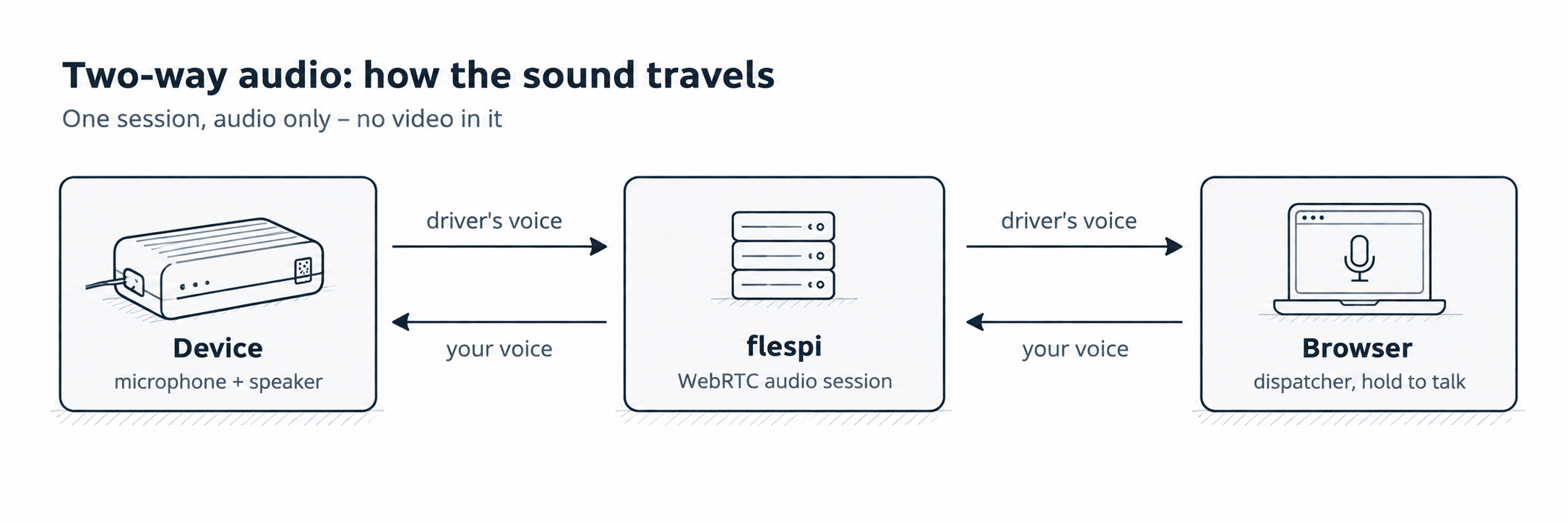
Devices do not all handle audio the same way, so flespi supports three modes, and you pick one for each session.
Listening. You hear the device; it hears nothing. Works on any audio channel, which is useful when you need to check a specific microphone in a bus or van.
Intercom. A real conversation: the device sends its microphone audio upstream and plays what you send downstream. This is the mode for talking to the driver, and it runs on the device’s first audio channel.
Broadcast. One-way audio, downwards. The device sends nothing back and plays what arrives – an announcement to a cabin, a warning to a depot, or a message to a passenger area.
All three are sessions in their own right, and that is worth making clear, because sound can reach you in two different ways. A live video stream can carry the device microphone together with the picture, which is handy when you want to hear what is going on while you watch. But there is no way back through it.
Talking is a separate session with its own command: no video is requested from the device, no video is converted, and the traffic costs are closer to a voice call than a video stream. On a truck with a metered SIM, that is the difference that matters.
Starting a session
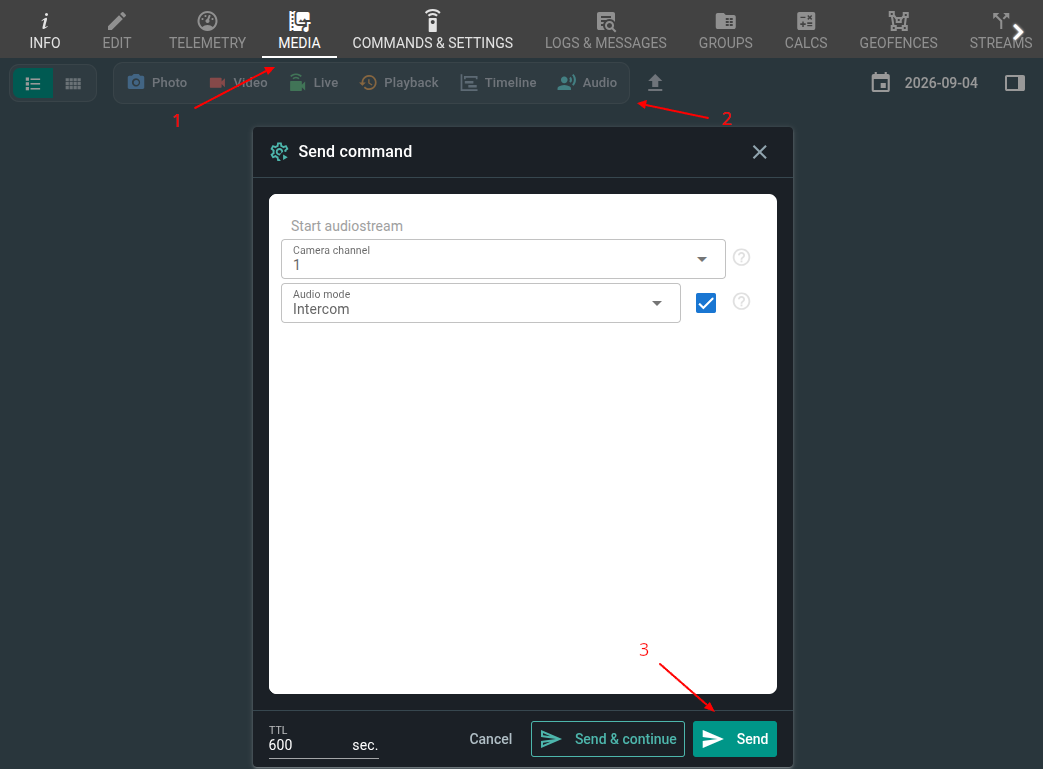
To start an intercom session, go to the dashboard, click on Media > Audio > Send. Also, you can use the following request with a payload:
POST https://flespi.io/gw/devices/{device_id}/commands

[{
 "name": "start_audiostream",
 "properties": {
   "channel": 1,
   "type": 1
 },
 "timeout": 30
}]
The type property selects the mode – listening, intercom, or broadcast – while channel selects the audio channel of the device. The command completes once the stream is ready, and the response contains the address to open:
{
 "mediastream": "webrtc",
 "has_audio": true,
 "channel": 1,
 "url": "https://..."
}
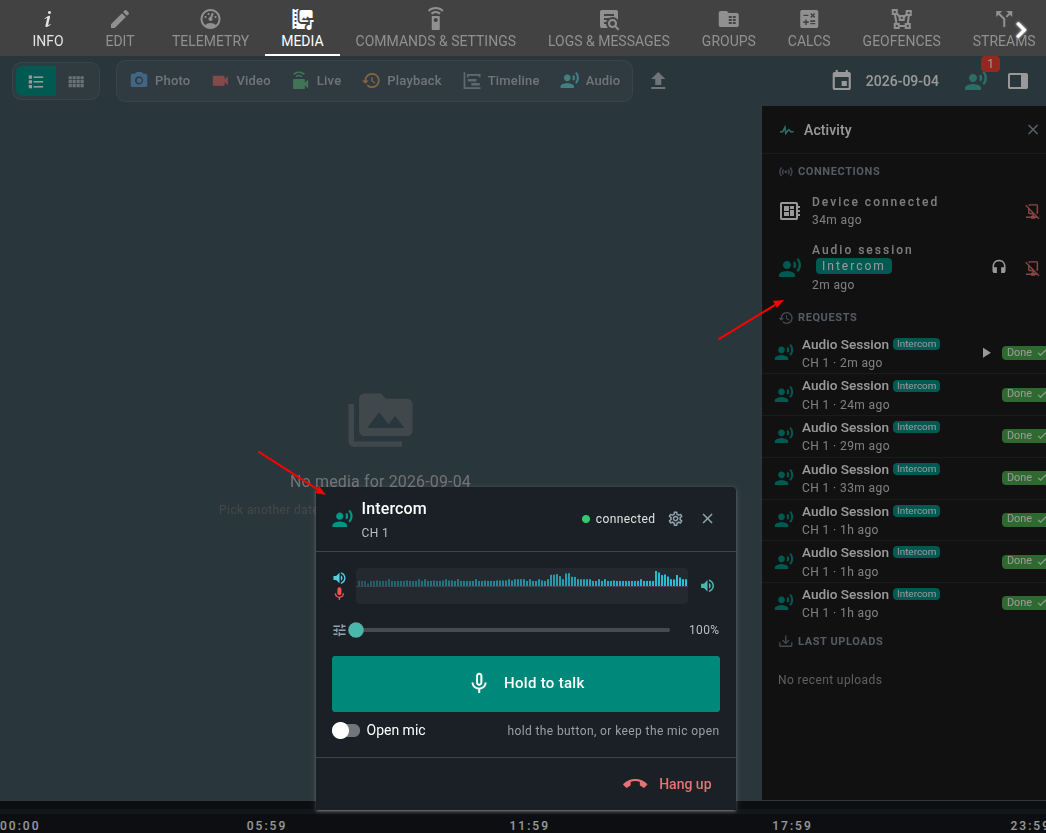
There is nothing else to switch on: in intercom and broadcast, the return path is available from the moment the session starts. Point a player at that URL, and you are connected. In the flespi panel, the same session is one click away, with the talk button right under it.
Push-to-talk, by design
The talk button is not there to look like a radio – it is how the feature is designed to work.
A vehicle cabin is a small room with a loudspeaker and a microphone in it. When the dispatcher speaks, the device plays that voice into the cabin; the microphone picks it up, and it goes straight back up the channel. So the dispatcher hears their own voice come back a moment later, which makes a conversation difficult.
This is why the player works like a two-way radio. Your microphone reaches the device only while you hold the button, and the incoming audio is muted while you speak and for a moment after you let go, so the echo of your own voice never reaches you.
Only one operator can talk at a time, and the microphone is assigned at the moment of connection: the first viewer who asks for it gets it, while everyone who joins later connects as a listener, with no way to send audio. The microphone is released when the speaker disconnects, and the next viewer to connect takes it.
If you would rather keep both directions open, turn on Open mic in the player. The microphone stays on, nothing is muted, and the session becomes an ordinary two-way call. On devices that handle echo cancellation themselves, this is the nicer way to talk; on the others, the button is the safer option.
What works today
Listening works with the protocols that already bring audio to flespi. The return path – the part that sends your voice down to the device – works today with Howen and Streamax devices, and we are adding support for more protocols as we go. If the model in your fleet is not covered yet, tell us which one it is: we add protocols based on what our customers actually use.
Two things to know before you start. The audio is phone quality because that is what these devices record and send – enough for speech and nothing more. And how much echo you get depends on the device: echo cancellation is part of the device firmware, and not every model supports it. The talk button keeps the channel usable either way.
Ready to test?
If your devices already talk to flespi, two-way audio is one command away – nothing new to enable, nothing to deploy. Start an audio session, hold the button, and say something. :)
If you have a question, a device model you want supported, or a use case we have not thought of, drop us a line in the chat – we read every message.