This year, in March, we announced the availability of MCP servers in flespi. The next month, in April, Jan decided to give it a try in a practical case. The idea was to give Claude Code a flespi skill, connect it to the MCP server, and let it create a demo customer account based on nothing more than a minimal task description.
Everything went well. Claude Code, powered by the Opus 4.6 model, handled the task correctly: it created a subaccount and a channel, added several devices, grouped them, and assigned them to a stream. It also generated a Python script so that later even more devices could be provisioned from a CSV file without involving AI at all.
The task was accomplished. Perhaps the only limitation of the demo was that it relied on the terminal UI version of Claude Code, which was designed primarily for engineers who understand what they are doing. Still, it was a pretty cool demonstration of device provisioning and account setup automation.
So, once I saw the video, I quickly cross-linked it with the protocol engineering harness we had developed for internal use and decided to create an AI tool to manage flespi accounts. This one (which we named flespi Concierge) went live just a few days later, and Jan joked that it was probably the first time one of his freshly published hands-on articles had become outdated in less than a week.
Within a few weeks, we adapted our harness to accept new account registrations via identity providers in realms, integrated it with Gurtam's internal authentication system, and gave employees access to AI Concierges across the company. From that moment on, anyone using flespi for both telematics and non-telematics work inside Gurtam had an efficient Concierge agent at their disposal, safely protected by our secure operation approval system.
As time went by, more and more flespi-related tasks inside our company shifted to AI Concierges. Even I became a bit lazy about clicking buttons in flespi.io and found myself delegating more and more account-related work to the Concierge. Especially when dealing with complex tasks involving deep flespi knowledge – subaccounts, realms, webhooks, calculators, and so on. At some point, I caught myself thinking that it would be really difficult to go back to the panel UI and start clicking buttons manually again. It was much easier – and even more secure – to explain the task to the AI Concierge and let it design and implement the solution. I got addicted to AI.
Over the past few months, we've been working to make a similar system available to all flespi users. The goal was to make it reliable, customizable, and transparent. And finally, it's ready.
To give the new system a try, you need to create:
-
Token. I'm pretty confident you can even share your master token with it;
-
AI connector of type flespi, where you store this token;
-
AI agent, and assign the newly created connector to give it visibility into your flespi account;
-
and finally, send it a message. You can simply start with "Hi" or ask it to help with any specific task you're interested in.
To make things even simpler, you can click the AGENTS button in the top right corner of the flespi panel and then the + button. In just one click, we'll provision a complete bundle for you: a master token, an AI connector configured with that token, and an AI agent with the connector already assigned to it. 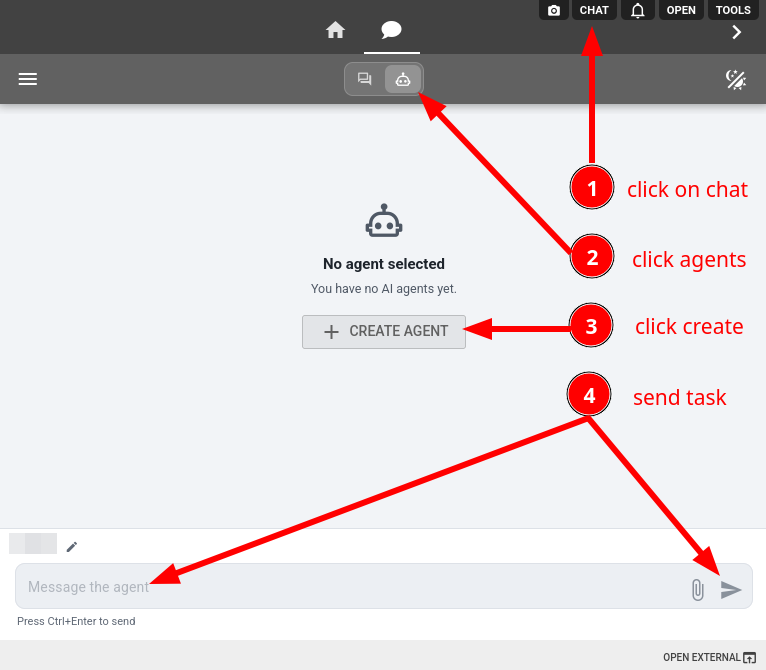
To give you an idea of what it's like to work with a flespi agent, I created one this way and asked it to build the infrastructure for a specific device in an almost empty account.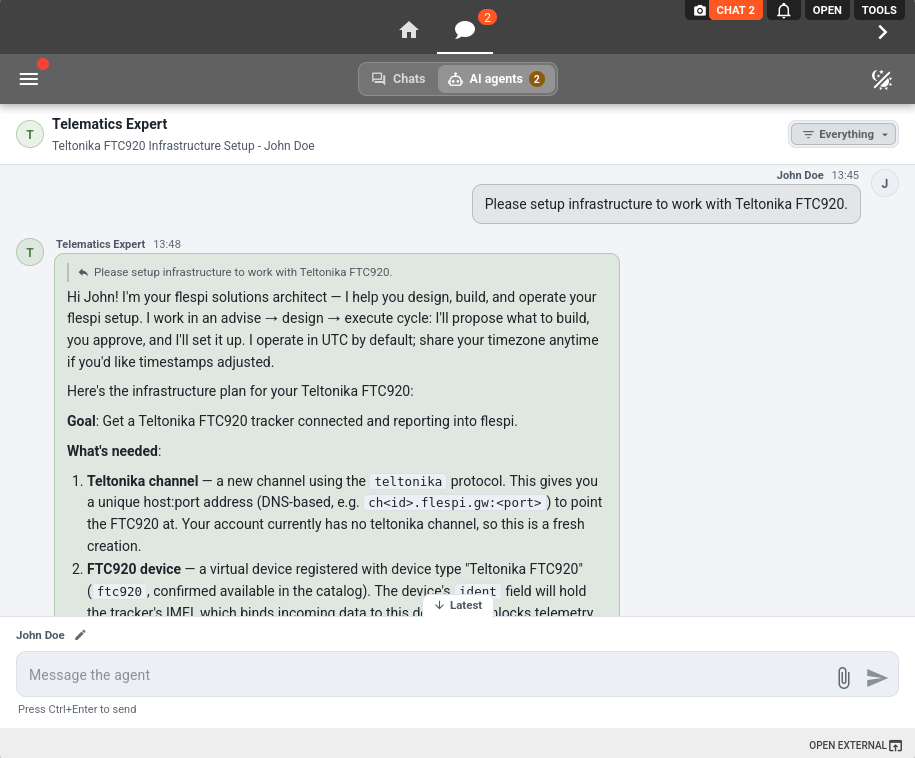
As you can see in the screenshot, instead of rushing to complete the task, the agent first confirmed my intent, clarified anything that wasn't clear, and only after receiving my confirmation queued the flespi REST API calls needed to create the infrastructure – in this case, a channel and a device.
This is where we deliberately inserted a human decision into the agentic loop. By default, all dangerous operations require explicit human approval. 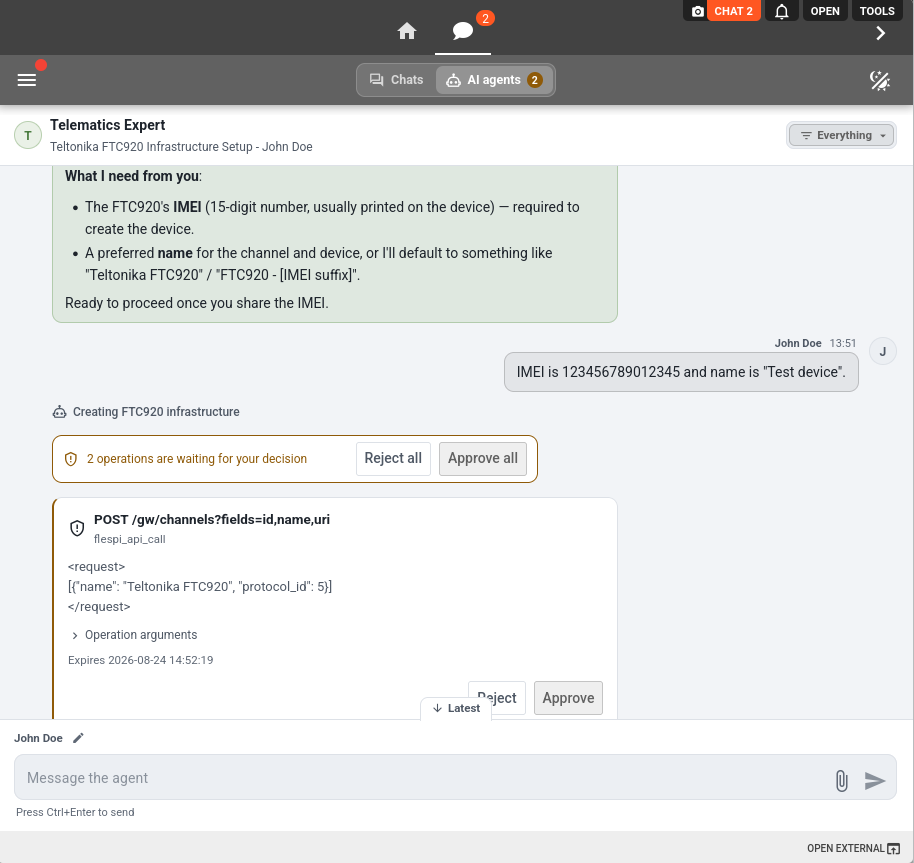
After you approve the operation, the harness executes it by sending the required flespi REST API calls. You can later inspect everything the agent did either in the chat or in the agent and connector logs.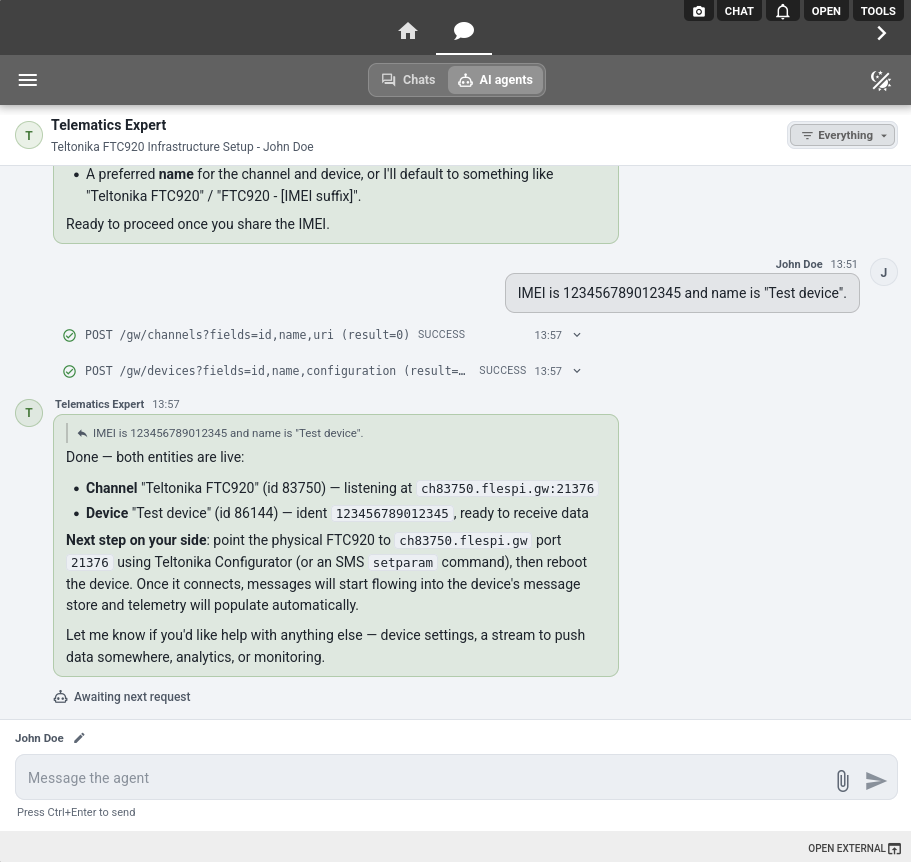
As you spend more time working with agents and build trust in them, you may eventually decide to auto-approve all operations. This can be configured for each agent individually in its Connector bindings. 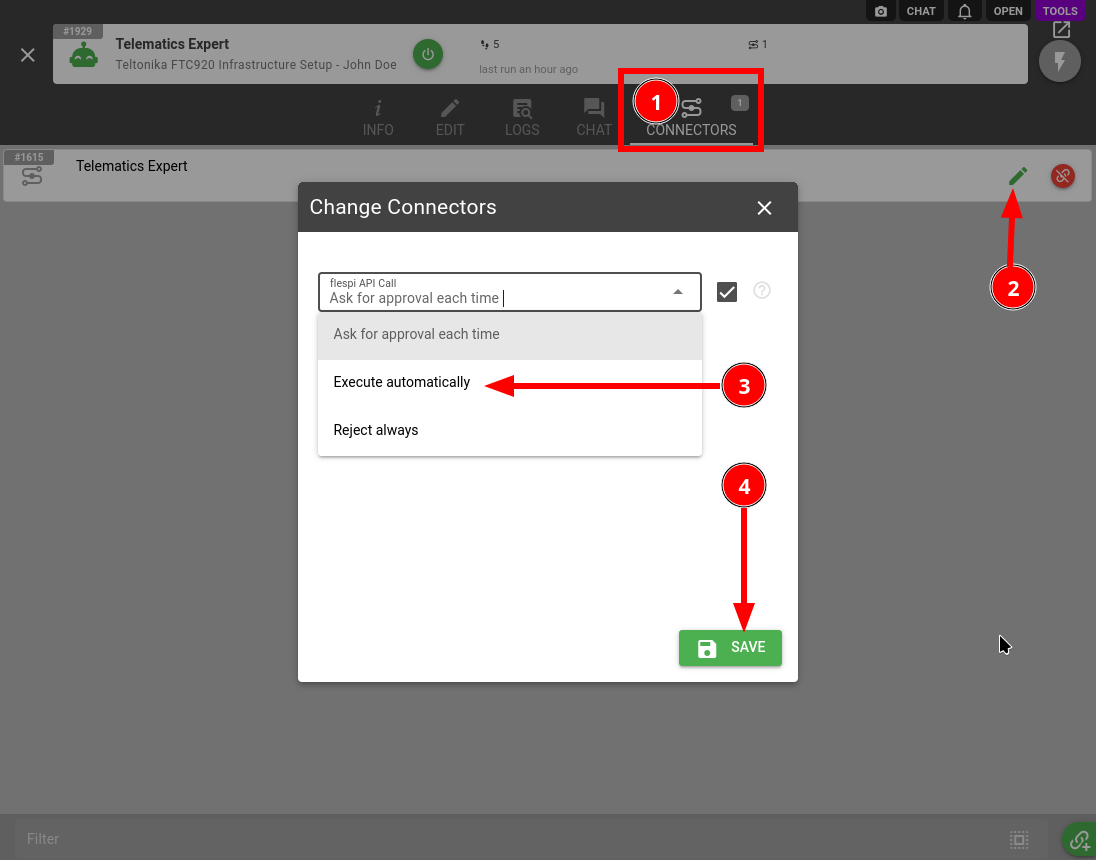
Our AI agents can do much more than simply execute the tasks you give them. They can also set up computational infrastructure to wait for specific MQTT events. For example, an agent can wait until a device connects to its channel for the very first time, then notify you or automatically configure the device.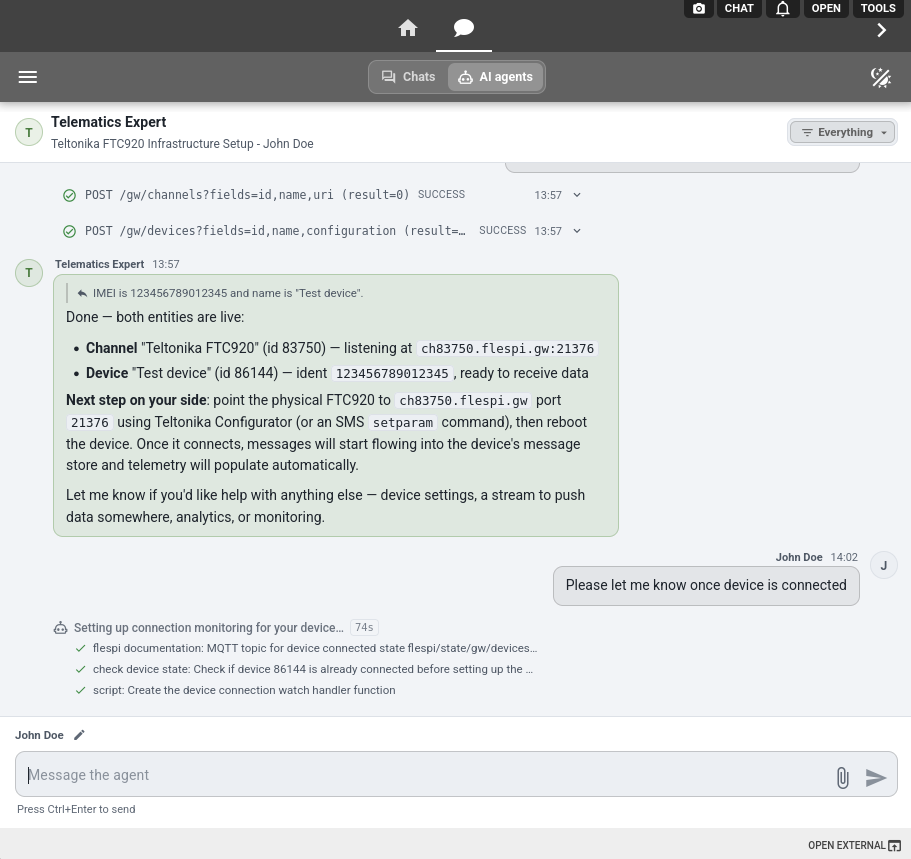
If something isn't available through MQTT, the agent can set up periodic checks instead – again, using purely computational logic with no model-level reasoning involved.
To make agents even more accessible, you can interact with them directly from Telegram or Slack. Once a Telegram or Slack bot is linked to an agent, any operation requiring approval will be delivered there as well.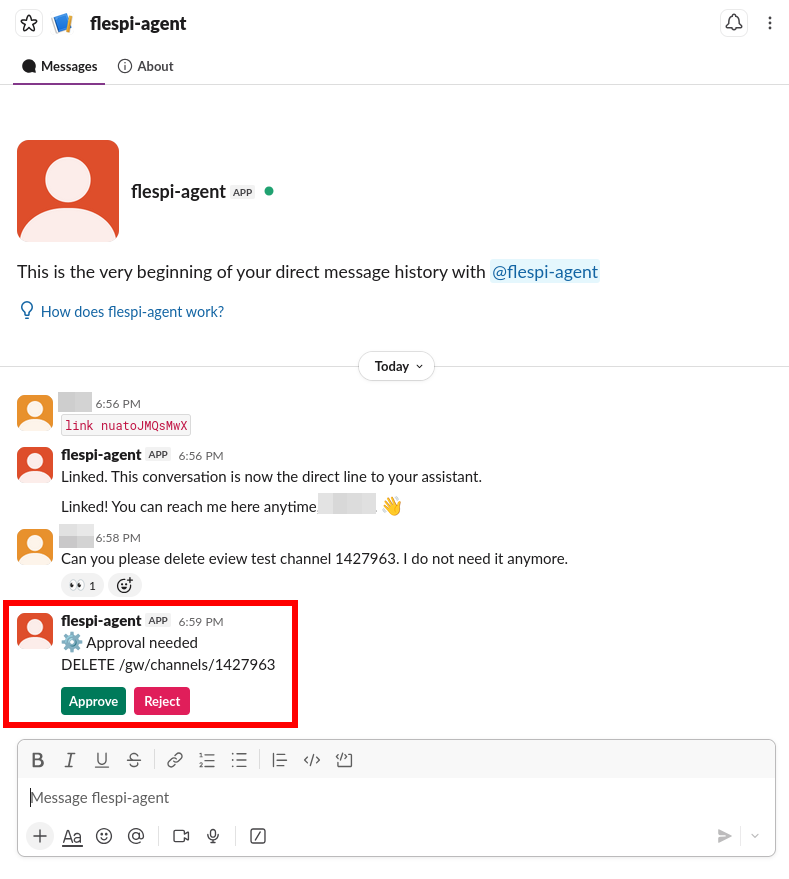
For those who prefer email, we also designed an Email connector. Once configured and approved, it allows an AI agent to work with you through email. But the Email connector is not limited to communicating with you. We designed it so that an AI agent can also communicate with third parties on your behalf – software platform vendors, device manufacturer support teams, and so on.
Let's say you're having a problem with a Teltonika, Queclink, or Jimi IoT device. Instead of contacting the manufacturer's support team yourself, you can delegate the task to a flespi AI agent. After your approval, it can share the device configuration and raw traffic with the support team, perform diagnostic tests, verify configuration, and handle the back-and-forth communication for you – all via email. The agent works autonomously and only comes back to you when your input is needed.
And one more specialized connector is Wialon Hosting. This one allows a flespi AI agent to perform operations in your connected Wialon Hosting account and securely configure both flespi and Wialon Hosting together. Moreover, it can even be used independently of flespi, simply to access and work with your Wialon Hosting account via AI.
Using flespi AI agents
We are using AI agents for all kinds of tasks now. Both to change things and for all kinds of consulting. And they are beating human experts, general AI agents such as Claude Code, and even Codi, our AI assistant.
Compared to human experts, they have a tremendous context capable of cross-linking deep telematics knowledge with powerful computational systems. Let's say you have a problem and need to analyze logs because a device is behaving incorrectly. As a human, you open the device Toolbox, read through device messages and logs, and try to understand what went wrong and when.
Or, even worse, consider working with the next data layer – reports, which in flespi are usually built with a calculator. You need to read the calculator, connect its interval changes to the original messages, and understand the reason behind them. It's a lot of data, and it's difficult to fit it all into a human brain.
Now imagine telling an AI agent that you're facing a problem and simply giving it some time to investigate.
It will read the device and calculator configurations, understand how they work, extract relevant data projections (for example, when a particular parameter changed and how its values evolved over time), formulate hypotheses, and verify them by checking what happened in the account, how other devices behaved, and more. It can correlate data from devices and calculators, identify the root cause, and often suggest the appropriate fix. The key difference is that it writes and executes scripts on the fly during the analysis. This is where AI has a fundamental advantage – no human can match that combination of reasoning and computation.
So how is this different from external AI agents such as Claude Code, which you can also easily connect to your account? The difference comes down to two layers: context and security.
By context, I mean that a flespi AI agent is specifically designed to handle telematics tasks. It comes with all the right tools, context-building pointers, and its own computational space. External AI agents mostly rely on their general training knowledge, which is often stale. They can also write scripts, but those scripts will usually be much less efficient. They don't know how to use features such as flespi REST selectors, how to retrieve only the minimum data to avoid excessive traffic or API calls, or how to work with the retrieved data afterward.
By security, I mean that external AI agents, while trying to achieve the final goal, can make mistakes – sometimes even fatal ones. They may expose your token to a third party, try indirect methods to retrieve data they think they need for the task, and so on. A flespi AI agent, on the other hand, gates all account-mutating operations through the approval layer. This is slower, but much more secure.
Compared to Codi, an AI agent has a much more powerful computational environment. Codi is limited by the amount of data that can fit into its context, so it can only inspect a handful of devices at a time. An AI agent can analyze thousands of devices simultaneously, cross-checking their logs, messages, and settings.
And, of course, it can make actual changes. Codi can only explain the required steps or generate configuration for you. A flespi AI agent can prepare an action plan, coordinate with you on it, implement it, and then verify that everything works as expected.
Agents are stateful. They have working memory, and as you continue working with them, they become increasingly familiar with your projects, account setup, and even your preferred communication style.
So I suggest treating them as your employees. Hand over to an AI agent whatever you keep doing manually. Here are a few patterns to get you started:
-
Device diagnostics: the agent walks the same diagnostic path as Codi – checking logs, raw traffic, and device settings – and then, with your approval, actually fixes the configuration.
-
Monitoring you used to script by hand: a stream that stopped delivering, a device silent for 15 minutes, API calls approaching the plan limit. The agent binds its own scripts to MQTT topics and timers. These scripts watch the conditions computationally, and wake the agent's reasoning only when the condition you agreed on fires.
-
Tracking flespi changes: the agent follows our changelogs and notifies you only about updates that actually affect your setup, rather than making you read every post. ;)
- Team support in a channel: connect the agent to a Slack or Telegram group, and your whole team gets a telematics engineer on call.
-
Correspondence: from chasing a device manufacturer's support team on a firmware issue (complete with raw traffic attached as evidence) to communicating with flespi support on your behalf. Yes, your agent can even escalate the case to Codi and follow it through until it's resolved.
It's hard to say what the future of AI will look like. Everything is changing so quickly. With flespi AI agents, we've packed a lot of fresh modern technology into the familiar API/MQTT/UI layer you're used to when working with our platform.
I'm firmly convinced that the power of AI is not in communication itself, but in the ability to combine computational and reasoning surfaces. If you want to import 1,000 devices from a CSV file, you don't feed the whole file into the AI context. And AI shouldn't create and configure every device one by one either. Instead, it should provide you with a custom-built tool for exactly that. In our case, it can be a simple form where you upload this CSV file, and the form handles the entire import and device creation process on its own, with no AI reasoning involved.
The same applies to data visualization. You ask for something just once, and the AI should give you a computational surface – for example, a live dashboard that you can use anytime later to view this projection of live data.
I believe this is where AI is heading. And for us, flespi AI agents are the key building block for creating and delivering this kind of functionality.
Hopefully, very soon.