- Essentials
- How flespi AI agents work
- Automations and integrations
- Apps and dashboards
- Connectors
- How to create an agent?
- Talking to your agent
- Operation approvals
- Monitoring and logs
- Credits and limits
- Agents API
- Troubleshooting
- What's next?
Essentials
A flespi AI agent is an autonomous AI worker living in your account. You describe what you need in natural language. The agent plans the work, uses the systems you connected it to, reports back, and asks for your approval before sensitive actions. From the agent's perspective you are its principal — the controlling identity it works for, reports to, and asks for approval.
Compared to the AI assistant in the flespi support chat, an agent does more than answer questions: it acts on your behalf, monitors what you entrust to it, and keeps its own memory and working state across days of work. Compared to general-purpose AI agents, it knows flespi and telematics deeply out of the box. And it is more than a conversation: it builds automations and integrations inside your account and runs them on its own, at no cost in credits while they work. A script that runs on events or a schedule, a chain that carries a job through step by step, a bridge between the systems it is connected to. It is also safe by design: every account-changing action passes through the platform security layers and your approval rules.
Typical work to hand over:
- keeping your flespi account in good shape;
- discussing and implementing your telematics project;
- watching the flespi changelog and surfacing only the changes that affect your setup;
- running the correspondence with a device manufacturer's support on your behalf;
- integrating flespi with the systems it is connected to: your fleet management platform, your device management system, your connectivity provider, your ERP or ticketing system, the intake of an authority that must receive your events, your own backend;
- building and running your automations and bulk data jobs, on a schedule or on events, in the background;
- building the apps you need, a live dashboard for your dispatchers or a tool for your team, with flespi as their backend;
- serving your own customers as a branded assistant, with a persona.
How flespi AI agents work
An agent lives in a sleep-wake cycle. It sleeps until something wakes it up: your message, an event in a connected system, a wake-up it scheduled for itself, or your decision on a pending approval request. A newly created agent is born asleep too: assigning connectors does not wake it up, the first message or event does. Talk to it the way that suits you — in its chat in the flespi panel, via POST /ai/agents/{selector}/messages, or right in Telegram and Slack when the corresponding connector is assigned.
Once awake, the agent thinks in reasoning steps. A reasoning step is one full turn of the AI model: the agent analyzes the situation, uses the tools of its connectors, and communicates the results. A typical task takes a single step. A complex one, or one requiring the agent to switch on additional capabilities, may take a few. A settled agent often handles several related requests in one step.
Within a step the agent works with data freely: it calls the flespi REST API, creates and runs scripts, and processes the results computationally. It can also bind scripts as handlers to MQTT topics, to timers, or to a webhook address of its own that an external system pushes events to. A handler is not a reasoning step. It watches, filters, and computes on its own and wakes the agent only when its condition is met. When the action is decided in advance, the handler applies it itself: a nightly data move, a reaction to a device event, a bulk transfer that pages through on the outcome of each batch. Computational processing is free, only reasoning steps consume AI credits.
Every action that changes something outside the agent, a modifying flespi API call, an outgoing email, a change in a connected system, follows your approval rules: it executes automatically, is rejected, or waits for your approval. Read-only operations run free: the agent explores as much as it needs, while you control everything it changes.
Automations and integrations
An agent writes scripts and binds them as handlers, and those handlers become automations and integrations that live in your account and run on their own, with no reasoning step and no credits spent while they work. Typical ones:
- a job on a schedule: a command sent to every tracker each morning, a report of yesterday's mileage delivered to your server at night;
- a reaction to an event: a notification to your system when a device has been silent for a day, a new device added to the group that gives it its calculators and streams;
- a chain where each step waits for the outcome of the previous one: a device history copied into another account, page after page, in the background;
- a bridge between the systems it is connected to: a unit created in your fleet management platform for every new flespi device, the SIM of a deleted tracker suspended at the connectivity provider, a daily usage record filed in your ERP.
Where flespi has a native way, a webhook, a calculator, a plugin, the agent prefers it and sets it up for you. Where flespi has none, the agent runs the automation itself. Each one is proposed first, with its trigger, its actions and how much it will do, and runs only once you agree. Its writes pass your approval rules like any other, and you hear from the agent when something fails. Every handler run shows in the agent logs, so you always see what runs in your account.
Apps and dashboards
Some work is better run than read about: a live map of your fleet for the dispatchers, a fuel report for the manager, a page where your team sends a command to a group of trackers with one click. Ask for it, and the agent builds the app: a web app it publishes on a domain of its own, with no servers, hosting or developers on your side.
With the flespi connector the agent also supplies the backend. The page draws on the platform directly, live device data, calculator reports, history and app state kept in flespi storage, so the app works on its own once the agent has handed it over. What flespi does not provide out of the box, the agent provides itself: a handler of its own reconciles the data or pulls a report from a connected system and publishes the result for the page to show. The people who use the app sign in with flespi, as users of a realm the agent sets up for you, or open a link that carries exactly the access the page needs. Every change the page can make passes your approval rules before the handover, like any other change.
The same way, an app can work on the data of any system the agent is connected to, with that system's own sign-in where it offers one. Each app stays the agent's: report an issue in the chat, and it fixes and republishes the page under the same link. An app lives on the agent's domain as long as the agent does. For an app your team keeps beyond it, ask the agent to move the app into a CDN of your account. See Building apps with flespi AI agents for the whole story.
Connectors
A freshly created agent has no access to anything — connectors give it capabilities. A connector holds the credentials and configuration for an external system and brings the agent the tools and expertise to work with it. Connectors are created separately and assigned to the agent. You can assign and unassign them at any time.
| Connector | What it gives the agent |
| flespi | Binds the agent to a flespi account: platform expertise plus API access with the provided token. The agent becomes a solutions architect and operator of the account. |
| telegram | A Telegram bot identity: talk to the agent in a private chat or invite it to groups; the private chat also delivers approval prompts. |
| slack | A Slack app identity: work with the agent in your Slack workspace, alone or with your team; direct messages also deliver approval prompts. |
| An email account: the agent runs correspondence on your behalf and can watch the inbox for incoming mail. | |
| wialon_hosting | Access to a Wialon Hosting account: Wialon expertise plus direct work with the account data. |
| wialon_local | Access to a Wialon Local installation, the Wialon server you run yourself: Wialon expertise plus direct work with its data. |
| teltonika_fota | Access to a Teltonika FOTA WEB account: FOTA WEB expertise plus direct work with the devices, files and tasks of the company. |
| wialon_platform | Access to a Wialon Platform installation: Wialon Platform expertise plus direct work with the provider's customers, devices, channels and module data. |
| emnify | Access to an emnify account: emnify expertise plus direct work with the SIMs, devices, policies and connectivity of the fleet. |
| onomondo | Access to an Onomondo account: Onomondo expertise plus direct work with the SIMs, Network Lists, data limits, webhooks and network logs of the fleet. |
| traccar | Access to a Traccar server: Traccar expertise plus direct work with the devices, users, geofences, notifications and reports of the server, live events over its WebSocket, and diagnosis paired with the flespi Traccar stream. |
| http | Access to any other system over its HTTP API: up to ten named systems with their base URL, credential headers and your description of them, read by the agent on its own and written under your approval rules. |
| persona | A presentation of your own: the agent introduces itself under your name to the audience you describe, speaks their vocabulary, and under branded disclosure never mentions flespi. Configuration only, shared by any number of agents. |
Each connector type is covered in detail in its dedicated article.
The flespi connector is the main one: it makes the agent an expert on the flespi platform and an operator of your account. Provide it with a token. A master token is appropriate here: the token only defines what the agent can reach, and every change it makes still passes your approval rules. Create the token specifically for this connector and set its IPs whitelist to 185.213.2.*: the agent calls flespi from the flespi datacenters, so the token works for it and nowhere else.
How to create an agent?
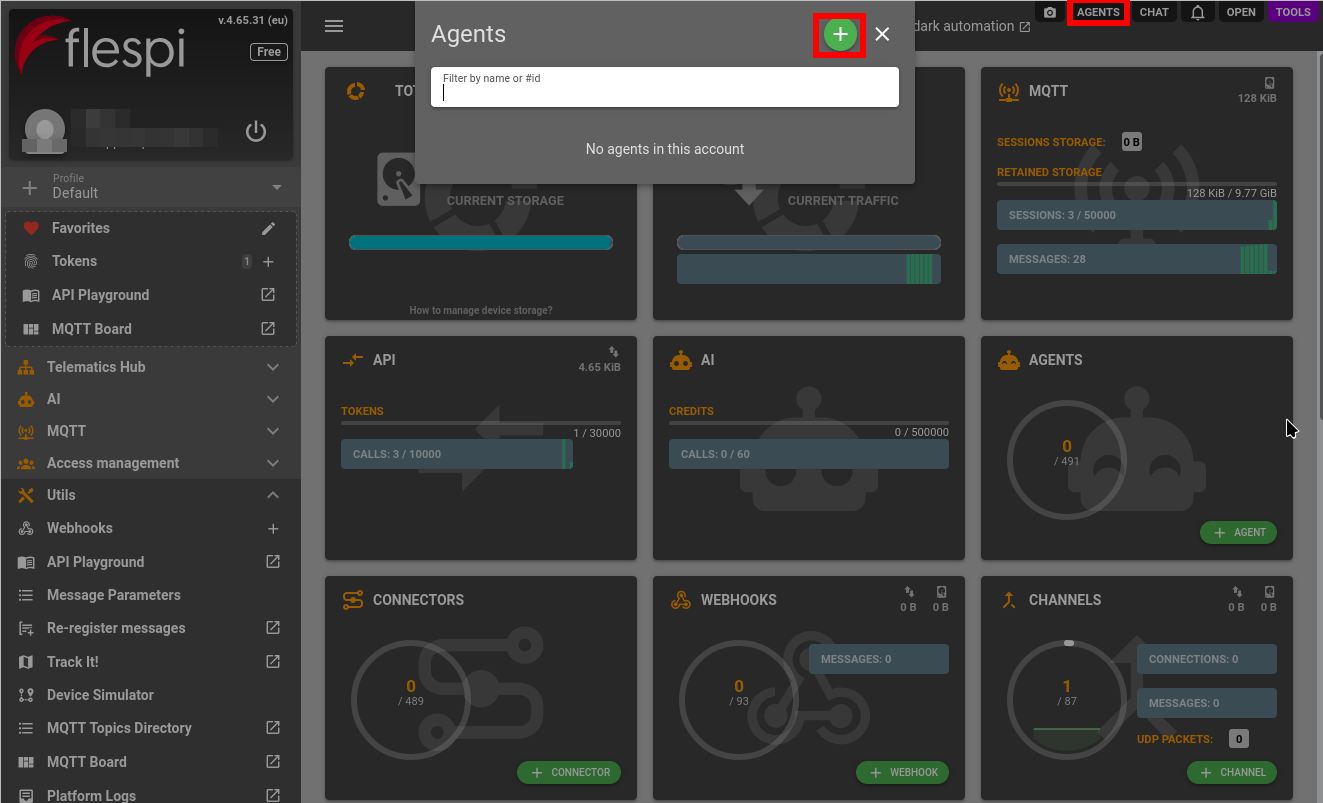
The quickest way is the AGENTS button in the top right corner of the flespi panel. It lists the agents of your account, and the "+" button at the top of the list creates a new one:
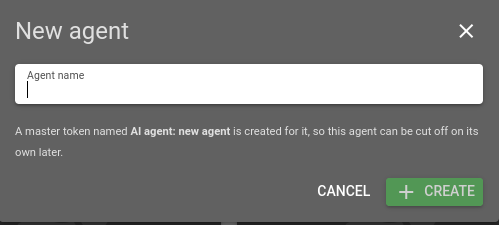
Give the agent a name and click Create. The panel creates a master token named after the agent, a flespi connector holding this token, and the agent with the connector assigned, and opens the chat with it. The token serves this agent alone, so you can cut off its access at any time without touching anything else:
The agent is ready to work with your flespi account: send it the first message to set it on course.
The AI section of the flespi panel left menu holds agents and connectors as regular items. Use it to set up an agent by hand, with a token you prepared yourself or with connectors of other types, and to add connectors to an agent you already have.
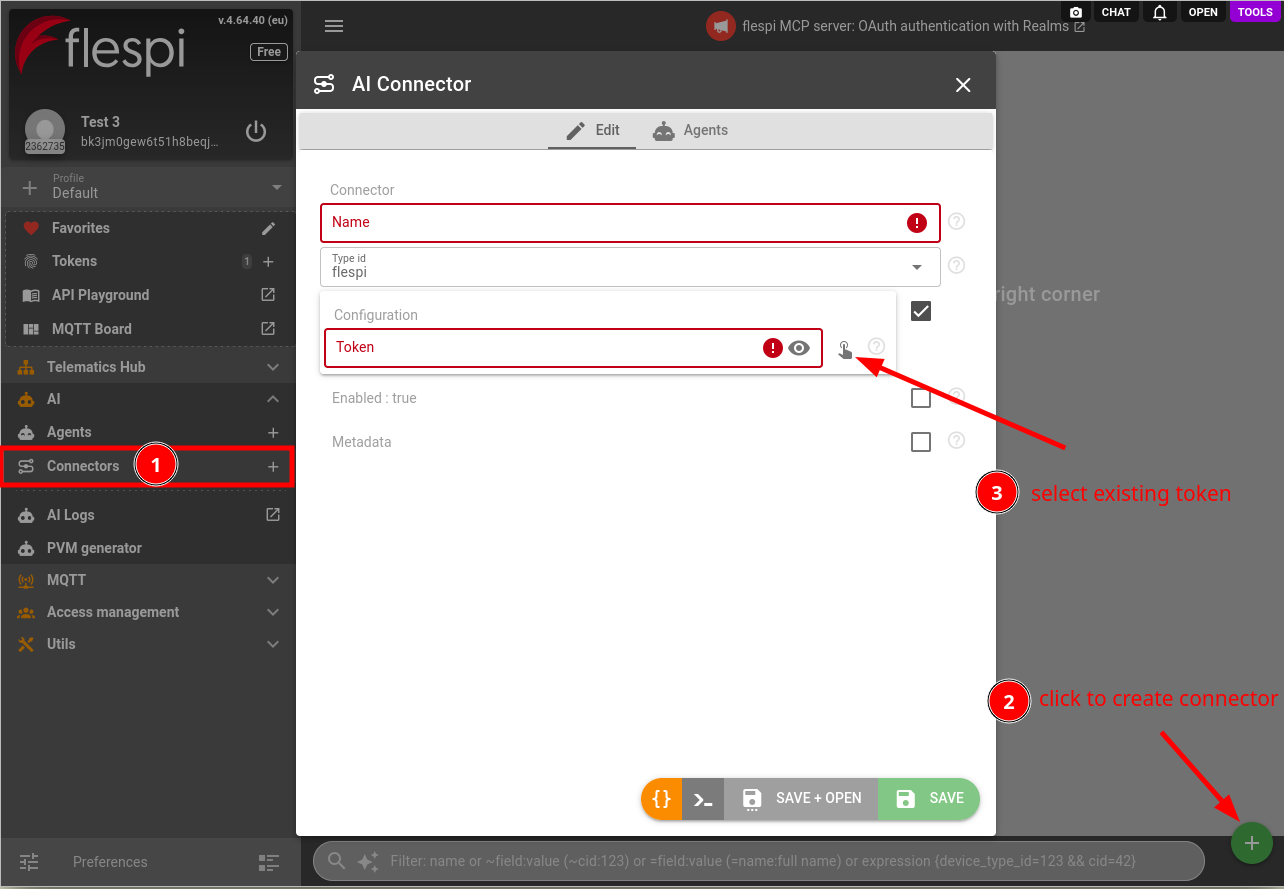
Start with a connector, so that the agent has something to work with. Navigate to AI -> Connectors, click the "+" button in the bottom right corner, pick the connector type, and fill in the configuration it asks for: a name, the credentials of the connected system, and type-specific options. For the flespi connector the credential is a token of your account: pick an existing one with the key icon next to the field or paste a value:
Now create the agent itself: navigate to AI -> Agents, click the "+" button, give the agent a meaningful name, and assign your connector on the Connectors tab of the same dialog:
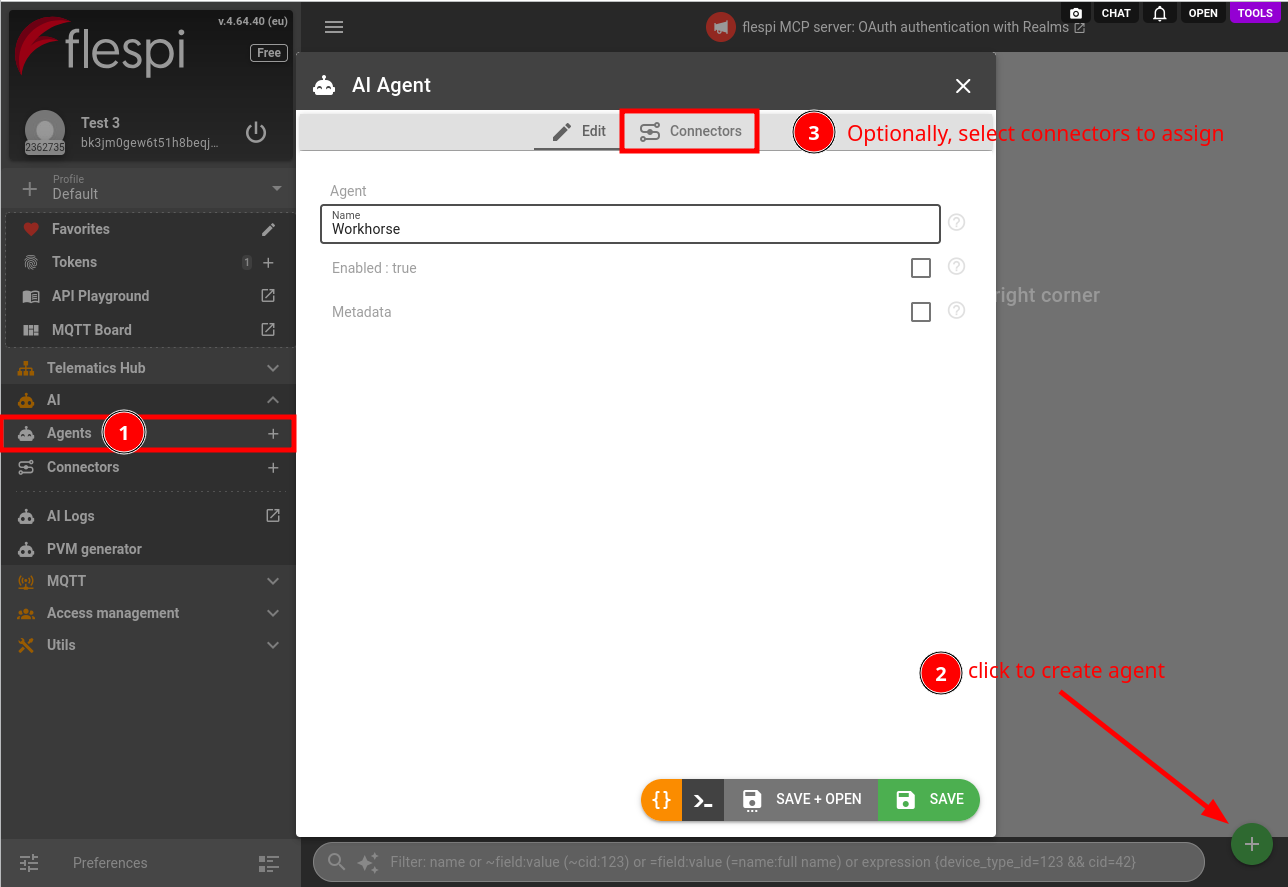
Assigning a connector also sets what the agent may do on its own. By default every account-changing operation asks for your approval, and approval rules release the routine parts to the agent. The Connectors tab of the saved agent manages the same bindings at any time. An agent holds at most one connector of each type.
Save, and the agent is provisioned: enabled, equipped with its connectors, and asleep. Send it the first message to set it on course.
Talking to your agent
Open the agent and switch to the Chat tab: this is your workspace with the agent. Write the way you write to a colleague, and attach files with the paperclip button or paste them from the clipboard with Ctrl+V. While the agent reasons, the chat shows the live status of the step and the activities it performs, so you always see what it is busy with:
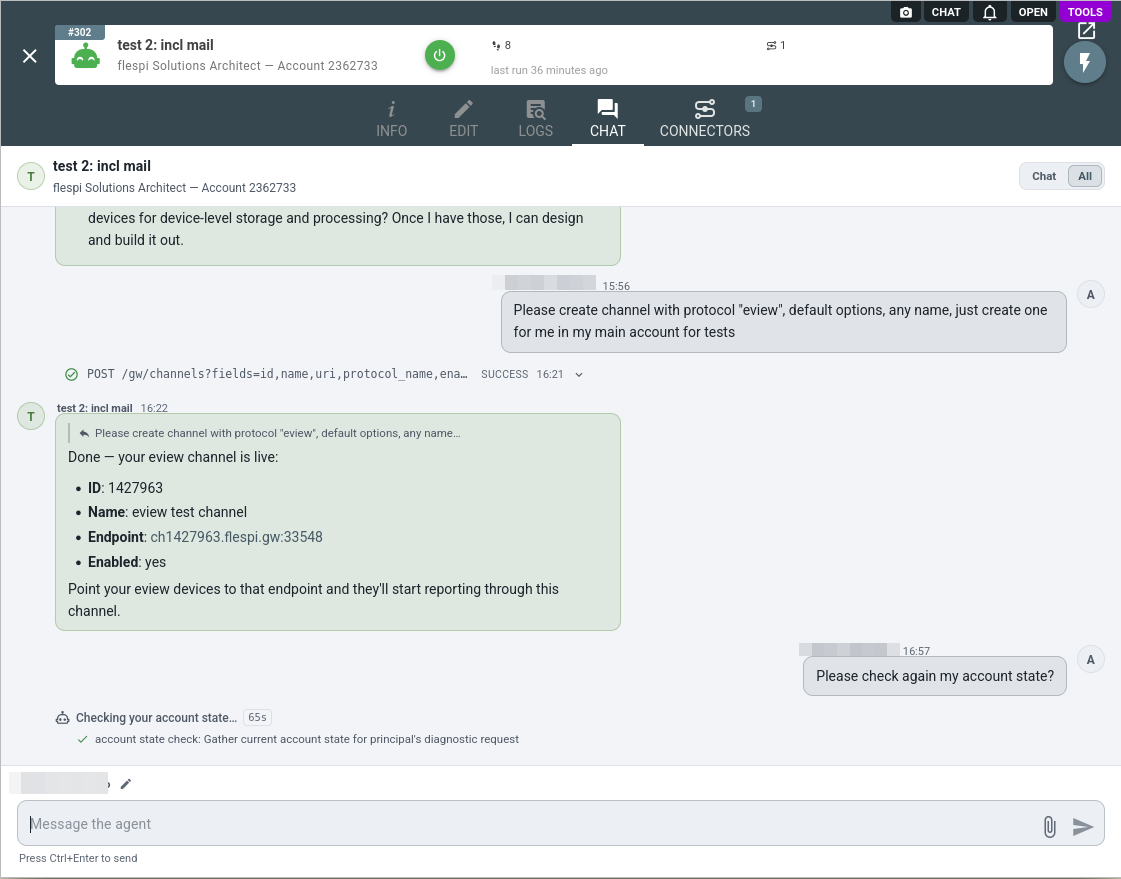
The reply lands in the same chat, and with no active task left the agent goes back to sleep. The Chat view keeps the pure conversation. Switch to All for the complete working history: the operations performed with their requests and responses, approval records, and the exchanges with other parties.
The same chats open from anywhere in the panel. The AGENTS button in the top right corner, next to CHAT, lists every agent of your account. Pick one, and its chat opens as a tab in the pane on the right, the very conversation you see on the agent's Chat tab. Drag a tab by its title to turn it into a floating window, and keep as many agents at hand as you need while you work in the panel:
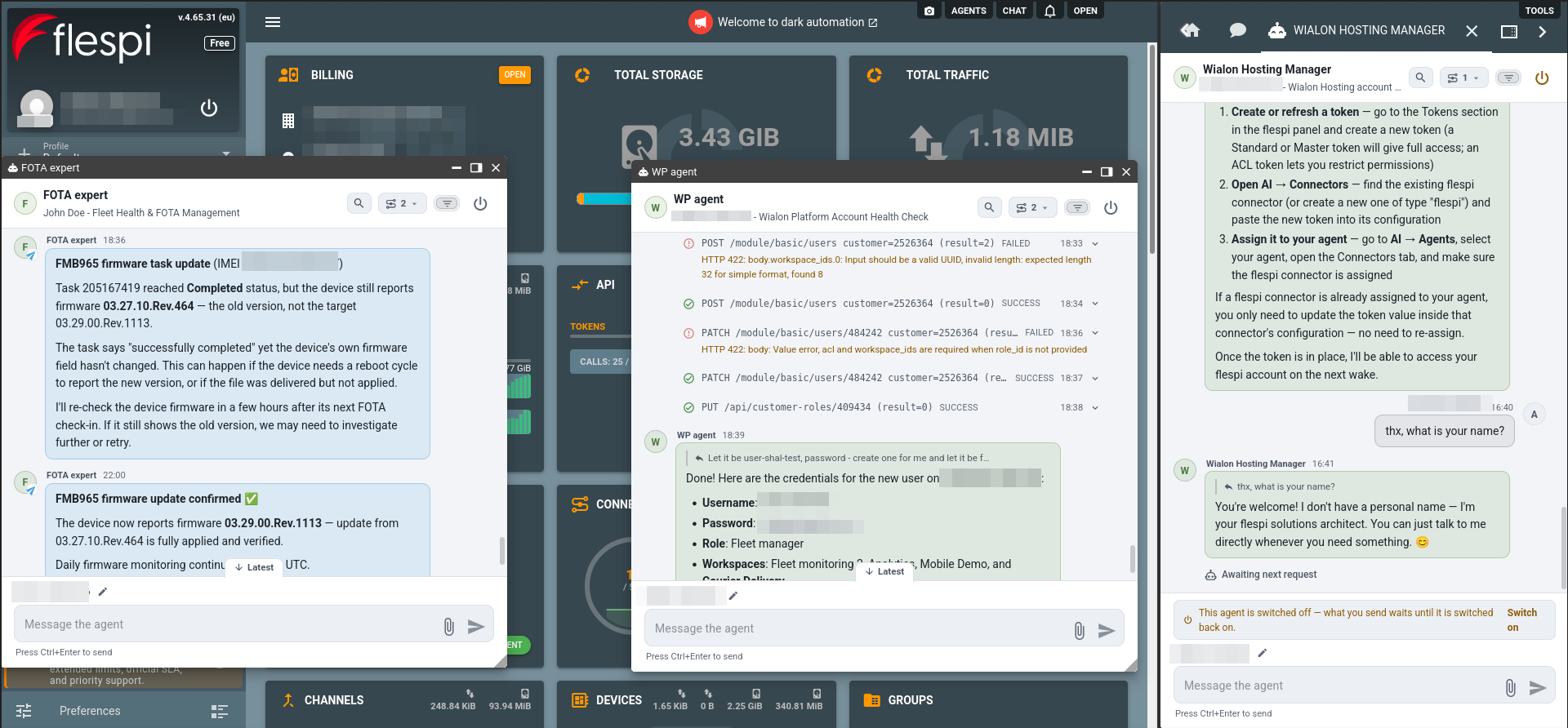
And with a telegram or slack connector assigned you talk to the same agent right from your messenger.
The same chat embeds in your own application. AgentBox, the flespi chat application for agents, opens an agent on a page of its own, ready for a frame or a link. Give it a token whose ACL entry on ai/agents is limited to that agent: the page then reaches its conversation, approvals and live history and nothing else in your account. Open or embed the link in form:
https://agentbox.flespi.io/#/agents/{AGENT_ID}?embed=1&token={TOKEN}
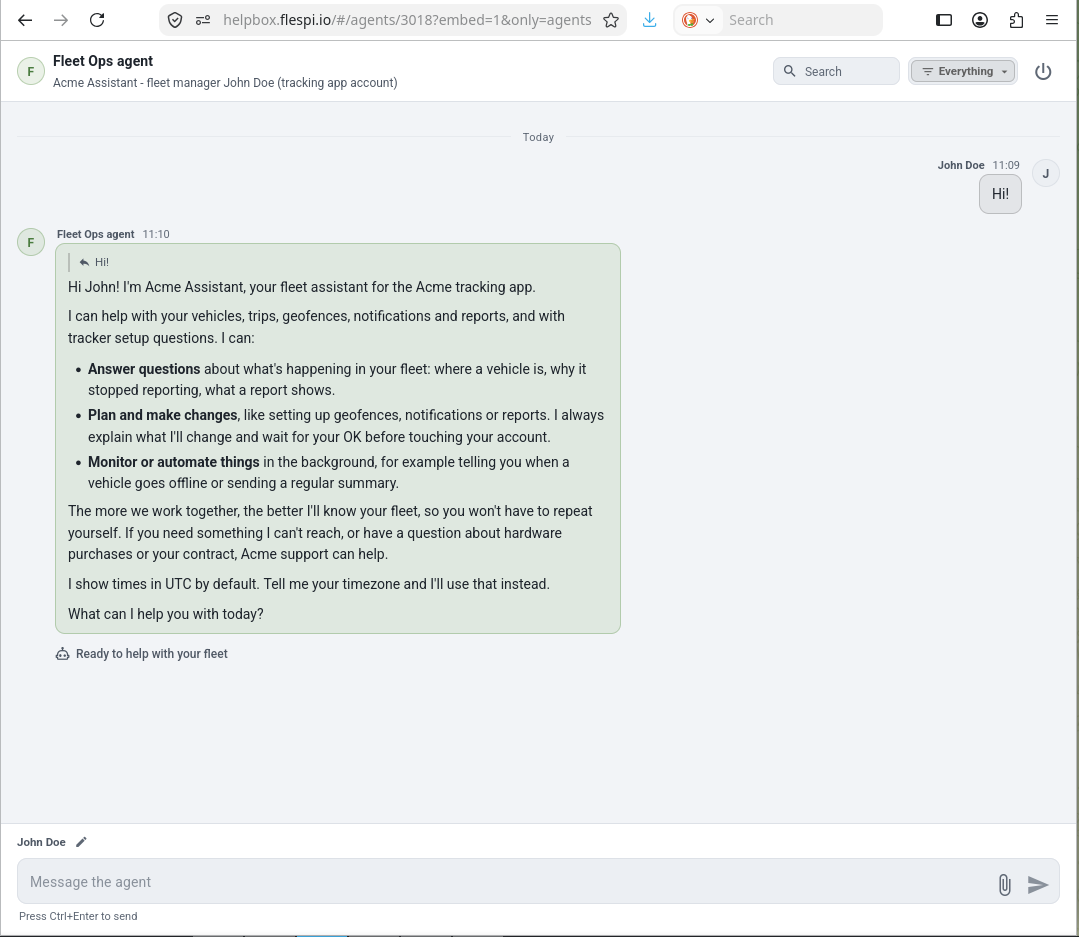
Paired with a persona, that page is a branded assistant for the people you serve.
Operation approvals
Approvals keep you in control of what the agent changes. Reads run freely. Every operation that changes something, a modifying flespi API call, an update in a connected system, an outgoing email, follows the rules of the connector assigned to the agent. Each operation type has a default decision: Ask for approval each time, Execute automatically, or Reject always. A newly assigned connector asks: nothing changes in your account until you say so.
Rules above the default release the parts of the system you trust. A rule names a target, a part of the connected system, and the decision for it. Rules are checked from the top, the first matching one decides, and an operation no rule matches follows the default. The pencil button on the Connectors tab of the agent opens the rules:
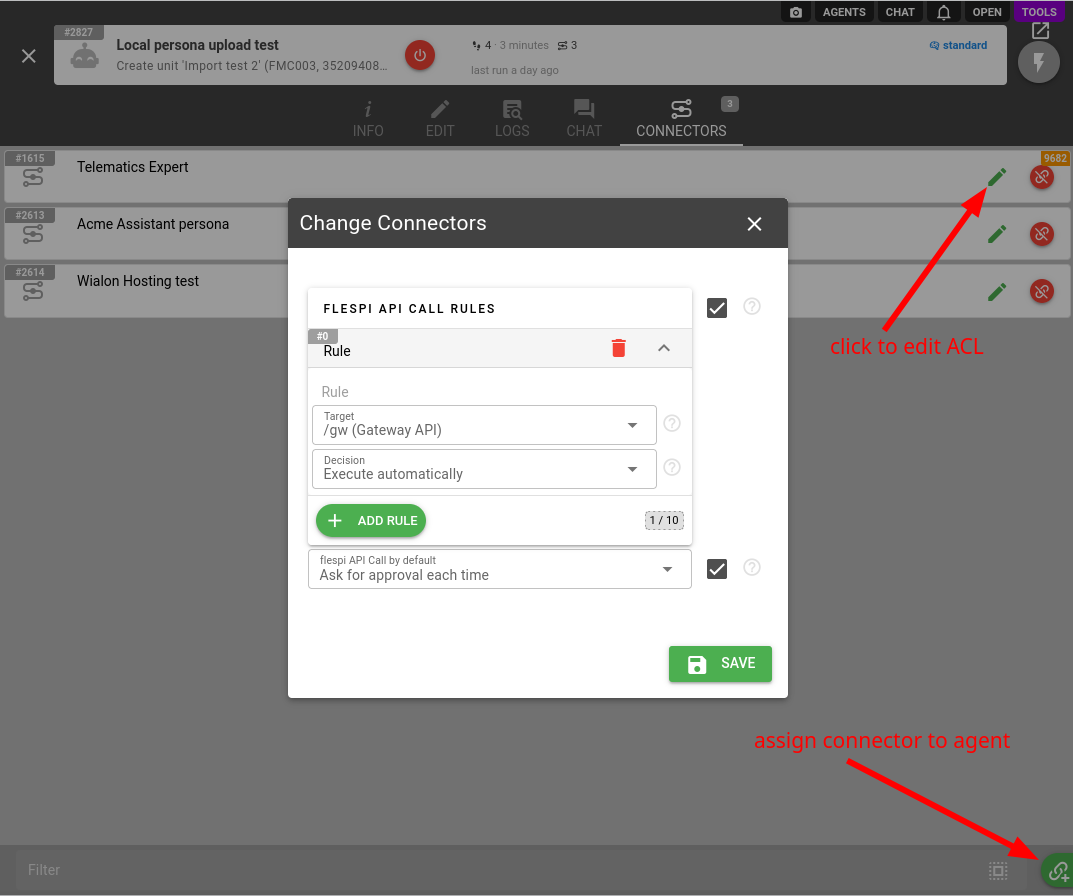
Typical setups: device changes run automatically while everything else asks, or everything runs automatically except tokens and billing. Rules work on top of the credential the connector holds. The token or key configured in the connector defines what the agent can reach at all, while the rules decide which of those operations run on their own, ask you first, or are rejected.
When an operation needs your approval, the agent pauses it and creates an approval request. Pending requests show in the flespi panel, in the "approvals" field of the agent, and as Approve/Reject prompts in the Telegram chat or Slack direct messages linked to you. Decide in any of these places or with POST /ai/agents/{selector}/approvals: a request resolved anywhere is resolved everywhere. An agent waiting for your decision is easy to spot by the red "waiting approval" badge:
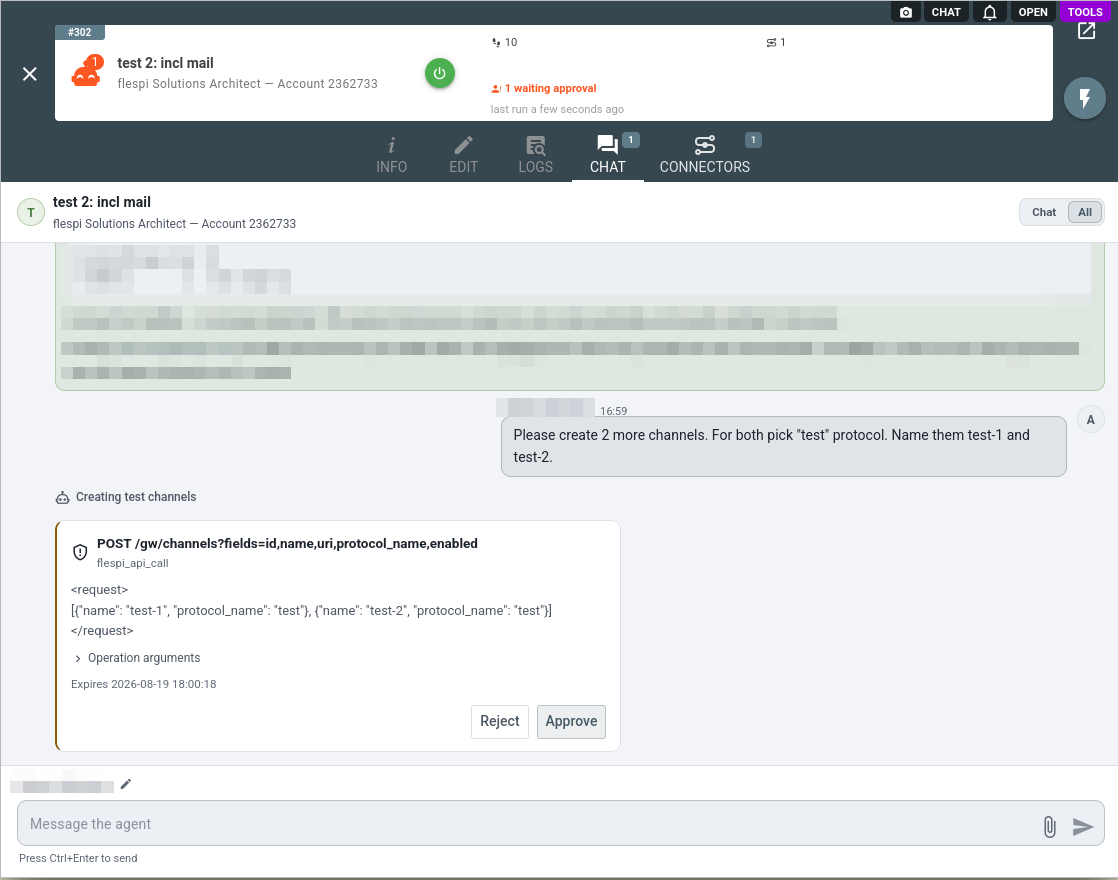
What happens next:
- an approved operation executes right away, between reasoning steps, without consuming one;
- a rejected one is discarded, and the agent learns the outcome together with the reason you provide;
- a request left unresolved is rejected automatically once the approval window passes, one hour by default;
- an operation of a background handler that fails, is rejected or expires wakes the agent, which reports it to you.
The executed operation stays in the All view of the chat, unfolding into its full request and response:
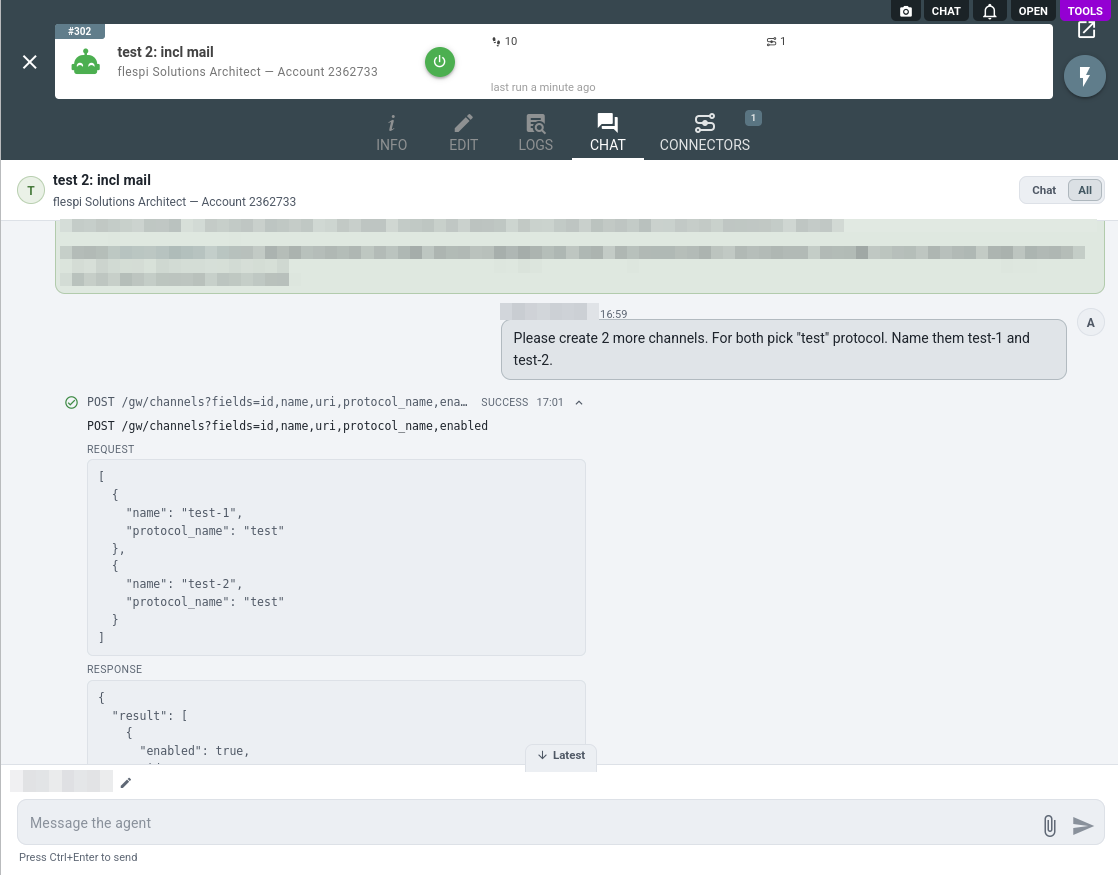
Monitoring and logs
The agent continuously reports what it is up to in its runtime fields: the current task, what it is doing or waiting on, and when it wakes up next. Watch them in the flespi panel, request them via GET /ai/agents, or subscribe to the agent state over MQTT.
The agent history — the messages exchanged and the operations performed — is available with GET /ai/agents/{selector}/messages and streams live over MQTT. Each history record carries a type. Each connector adds its own record types, for example flespi_api_call_executed.
Every important event is recorded in the agent logs, available in Toolbox and via GET /ai/agents/{selector}/logs: configuration changes, connector assignments, each reasoning step with its charge and outcome, and the approval lifecycle. The logs also keep the agent activity journal — every script executed, every event received, every message sent, and every background handler run — so the log alone tells what the agent did and why. The Logs tab of the agent opens them right in the panel:
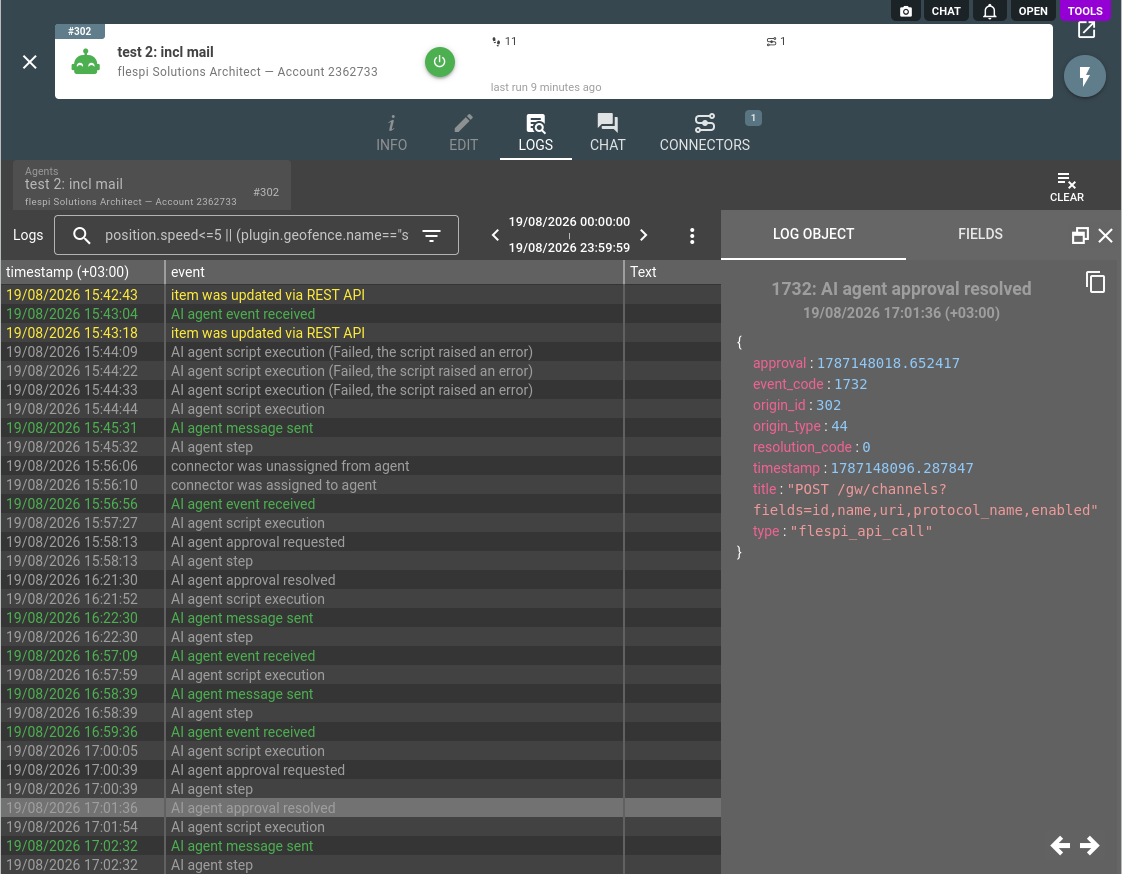
Connectors keep their own account of the agent's work. Every call the agent makes to a connected system, reads and changes alike, is recorded in the logs of the connector that served it, with the operation, its parameters, and the result. Review them in Toolbox or via GET /ai/connectors/{selector}/logs. Whatever the agent touches leaves a record:
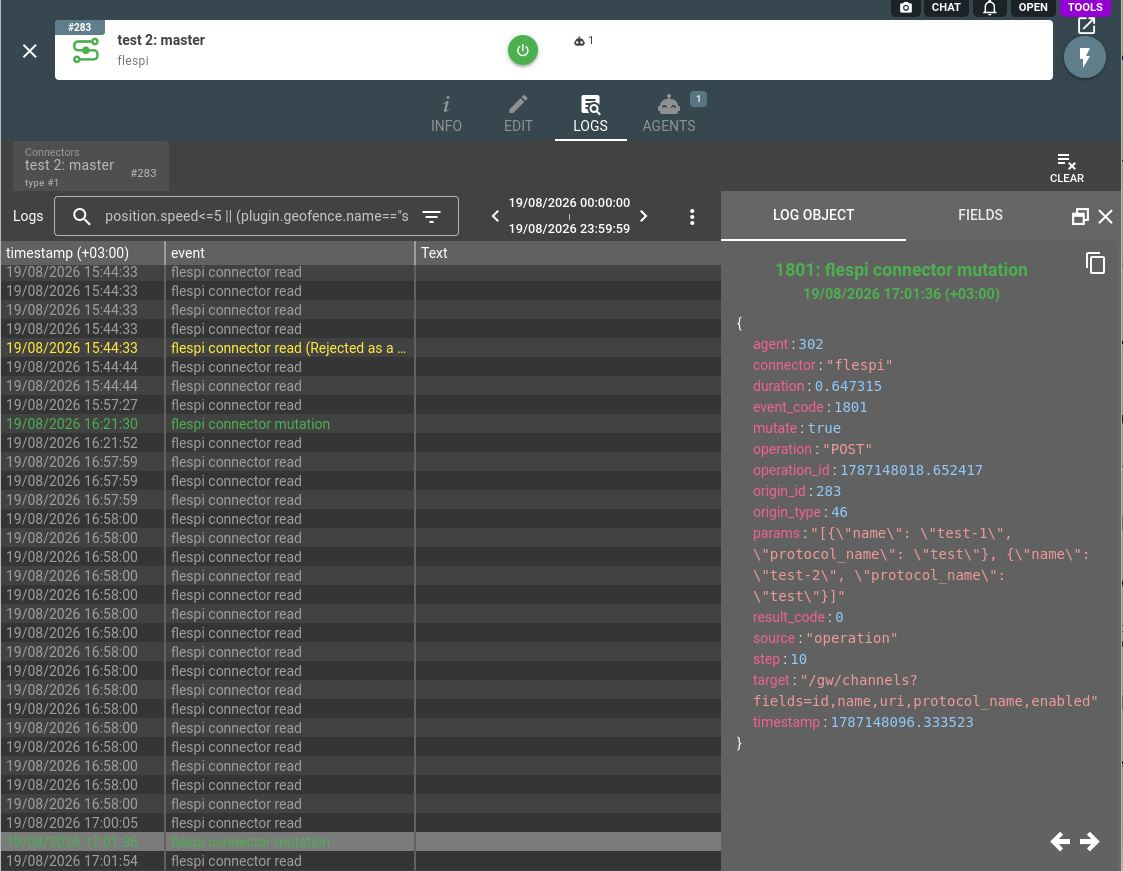
Credits and limits
Each agent has an intelligence level that selects the AI model it reasons on and the price of its reasoning step in AI credits:
- economy — 25 credits per step. A guided worker: you make the decisions and the agent does the work, analyzing data, applying the changes you spell out, watching what you point it at. Efficient for data analysis and well-defined tasks, it takes little initiative of its own.
- standard — 100 credits per step, the default. A self-directed assistant on the level of Codi, the flespi AI assistant: it adapts to the situation, investigates on its own, interprets data correctly, researches the documentation, and takes initiative on the task it is given.
- advanced — 250 credits per step. A senior engineer: it sees beyond the data at hand, weighs the options and advises. Use it where judgment matters more than throughput, such as complex diagnostics or decisions with many moving parts.
Start on standard, drop to economy for routine guided work, and raise to advanced when the task calls for a senior adviser. The level is the "intelligence" field of the agent and can be changed at any time and applies from the next reasoning step. The step price is charged before the step executes. Everything inside the step — AI model usage, tool calls, operations — costs no extra. The charge of a failed step is refunded automatically. Each charge is also recorded in the account AI logs, attributed to the agent.
When the credits left in the account cannot pay for one step of an agent, the platform blocks that agent. A blocked agent keeps its task and memory, but takes no messages and starts no steps until the monthly counter resets, the limit is raised, or you lower its intelligence level to one the credits left still cover. The block is per agent: the credits left may still run an economy agent while an advanced one is already blocked. On the Free plan the 2,000 monthly credits buy 80 economy steps, 20 standard or 8 advanced ones. Reasoning steps also count toward the per-minute ai_calls rate limit.
The number of agents in an account is a plan limit — see how flespi pricing works.
Agents API
Agents and connectors are regular flespi platform items managed via the /ai/agents and /ai/connectors REST APIs — everything described above is available programmatically. See flespi API basics for general API usage.
Agents can also face the people you serve rather than you: a persona connector gives an agent your name, your audience and your instructions, and a token limited to that one agent lets your customer talk to it from your application or straight from the panel.
Troubleshooting
- The agent does not react: check that it is enabled, not blocked, and has connectors assigned — a freshly created agent without connectors has nothing to act with.
- The agent went silent mid-task: look at its "approvals" field, it may be waiting for your decision. An unresolved request is rejected automatically after the approval window (one hour by default).
- The agent is blocked: the account has no AI credits left for a step of its intelligence level. It resumes automatically once the monthly counter resets or the limit is raised, or sooner if you lower its level to one the credits left still cover. The block shows in the agent's
blockedfield and in its log. - The agent was deleted by mistake: restore it from the Recycle Bin within 30 days. It comes back with its task, memory and history, but without connectors: assign them again.
- Telegram or Slack does not answer: the chat is not linked — ask the agent for a fresh link code.
- For anything else, the agent logs tell the story: each reasoning step, its outcome, and every action along the way.
What's next?
- Connect the agent to your messengers and systems: Telegram, Slack, email, Wialon Hosting, Wialon Local, Teltonika FOTA WEB, Wialon Platform, emnify, Onomondo, Traccar, and any other system with an HTTP API.
- Building apps with flespi AI agents — ask the agent for a live map, a dashboard or a customer portal, and see Flow Builder for how far an agent-built app can go.
- flespi AI integration — the other side of the AI story: connecting your own AI tools to flespi via MCP, REST tools, and skills.
- MQTT topics — follow the agent state, history, and logs live.
- Toolbox — browse the agent and connector logs.
Subscribe to the flespi AI and MCP change log to stay in sync with any updates.