The Onomondo connector gives your flespi AI agent access to an Onomondo account: Onomondo documentation and API expertise plus direct work with the SIMs, Network Lists, data limits, webhooks and network logs of your fleet on your behalf. Use it for connectivity visibility your whole team can act on: the agent tells which SIM is on the network and which is not, why a device was refused, how much of its data limit it has used, and turns that into alerts, reports and a live dashboard, whether or not the devices send their data to flespi.
New to flespi AI agents? Read the flespi AI agents article first: what agents are, how they reason and sleep, and how approvals keep you in control. This article covers the Onomondo side of the story. For a fleet on emnify SIMs there is the emnify connector instead.
1. Connect the account
One configuration field, api_key, holds an Onomondo API key. In the Onomondo app open the API keys tab, click New API key (the SoftSIM key next to it serves the SoftSIM SDK, not the management API), give the key a name and copy the value the moment it appears. The app shows it once:

The key reaches what its Tags allow. Left unrestricted, it covers every SIM, Connector and Network List of the organization. Limited to Tags, it sees and changes only the resources carrying them. There is no read-only key in Onomondo, a key that reads a SIM can also deactivate it, so Tags are the way to bound the agent to the part of the fleet you delegate, and the agent itself never lets the key out of its hands: not into a page, not into a message.
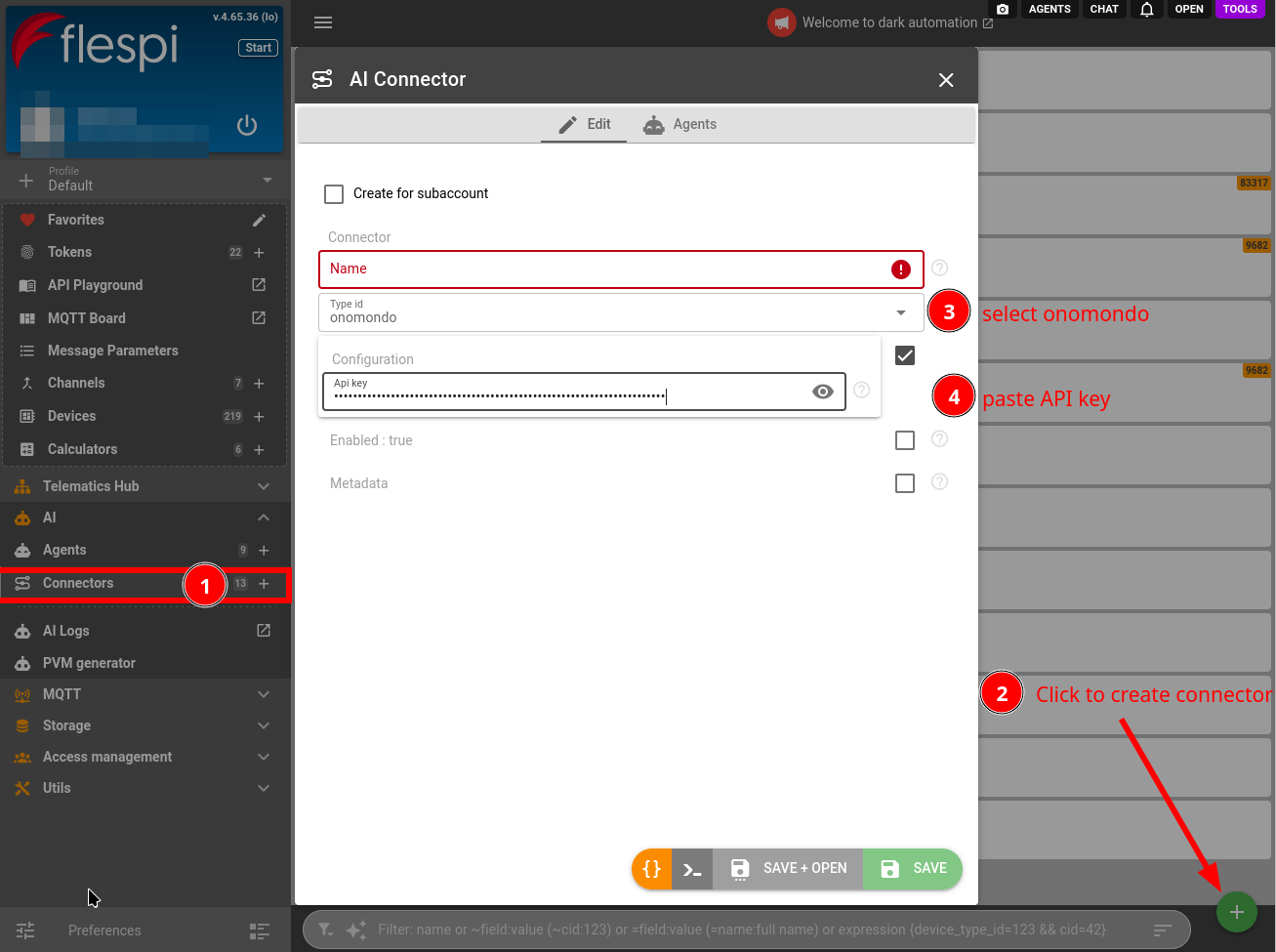
Create a connector of the onomondo type: open the flespi panel, navigate to AI, then Connectors, click the "+" button, pick the type and paste the key:
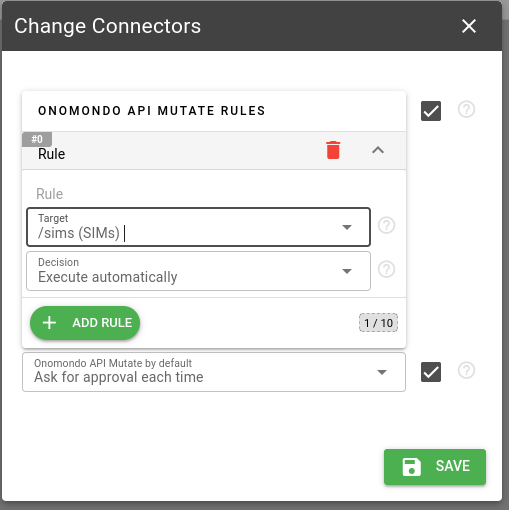
Assign the connector to your agent (create one if you have none yet), choosing the rules for the account-changing Onomondo API calls: the default, and above it a rule per part of the API you want handled differently, from SIM settings and bulk updates to SMS and messages to devices, webhooks, Network Lists and Connectors. The pencil button on the Connectors tab of the agent opens the same rules at any time:
The key defines the ceiling. The agent works within its Tags and the package of your organization, and tells you when a task is out of reach instead of attempting calls that will fail: SIM location needs the Fleet package, webhooks and alert thresholds the Pro package, Connectors the Enterprise one. A rotated or deleted key surfaces at the next call, and the agent asks you to reconnect the connector with a fresh one.
2. Work with the agent
The agent knows Onomondo: it consults the official documentation, the help center and the API reference on its own, so you can discuss SIMs and SoftSIMs, Network Lists and coverage, data limits and alert thresholds, webhooks, network logs and usage the way you would with an Onomondo engineer.
Reading the account is free and autonomous, through a read-only surface that physically cannot change anything: every SIM with its activation and online state, the device IMEI it last registered in, the network and country it is on, its usage against the data limit of the period, and its network logs: each attach allowed or refused, with the Network List or IMEI lock that refused it, each registration and deregistration with the technology.
Those logs are the Onomondo strength the agent leans on. A device that stopped reporting gets its connectivity side checked first: the online flag alone lags the traffic both ways, so the agent reads the usage records and the log timeline of the silent period and says whether the SIM is on the network, was refused, ran out of data or simply has nothing to send.
Hand it the connectivity watch of a fleet and it designs the setup, then runs it on its own: a warning threshold on every SIM's data limit, a sweep that reports the SIMs silent for longer than you tolerate, a monthly usage summary, and a list of the SIMs that have been dark for months and still cost you. A deactivated SIM stops both the charge and the service, so the agent asks before touching one.
SIM events can reach the agent live: it gives you a webhook address, creates the Onomondo webhook pointed at it (or you do, in the app) with only the event types you need, and reacts to each usage alert, attach refusal or deregistration as it arrives. Onomondo delivers one event per request, so the agent keeps the noisy usage and location events out of the webhook and reads usage from the API instead.
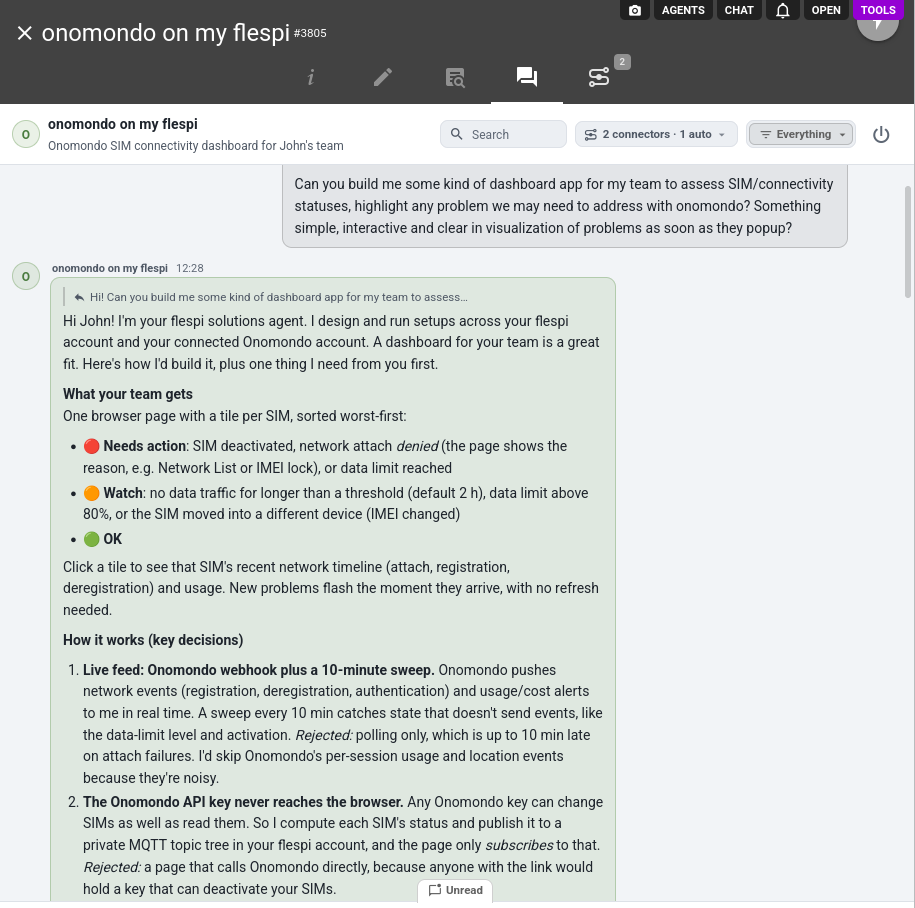
Ask for a view and the agent builds one. Asked for a dashboard app for the team, it designs the page and the feed behind it first, with the key decisions spelled out for you to accept or change:
The result is a live SIM dashboard for your team, a single page your teammates open from a link, sorted worst-first, with the SIMs that need attention, their network, last traffic and data used this period, refreshed on its own from a short poll of the account:
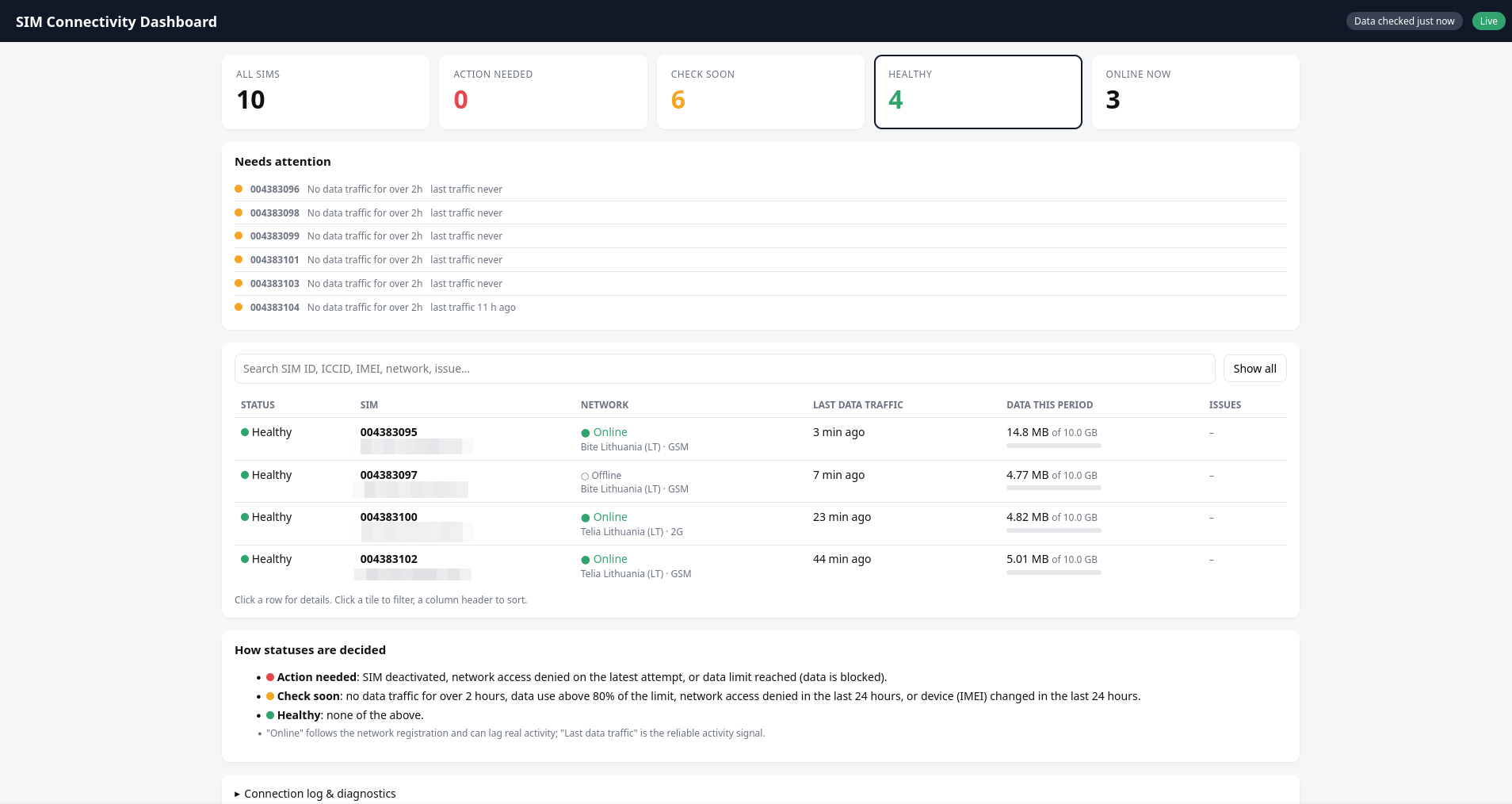
The page never holds the Onomondo key: the agent publishes the state of every SIM into your flespi account and the page only reads it there under a token of its own, so the link can go to anyone on the team.
3. When the devices also report to flespi
When the agent also holds the flespi connector of the account the same devices report to, it reasons across both systems. It pairs a flespi device with its SIM by the IMEI the SIM last registered in, or by the number in the device's phone field, and a silent tracker gets its SIM checked before its configuration: activation, the last attach and whether it was refused, the last data session, the usage of the silent period. The agent tells you which side the evidence points to.
Ask, and the agent designs such checks across both accounts and runs them on its own: a tracker silent for an hour triggers the SIM diagnosis and a message with the findings, a tracker retired from flespi gets its SIM deactivated so you stop paying for it, a SIM that crosses its warning threshold names the device behind it so a misbehaving tracker is found before it burns its limit.
The same works the other way: an attach refused by a Network List or an IMEI lock, seen in the Onomondo logs, explains a device flespi has never heard from, before anyone drives out to it.
Configuration SMS to the devices take the flespi path: an Onomondo modem in the flespi account, created with an API key, sends to the SIM by the ICCID in the phone field of a device, and the agent sends a bootstrap or diagnostic command to a silent tracker as a flespi device command, with the text rendered for the device protocol and the delivery logged on the device. A raw SMS text through the Onomondo SMS endpoint stays an Onomondo API write under the connector rules.
4. Approvals and logs
Every account-changing Onomondo API call goes through the agent approval rules as the onomondo_api_mutate operation type, and by default each call becomes an approval request. Rules let you delegate the routine and keep the sensitive part under review, for example SIM labels, Tags and alert thresholds on automatic execution while activation changes, bulk updates, messages to devices and Network List changes still ask. You review the exact call, its path and its body before approving, here the label asked for in the chat as the SIM update it becomes:
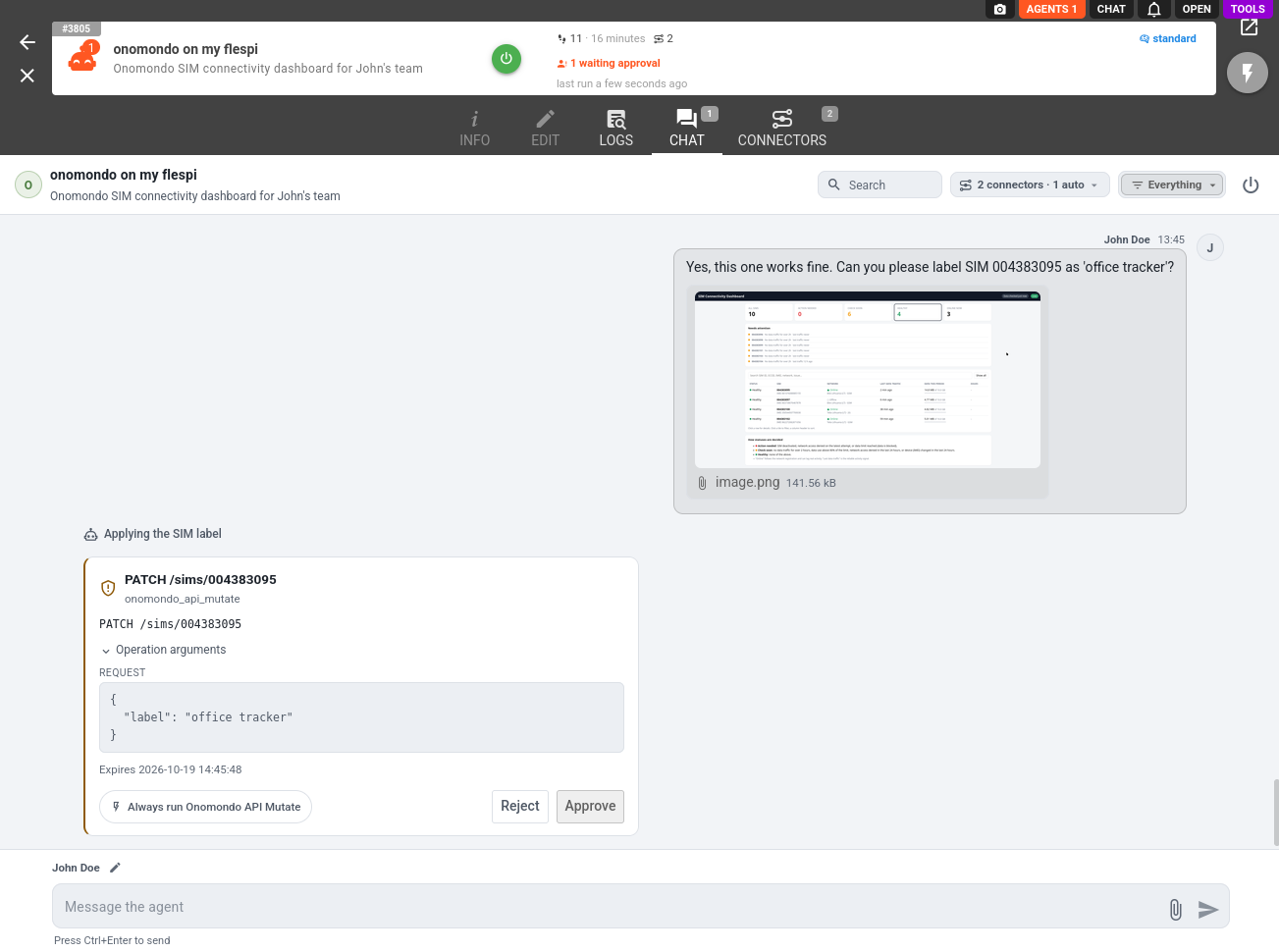
Mind what the default protects before relaxing it: SIM deactivation, bulk updates across the fleet, Network List changes that apply to every SIM on the list and carry their own rates, data limit changes, Connector changes that reroute device traffic, webhook removal, and SMS or messages sent to physical devices, each billed per message. The agent coordinates every change with you either way. The rules only decide whether you confirm each call before it leaves.
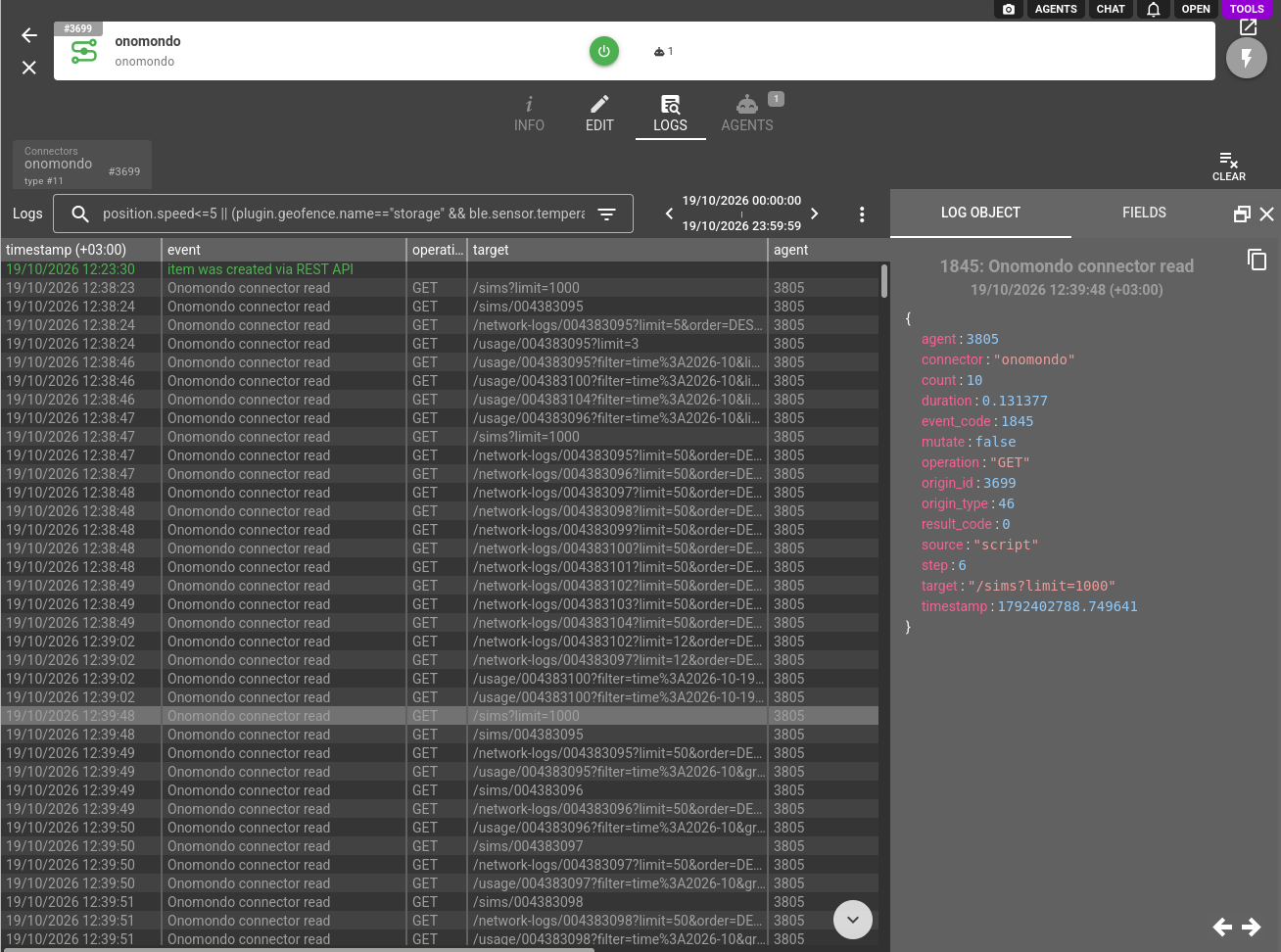
Executed mutations land in the agent conversation history as onomondo_api_mutate_executed records, and every Onomondo API call the agent makes on your behalf, reads included, is recorded in the connector logs with the method, path and result. The agent also paces its calls under the per-key rate limit of the API, so its reads never crowd out your own integrations:
To put the agent in front of the people you serve rather than yourself, pair the connector with a persona: the agent takes your name, speaks their vocabulary, and under branded disclosure never mentions flespi.
The Onomondo connector is one of several an agent can hold: browse the full connector list to give your agent more capabilities, such as a Telegram or Slack chat with the agent and its alerts.
Subscribe to the flespi AI and MCP change log to stay in sync with any updates.