The HTTP API connector gives your flespi AI agent access to the systems that have no connector type of their own: a ticketing or CRM system, an ERP, the reporting intake of an authority, a notification bot, a backend you run yourself. You name each system by its API address, the headers that carry its credentials and a description of what it is, and the agent reads it, writes to it under your approval rules and bridges it with the other systems it is connected to. Use it for the systems your telematics work ends in: the ticket opened for a silent device, the daily usage record filed in the ERP, the event handed to a regulator, the order status looked up for a customer.
New to flespi AI agents? Read the flespi AI agents article first: what agents are, how they reason and sleep, and how approvals keep you in control. This article covers the generic connector. Unlike the other connector types, it brings the agent no built-in expertise for the system: your description of it and the documentation it names are what the agent works from.
1. Connect a system
Create a connector of the http type: open the flespi panel, navigate to AI, then Connectors, click the "+" button and pick http. One connector holds up to ten named systems. Each system has a name the agent calls it by, the base URL of its API that every call appends its path to, the methods the agent may use on it, a description written for the agent, the headers sent on every call, and, when the system needs them, a custom CA certificate or a client certificate with its private key:
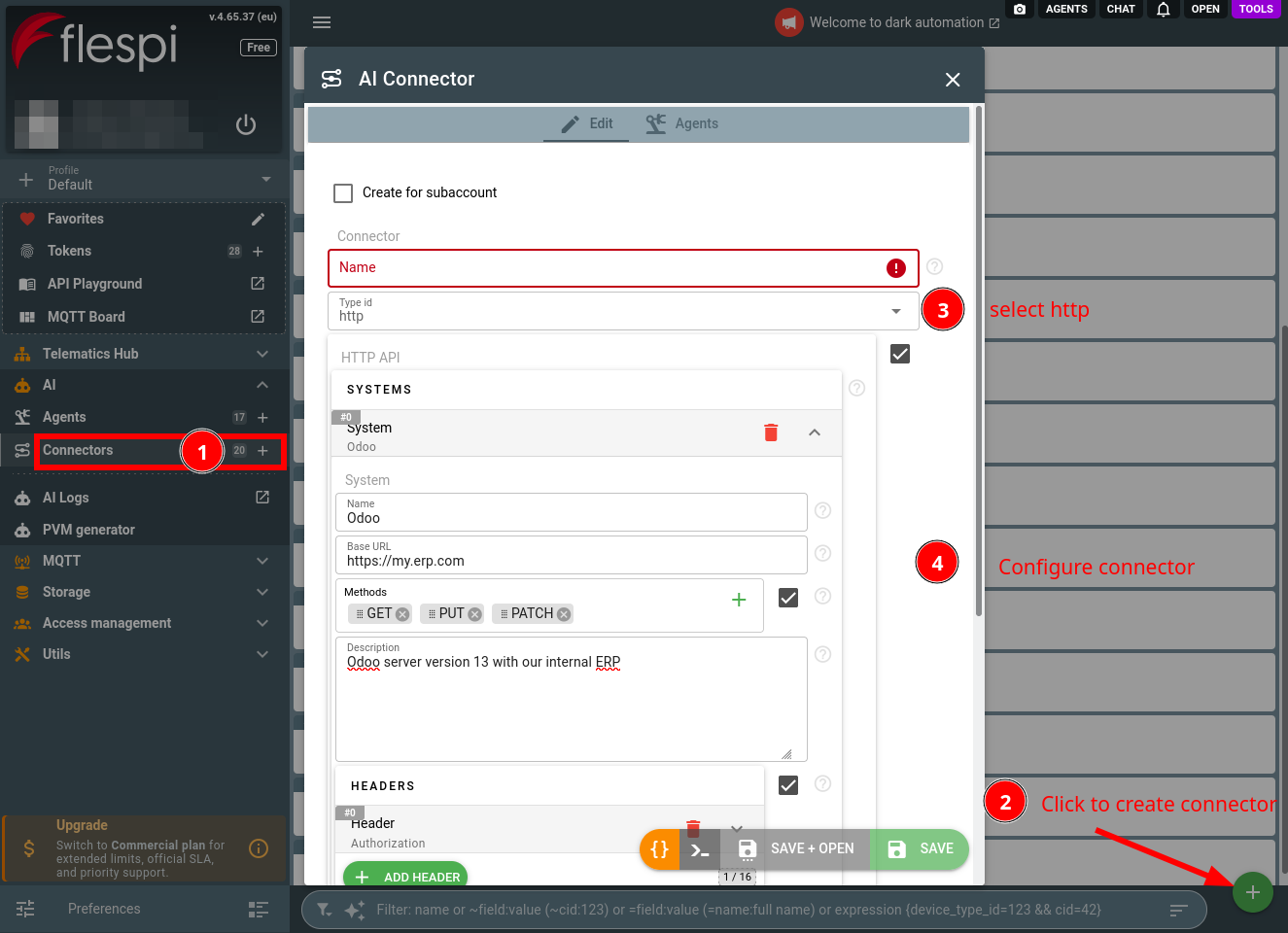
The description is the field the agent works from. It reads it before the first call to the system, so write it the way you would brief a new engineer: what the system is, where its API documentation lives, what the headers authenticate, which formats and limits it has, what the agent is for in it. Two thousand characters are enough for a pointer to the documentation and the facts it leaves out. What the description leaves out, the agent asks you about rather than guessing an endpoint:
Odoo 13, our internal ERP. Devices live in the fleet module and are exposed
by our REST module under /api/v1, documented at https://my.erp.com/api/docs:
JSON in and out, bearer token in the Authorization header with read and write
access to devices and service tickets, no access to invoices. Pagination with
page and per_page, 100 records a page, 60 requests a minute. Use it to keep
the device records in sync with flespi and to open service tickets.
The headers hold the credentials, an Authorization or an X-API-Key header as the system expects it. Their values stay in the connector: the agent sees the names of the configured headers, never their values, the platform puts them on every call, and a header of the same name composed by the agent is refused. A system signed by a private CA takes the CA certificate in PEM format, a system that authenticates its clients by certificate takes the client certificate chain and its private key. A system without headers is just an address: a public website or a service that needs no authentication is connected the same way.
The methods are the first control lever. GET serves the reads the agent runs on its own, POST, PUT, PATCH and DELETE are the writes, and a system left with GET only is read-only for the agent whatever it is asked to do. Leave the field unset for every method, or list what the system should ever receive from the agent: a lookup-only system gets GET, a ticketing system GET and POST, and a system without DELETE is safe from deletions. A read is never an approval matter: a GET runs the moment the agent needs it, without a question, and leaving GET out of the methods is the only way to keep the agent out of a system's data.
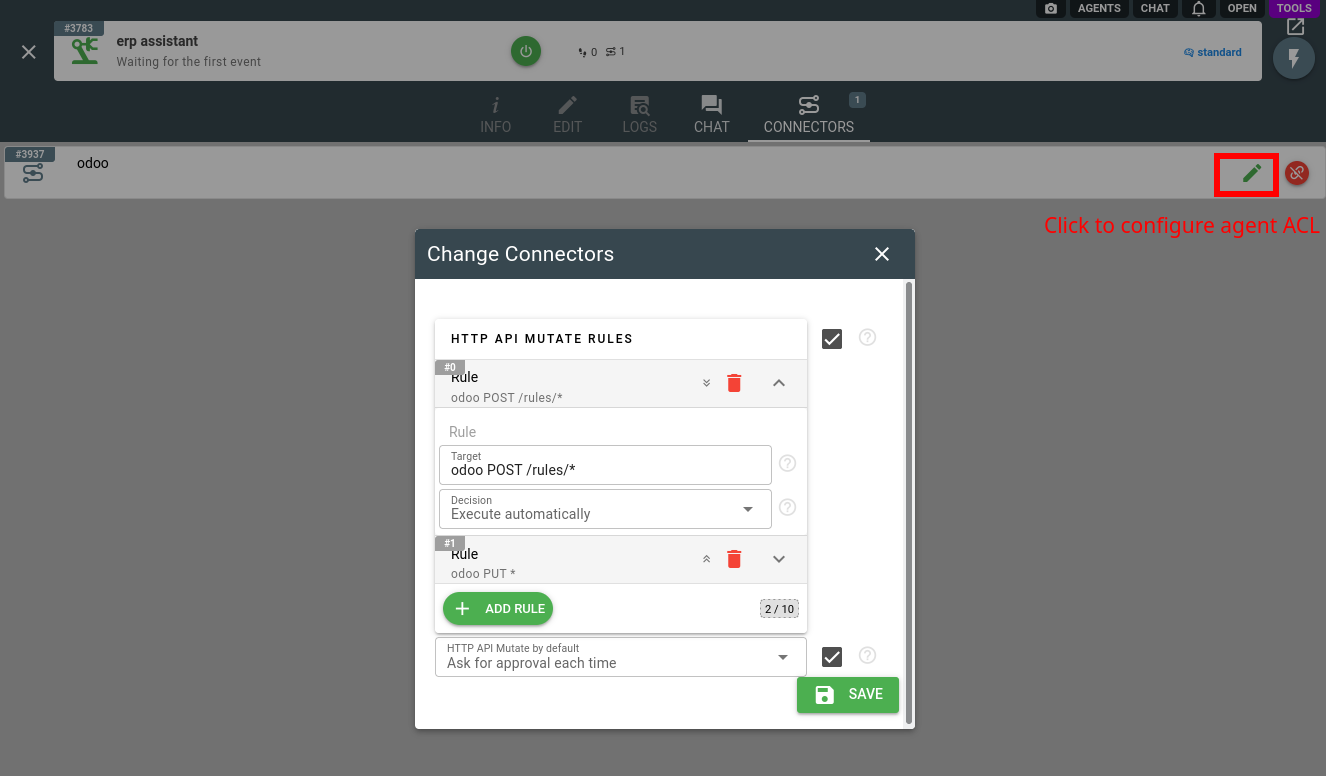
Assign the connector to your agent (create one if you have none yet). The rules of the assignment are the second lever: the HTTP API Mutate operation, which every write of the agent is, asks for your approval by default, and above the default you add rules per call mask. A mask reads "system METHOD /path", with "*" standing for any part: odoo PUT * releases every PUT to that system, odoo POST /rules/* the records created under one path, * DELETE * keeps every deletion under review whatever the system. The pencil button on the Connectors tab of the agent opens the same rules at any time:
A system served by a native connector type (see the full connector list) stays with it: a system of this connector pointing at its address is refused by every call, and the agent asks you to connect that account through its own type, where it has the expertise and the tools for it. The exception is a bot of yours on Telegram or Slack: a bot that only pushes notifications into a chat is an ordinary system here, while a conversation with the agent in the messenger, with approval prompts in the chat, is the Telegram or Slack connector.
2. Work with the agent
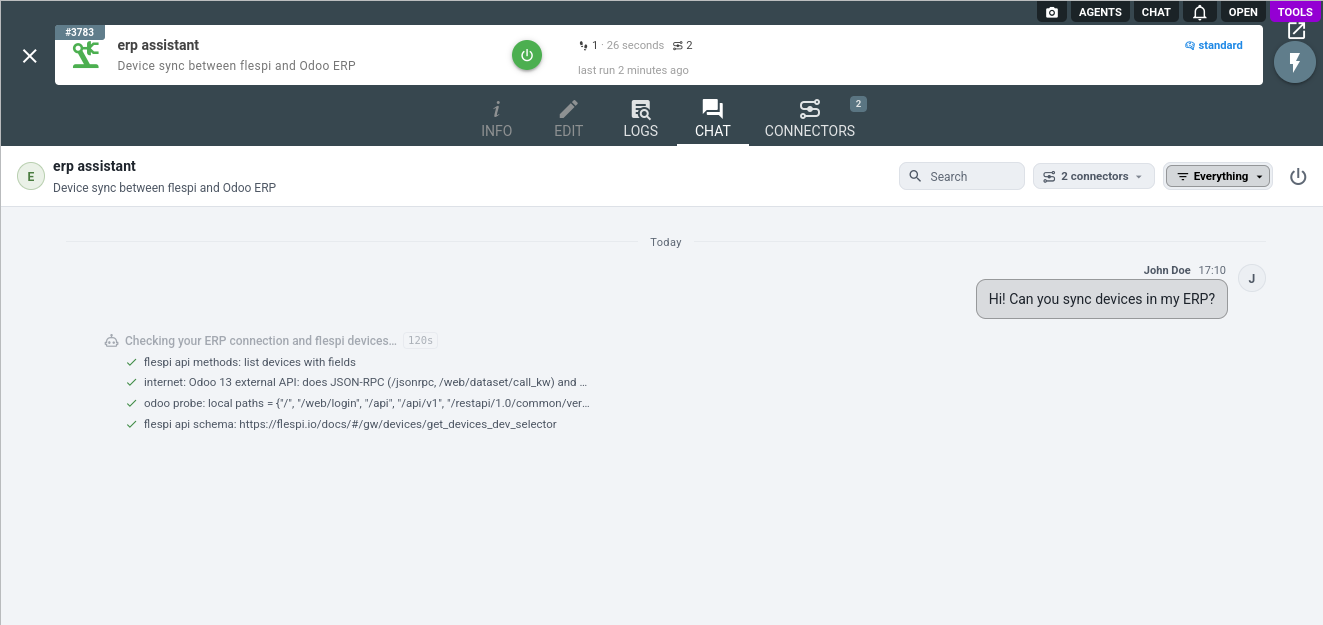
The agent grounds every call in three sources, in this order: your description of the system, the documentation it names, which the agent reads on the internet, and you. It composes a call from a documented endpoint, its parameters and the shape of its body, never from what a similar API would do, and where the documentation is out of reach it reads a documented listing or a health endpoint before designing a write. Ask it to sync your devices with the ERP and watch it work: it reads the flespi side, finds the external API documentation of the ERP on the internet, probes the system for the endpoints it speaks, and only then starts designing:
Reading a system is free and autonomous: the agent runs the GET calls from its own scripts, pages through listings, joins the records with what it knows from your other systems and keeps datasets beyond a single response in its files.
Writing goes through your approval rules, and the agent designs a write before it queues it: the endpoint, the body, what the answer should look like. Anything that reaches a third party beyond your own system, a record filed with an authority, a message sent to your customer, a bulk update over many records, a deletion, is presented to you first even where a rule would let it through. A failed write whose request may have reached the system is verified by a read before it is repeated.
A notification bot is the simplest system to start with: a Telegram or Slack bot of yours with the chat it posts into, and the agent sends the alerts of your setups through it. The agent checks the bot before the first message and, when the system rejects the credential, tells you to replace it in the connector rather than asking you to paste it into the chat. The same goes for every rejected credential: an HTTP 401 or 403 on a call that should pass means a new key or certificate in the connector, anything else the agent handles as an ordinary error, reads the answer and fixes the call.
The connector is for the calls the agent makes itself, not for a data feed. Telemetry to a destination and events on every message stay with the platform mechanisms built for them, a flespi stream or webhook, a notification or retranslation of the telematics platform, and the agent configures those through the tools of that system. A system that needs to reach the agent gets a webhook address of the agent's own and pushes its events there.
3. Bridges between your systems
The connector earns its place when the agent holds it next to the connectors of your other systems: it can then speak for both sides of a setup, read one system and write the other, and design the whole thing with you before anything changes. Two patterns come up again and again.
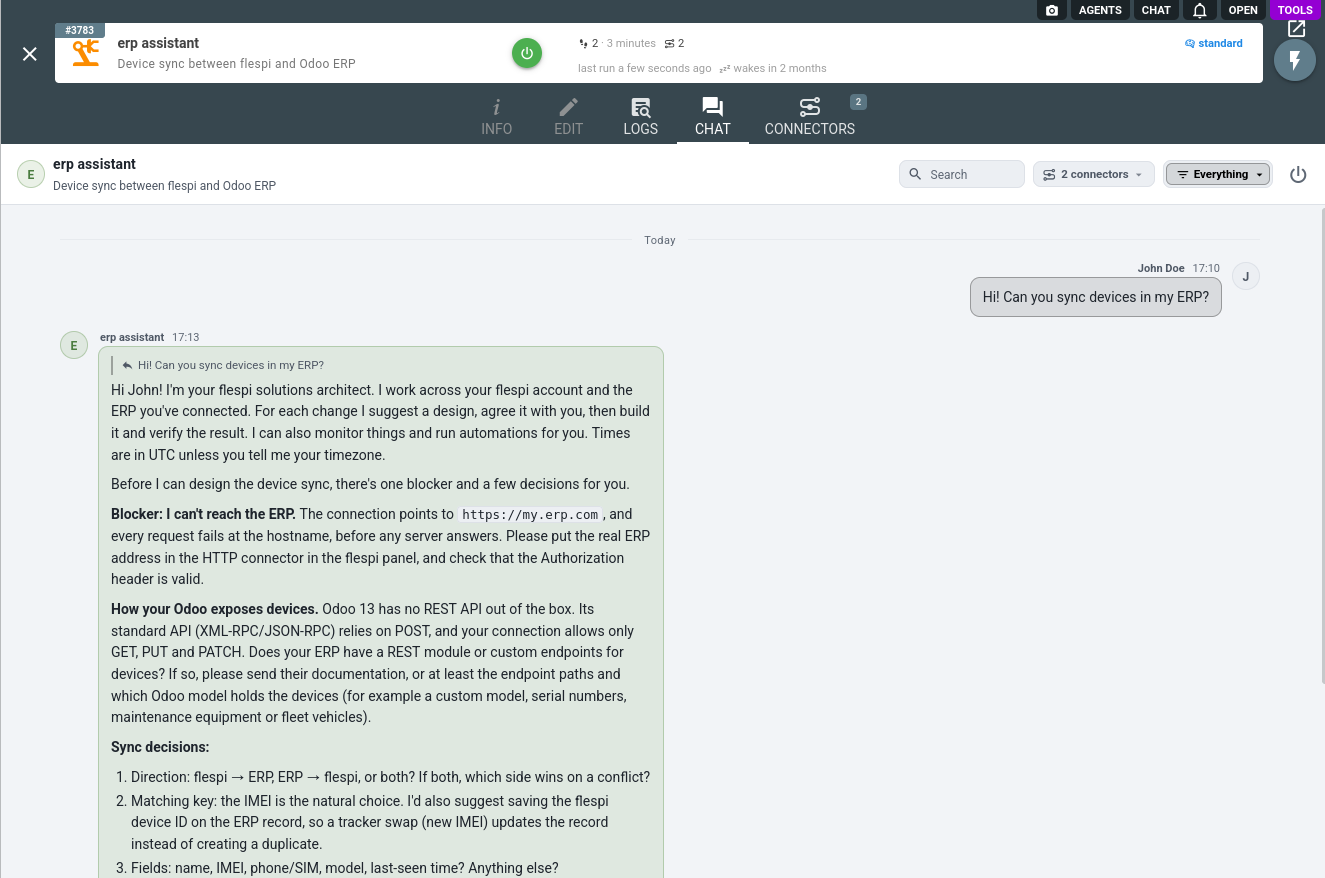
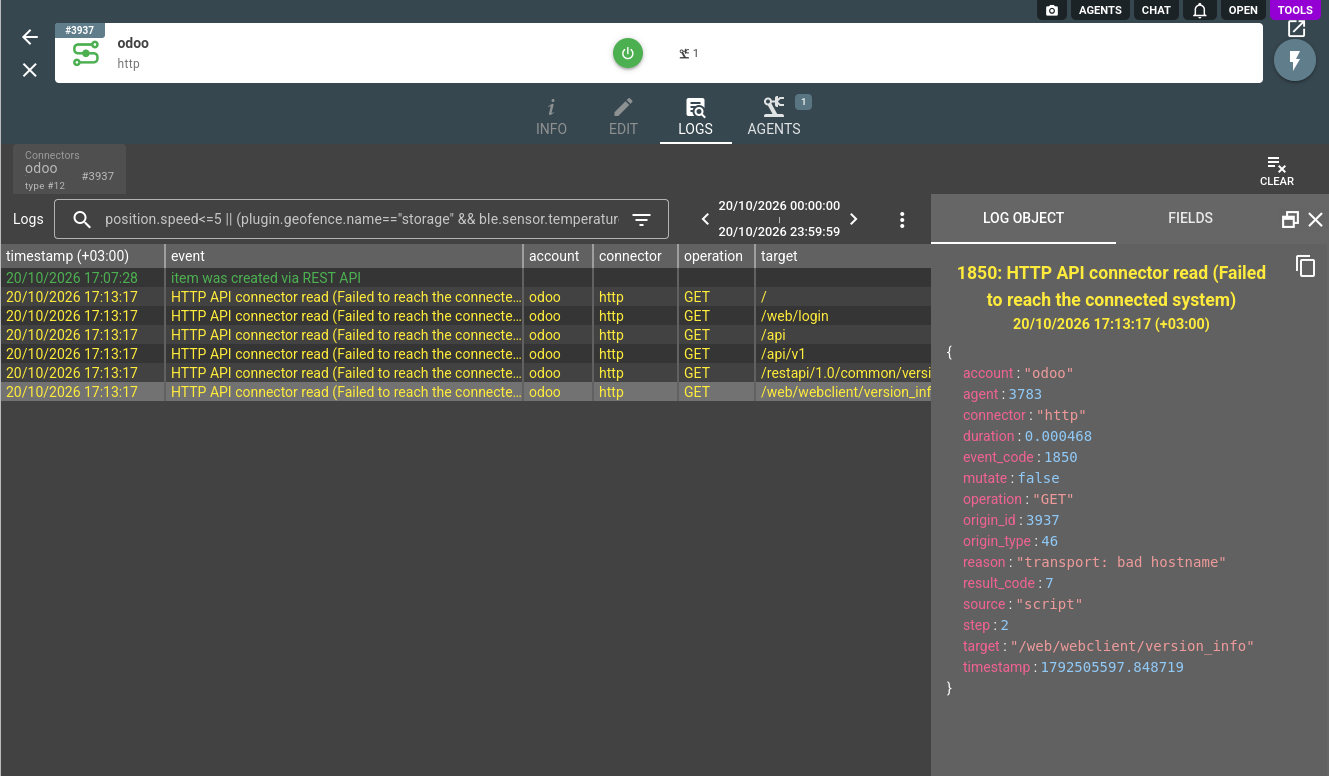
Your fleet mirrored in a business system. Ask for the devices of your flespi account kept in sync with the ERP, and the agent comes back with a design rather than a first write: what blocks it (in the chat below, an ERP address that does not answer), what the ERP exposes and how that squares with the methods you allowed it, and the decisions only you can take, the direction of the sync, the matching key, the fields. The same shape serves a daily usage record of every SIM filed in the ERP from the connector of your connectivity provider, a ticket opened in your helpdesk for every device silent longer than you tolerate, or an order status looked up for the customer who asks about it in the chat:
Events of your telematics platform handed to a system that must receive them. Regulators, emergency services and road operators increasingly take events straight from the telematics platform over an API of their own: a toll road system, a regulatory compliance system of the transport authority, an emergency intake for alarms, an insurer's claims interface. Ask the agent how it would build the hand-over and it designs it end to end: the notification of the telematics platform that detects the event and calls a webhook address of the agent's, the handler of the agent that turns the event into the record format of the intake, with the vehicle details looked up in the platform, and the write to the intake with your API key and client certificate on it. The alert to your own dispatchers stays a second action of the same notification in the platform, so a person learns about the event even if the intake is down. You test against the test intake of the authority first, and going live is a change of URL and credentials in the connector, with the platform side untouched.
Where the hand-over must run without a question on every event, a rule on the intake, intake POST /incidents* on automatic execution, releases exactly that write and nothing else. To put the agent in front of the people you serve rather than yourself, pair the connector with a persona: the agent takes your name, speaks their vocabulary, and under branded disclosure never mentions flespi.
4. Approvals and logs
Every write to a connected system goes through the agent approval rules as the http_api_mutate operation type, and by default each call becomes an approval request. The two levers work together: the methods of a system in the connector decide what the agent may send to it at all, the rules of the assignment decide which of the writes run on their own, ask, or are denied, per system, method and path, while reads never ask. You review the exact call, its system, method, path and body before approving, here a test call asked for in the chat:
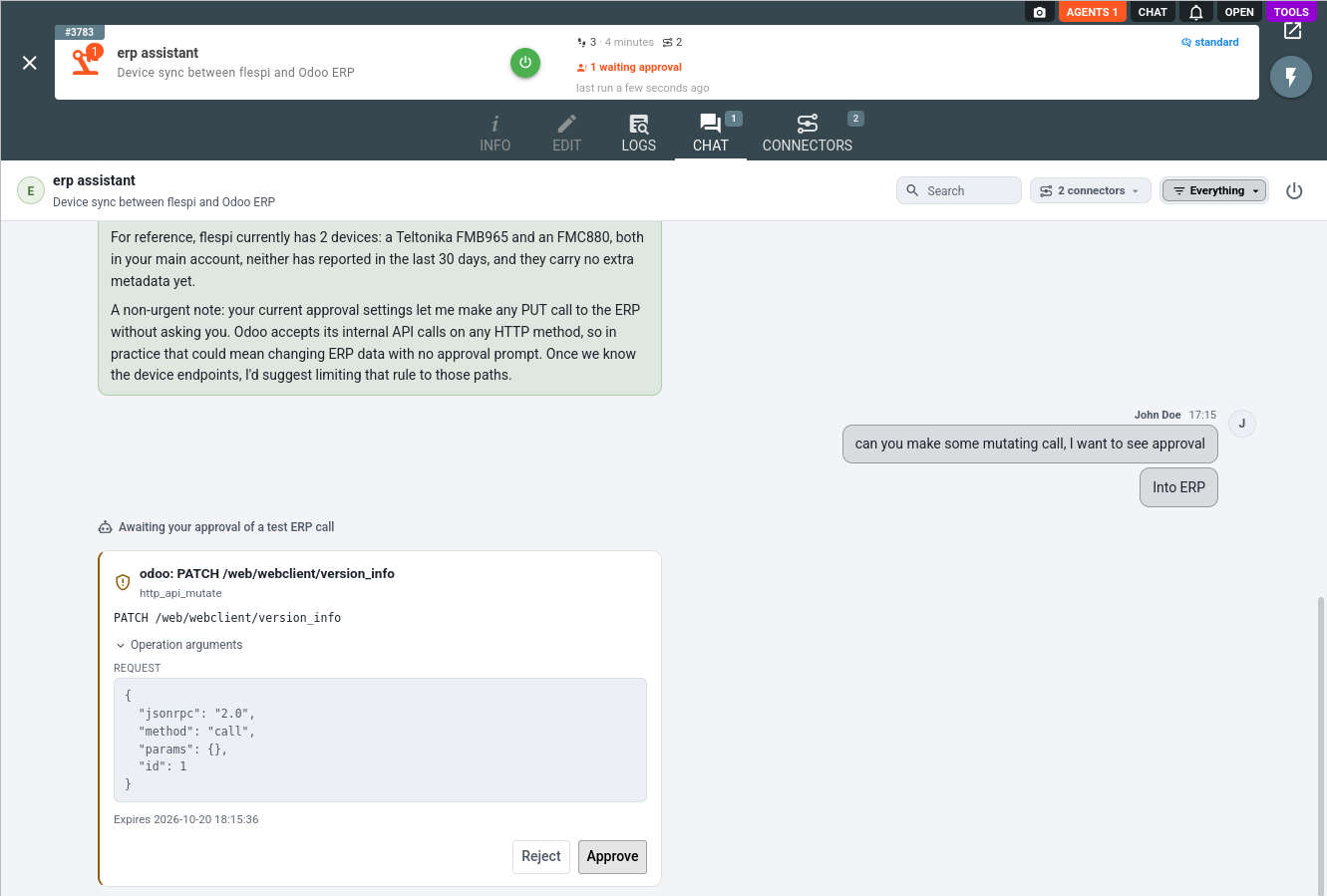
The agent reads your rules too. Above the request it notes that a rule releasing every PUT to the ERP is wider than the system warrants, since that ERP accepts its internal API calls on any method, and suggests narrowing the rule to the device endpoints once they are known. Mind what the default protects before relaxing it: a write to a third party cannot be taken back from your side, a bulk update touches every record it names, and a deletion is final for most systems. The agent coordinates every change with you either way. The rules only decide whether you confirm each call before it leaves.
Executed writes land in the agent conversation history as http_api_mutate_executed records with the request and the answer of the system, and every call the agent makes, reads included, is recorded in the connector logs with the system, the method, the path and the result. The probes of an address that does not answer yet show there at a glance:
A call refused before it leaves shows there too, with its reason, most often an address a native connector type serves. A system of yours that keeps running into the limits of a generic API deserves a native integration: ask for it on the flespi forum.
The credentials never leave the connector: the agent never prints a configured header value, a certificate or a key, never copies them into a page, a file or a message, a configured value the system echoes back comes to you masked, and a page it builds for your team reads the state it published into your flespi account rather than calling the system with your credentials. Rotate a key by replacing it in the connector. The agent notices the change at its next call.
The HTTP API connector is one of several an agent can hold: browse the full connector list to give your agent more capabilities, such as a Telegram or Slack chat with the agent and its approval prompts.
Subscribe to the flespi AI and MCP change log to stay in sync with any updates.