The Wialon Platform connector gives your flespi AI agent access to a Wialon Platform installation: Wialon Platform documentation and API expertise plus direct work with the provider's customers, devices, channels and module data on your behalf. Use it as a service provider running fleets on Wialon Platform, whether or not you also have a flespi account of your own.
New to flespi AI agents? Read the flespi AI agents article first: what agents are, how they reason and sleep, and how approvals keep you in control. This article covers the Wialon Platform side of the story.
1. Connect the account
Two configuration fields:
- url — the address of your Wialon Platform installation, the one you open the Studio at.
- api_key — an API key of your provider account. Keys are minted through the Wialon Platform API: in the Studio open Admin, then API playground, find the API Keys section on the Studio tab, expand
POST /api-keys, click "Try it out", paste the key configuration below into the request body and execute it.
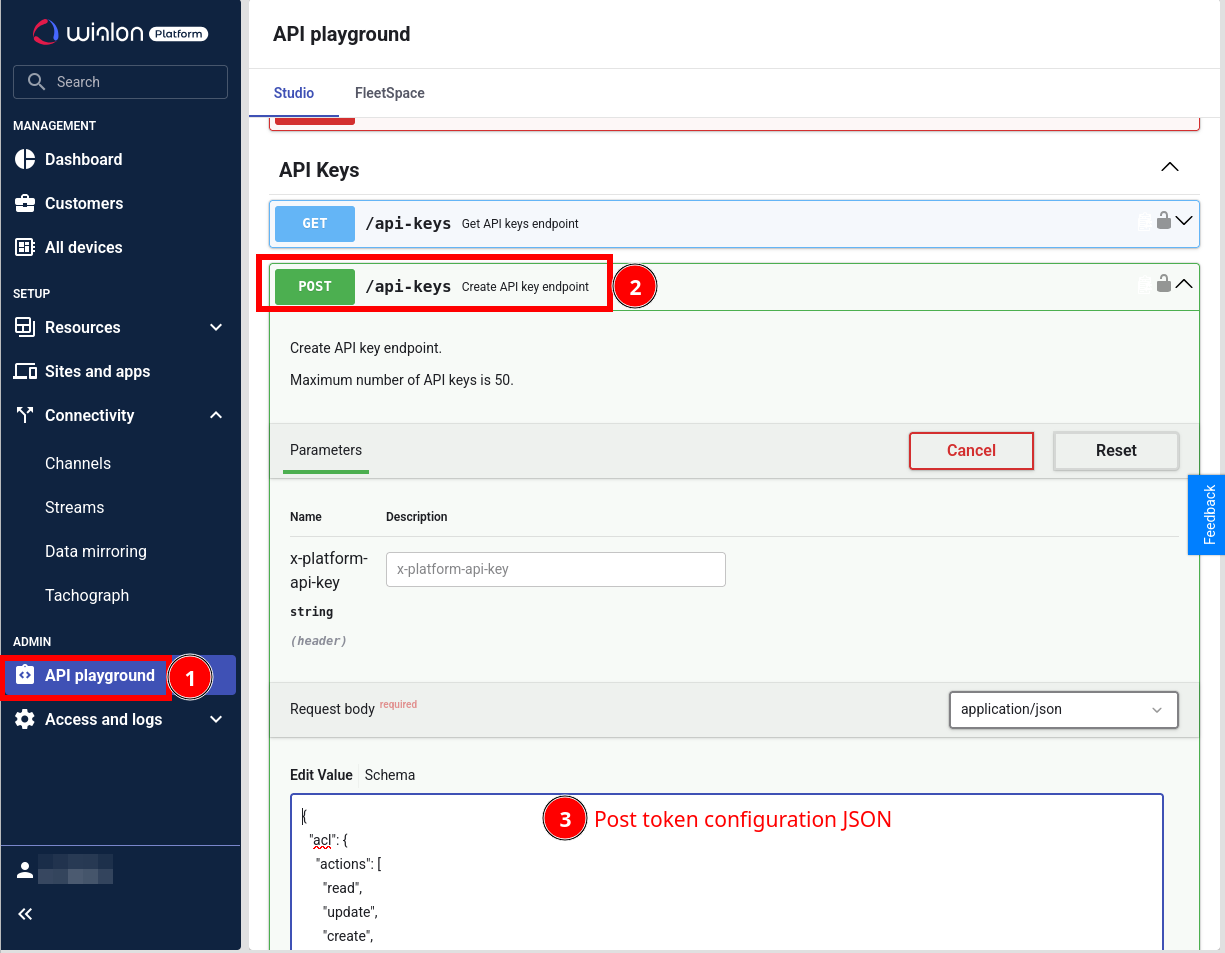
The key configuration names the key and lists what it may do: tsp_permissions are the provider permissions of the Studio side (customers, devices, channels, streams, billing and the rest), acl the customer permissions the key may exercise inside your customers (devices, geofences, drivers, forms, maintenance and the other modules), ttl the idle lifetime in seconds. This one enables everything; trim both lists to what the agent should be able to do:
{
  "name": "AI agent key",
  "description": "API key of the flespi AI agent",
  "ttl": 31536000,
  "tsp_permissions": ["read:channels", "update:channels", "delete:channels", "read:cmd_tmpl", "update:cmd_tmpl", "delete:cmd_tmpl", "create:customers", "read:customers", "update:customers", "delete:customers", "operate_as:customers", "read:cust_tmpl", "update:cust_tmpl", "delete:cust_tmpl", "read:devices", "update:devices", "delete:devices", "read:maps", "update:maps", "delete:maps", "read:sites", "update:sites", "delete:sites", "read:settings", "update:settings", "stats", "read:streams", "update:streams", "delete:streams", "read:tacho", "update:tacho", "delete:tacho", "read:users", "update:users", "delete:users", "read:ws", "read:limits", "update:limits", "delete:limits", "read:sensors", "update:sensors", "delete:sensors", "read:billing", "update:billing", "read:emissions", "manage:api_keys", "read:customer_roles", "update:customer_roles", "delete:customer_roles", "read:apps", "update:apps", "build:apps", "create:custom_analytics", "read:custom_analytics", "update:custom_analytics", "delete:custom_analytics"],
  "acl": {
    "actions": ["read", "update", "create", "delete"],
    "analytics_builder": ["read"],
    "anchors": ["read", "update", "create", "delete"],
    "asset_categories": ["read", "update", "create", "delete"],
    "assets": ["read", "update", "create", "delete"],
    "buildings": ["read", "update", "create", "delete"],
    "categories": ["read", "update", "create", "delete"],
    "checklist_templates": ["read", "update", "create", "delete"],
    "checklists": ["read", "update", "create", "delete"],
    "devices": ["read", "update", "commands", "history", "tacho"],
    "driver_behavior": ["read", "update", "create", "delete"],
    "drivers": ["read", "update", "create", "delete", "access_to_driver_app"],
    "emissions": ["read"],
    "floors": ["read", "update", "create", "delete"],
    "form_templates": ["read", "update", "create", "delete"],
    "forms": ["read", "update", "create", "delete"],
    "gateways": ["read", "update", "create", "delete"],
    "geofences": ["read", "update", "create", "delete"],
    "geofences_groups": ["read", "update", "create", "delete"],
    "jobs": ["read", "update", "create", "delete"],
    "labels": ["read", "update", "create", "delete"],
    "service_plans": ["read", "update", "create", "delete"],
    "services": ["read", "update", "create", "delete"],
    "tags": ["read", "update", "create", "delete"],
    "tasks": ["read", "update"],
    "tracking_links": ["read", "update", "create", "delete"],
    "users": ["read", "update", "create", "delete"],
    "zones": ["read", "update", "create", "delete"]
  }
}
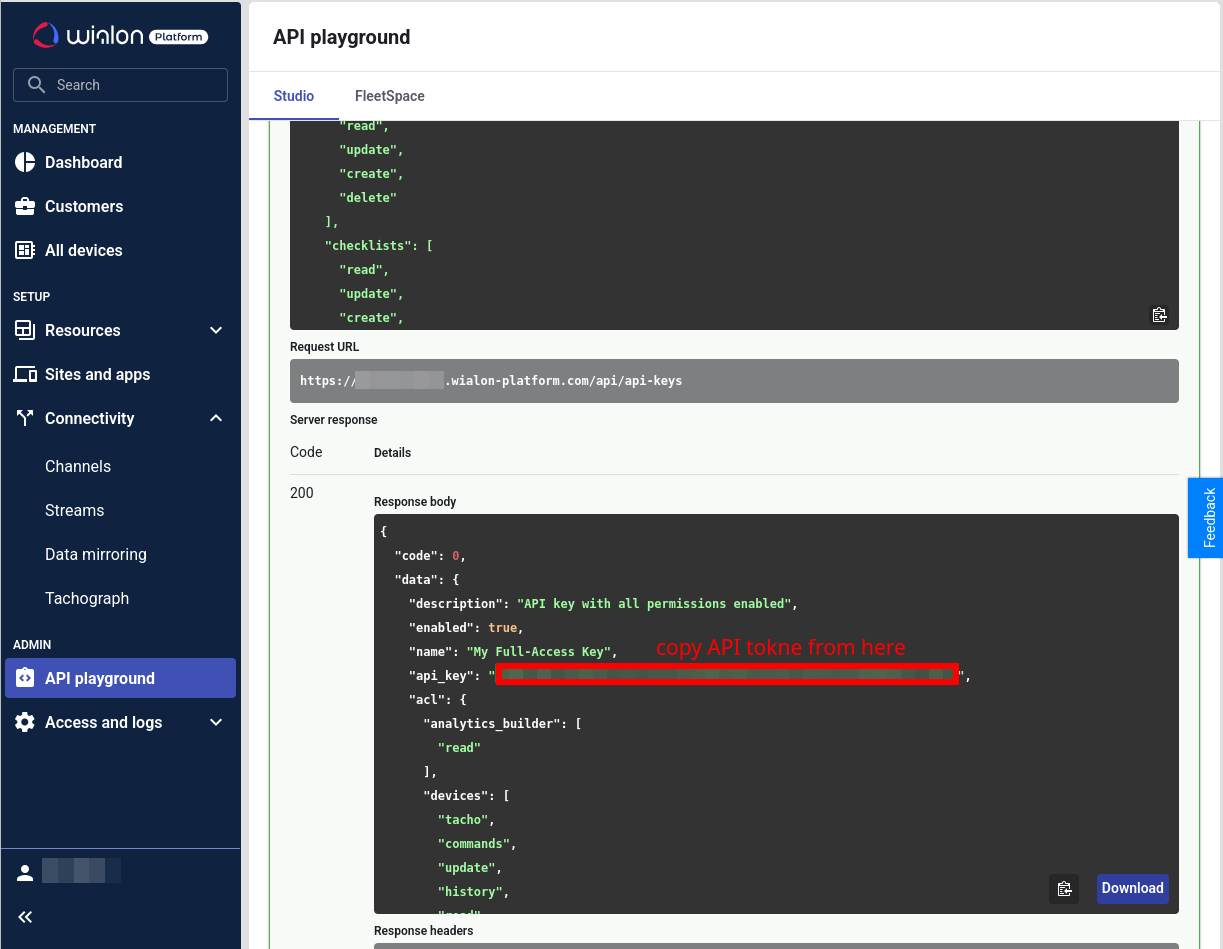
Copy the api_key value from the response. It is shown here only:
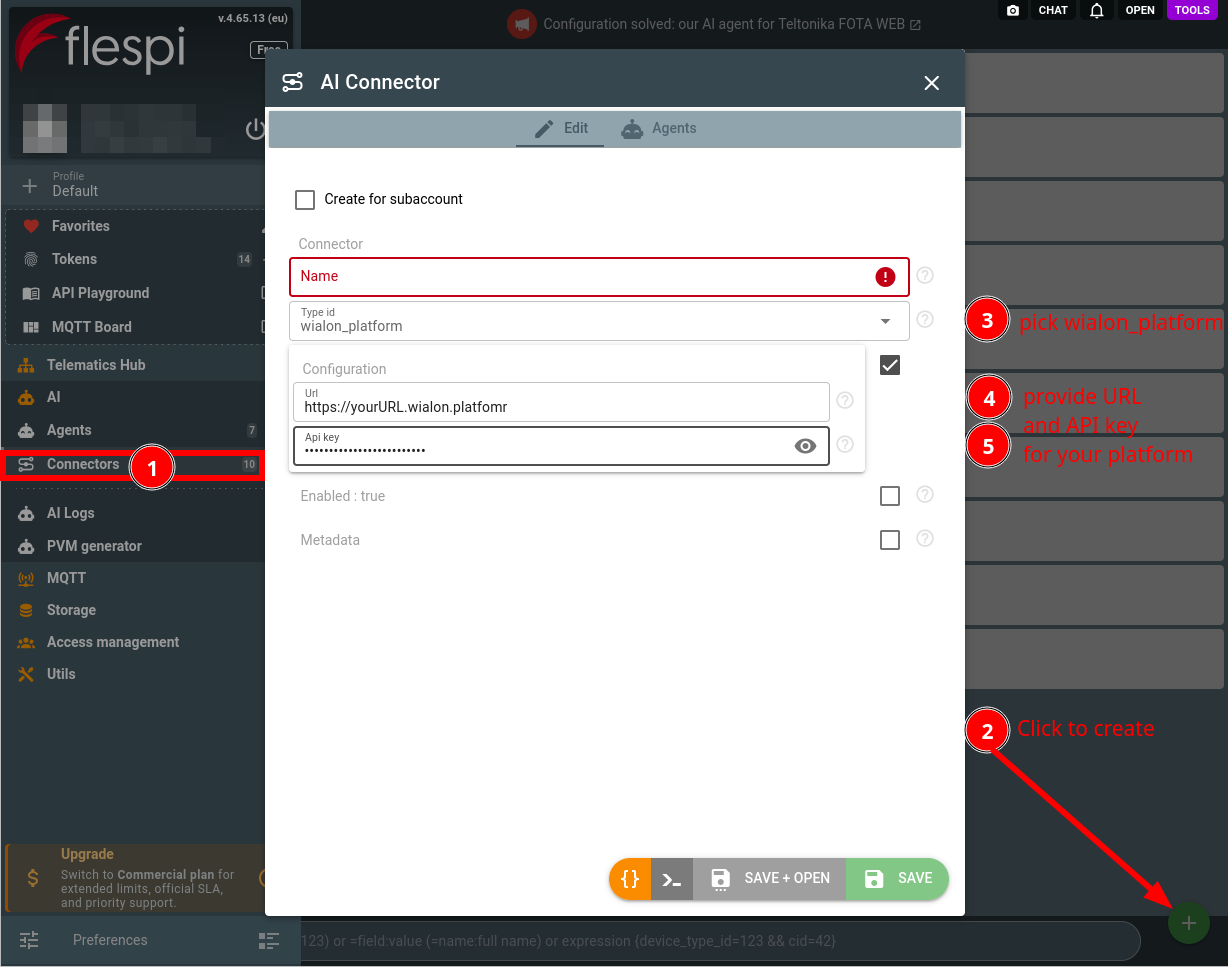
Create a connector of the wialon_platform type with the address and the key: open the flespi panel, navigate to AI, then Connectors, click the "+" button, pick the type and fill in the two fields:
Assign the connector to your agent (create one if you have none yet), choosing what the agent may change on its own: the default rule for account-changing Wialon Platform API calls and, above it, rules for the parts of the installation you trust it with, such as a customer module or the devices.
The key defines the ceiling: the agent works strictly within the permissions the key carries and recommends a broader key when a task is out of reach, rather than attempting calls that will fail. A revoked or expired key surfaces to the agent immediately — it will ask you to reconnect the connector with a fresh one.
2. Work with the agent
The agent knows Wialon Platform: it consults the official Wialon Platform documentation and the API reference of your installation on its own, so you can discuss customers, devices, channels, sensors, trips, geofences, drivers, maintenance and the other modules the way you would with a Wialon Platform engineer. It tells the Studio side from the FleetSpace side: provider work such as customers, devices and channels, and per-customer work inside the modules enabled for that customer.
Reading the installation is free and autonomous: the agent lists the fleet, reads a customer's trips or geofences, checks which channel a device reports to, and analyzes the results computationally — all through a read-only surface that physically cannot change anything. Ask it to connect a tracker for a customer and it checks the infrastructure first: a channel of the tracker's protocol has to exist before the device can report, and the agent notices when none does:
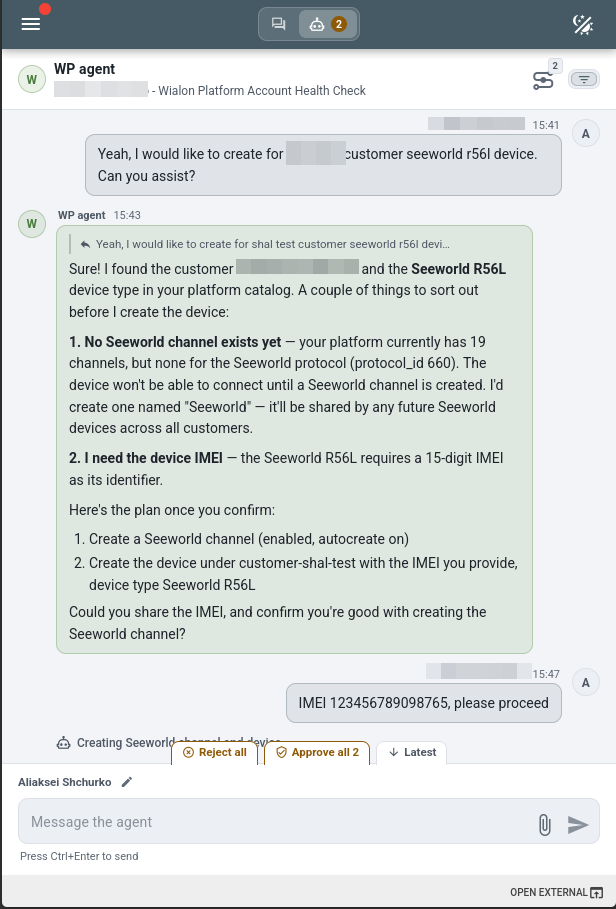
Every account-changing Wialon Platform API call goes through the agent approval rules as the wialon_platform_api_mutate operation type, and by default each call becomes an approval request — you review the exact call, its target customer and its body before approving:
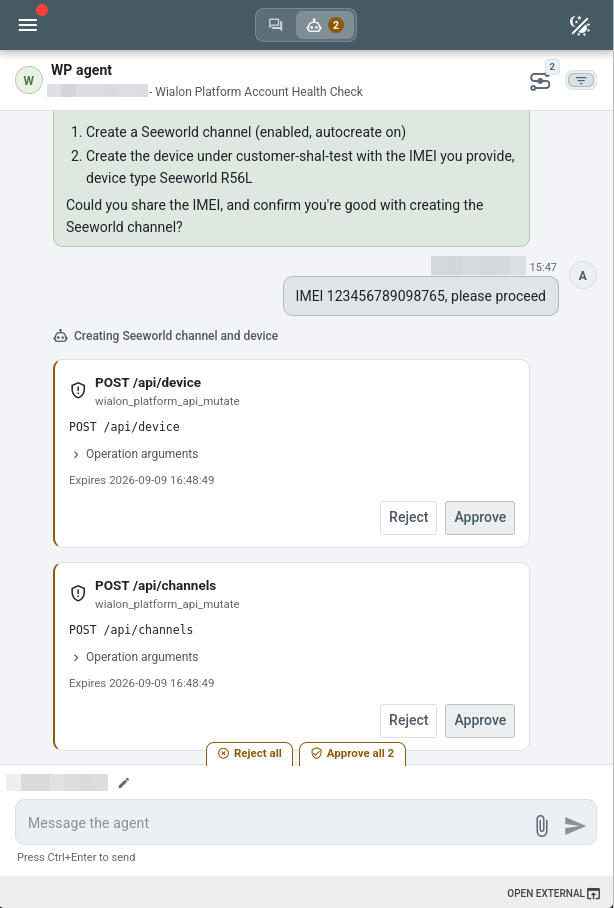
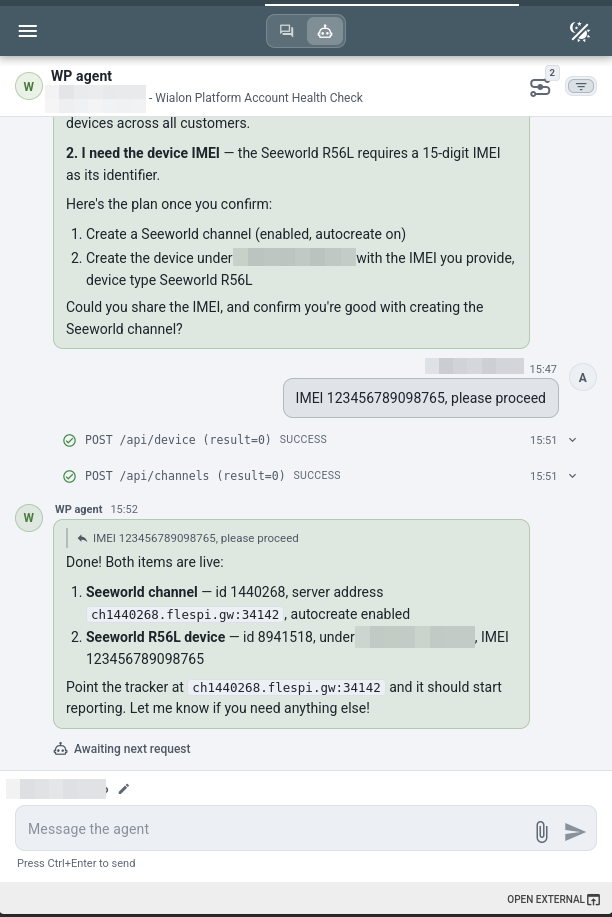
Mind what the default protects before relaxing it: the mutation surface includes commands to physical devices, channel changes, customer and billing changes, users and API keys. Rather than switching the whole operation to automatic execution, add a rule for the part you delegate, for example the geofences module on automatic execution while everything else still asks. Two approvals later the channel and the device exist, and the agent reports the server address to point the tracker at:
The agent can also watch the installation live. Wialon Platform publishes its state and events on MQTT, and the agent subscribes to the topics of your provider and your customers with a token it obtains from the API key on its own: a device coming online, a geofence or a driver assignment changing, a service falling due wakes the agent only when its handler decides the change deserves attention.
Executed mutations land in the agent conversation history as wialon_platform_api_mutate_executed records, and every Wialon Platform API call the agent performs, reads included, is recorded in the connector logs with the operation, target and result.
Wialon Platform runs on flespi, yet the connected installation is a system of its own: its devices, channels and topics belong to the provider account of the platform, not to a flespi account you may connect through the flespi connector. When a setup spans both, for example devices streaming from your flespi account into the platform, the agent reads and changes each side through its own connector.
To put the agent in front of the people you serve rather than yourself, pair the connector with a persona: the agent takes your name, speaks their vocabulary, and under branded disclosure never mentions flespi.
The Wialon Platform connector is one of several an agent can hold: browse the full connector list to give your agent more capabilities.
Subscribe to the flespi AI and MCP change log to stay in sync with any updates.