External AI agents — Claude, Cursor, VS Code, and other MCP clients — need authorization to work with flespi. A realm replaces token sharing with a sign-in: the user points the client at the realm MCP endpoint, authorizes through the familiar realm login flow, and the agent acts with exactly that user's permissions. No token is ever copied into a client configuration, access stays bounded by the realm user's ACL, and the realm owner controls and revokes it centrally.
1. Prepare the realm
Everything is controlled by the realm owner:
- Create a realm and configure its users or identity providers.
- Set the realm role or user token ACL: allow
POSTto theai/mcpmodule plus only the downstream API sections the agent needs. The ACL is the authorization — the OAuth flow adds no permissions of its own. - Enable the realm OAuth server and add the MCP client's exact Client ID Metadata Document (CIMD) URL to the allowed clients.
Each realm user then authorizes the client with their own realm permissions.
2. Connect the client
The realm's Info tab in the panel provides ready integration actions for Claude Code, Claude, Cursor, VS Code, LM Studio, and Goose:
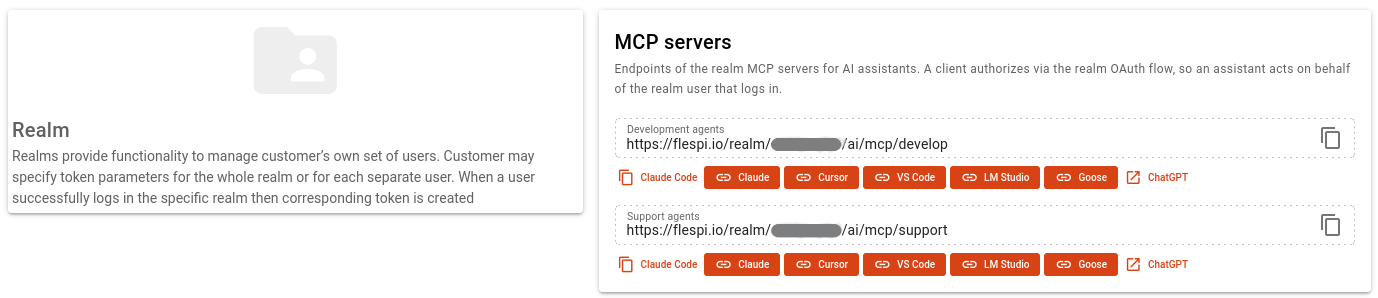
For any other OAuth-capable MCP client, enter the realm MCP endpoint as the server URL — it is normally the only value required, with no client secret and no Authorization header:
https://flespi.io/realm/<realm-public-id>/ai/mcp/develop
https://flespi.io/realm/<realm-public-id>/ai/mcp/support
Replace <realm-public-id> with the public ID shown in the realm configuration and pick the server — develop or support, realm-wrapped mirrors of the flespi MCP servers with the same tools, costs, and behavior.
On the first connection the client receives a Bearer challenge, discovers the realm OAuth server, and opens the realm login for the user to sign in and approve access. After authentication the endpoint redirects to its mirror with HTTP 307 — the client must follow it preserving the POST method, body, and authorization.
3. Troubleshooting
- The client does not open realm authorization: confirm it uses the realm-qualified
/realm/<realm-public-id>/ai/mcp/...endpoint (not the direct/ai/mcp/...one), realm OAuth is enabled, and the client's exact CIMD URL is allowed. If the CIMD URL is unknown, follow find an unknown client ID. - The client authenticates but cannot connect: confirm it follows the HTTP 307 redirect preserving the POST body and authorization, and that the realm and the realm user are enabled.
- Tools return permission errors: grant
POST ai/mcpto the realm role or user, grant the required HTTP methods on each downstream API section the tools must access, and check that the target item is within the user's permitted account hierarchy. - A client is incompatible if it requires a client secret, dynamic client registration, a non-URL client ID, or lacks OAuth discovery support — see the realm OAuth server requirements.
Subscribe to the flespi AI and MCP change log to stay in sync with any updates.