Note (Temporarily!): the structure of the JSON file can be changed, as the file has a complex hierarchy. Also, the memory data structure is under active development and testing. All changes and improvements will be displayed in the changelog.
The tacho-file-parse plugin type parses raw tachograph files downloaded from driver cards and vehicle unit memory into structured JSON. Tachograph files store data in a strict binary format defined by EU Regulation 2016/799 — driver identity, daily activity records, work period locations, vehicle usage history, border crossings, cargo operations, and more.
The plugin decodes all of this into clean, human-readable JSON that follows the original data structure defined by the regulation. The result can be used to build driver activity timelines, work and rest period charts, route maps, compliance reports, and any other analysis based on tachograph data.
How to use
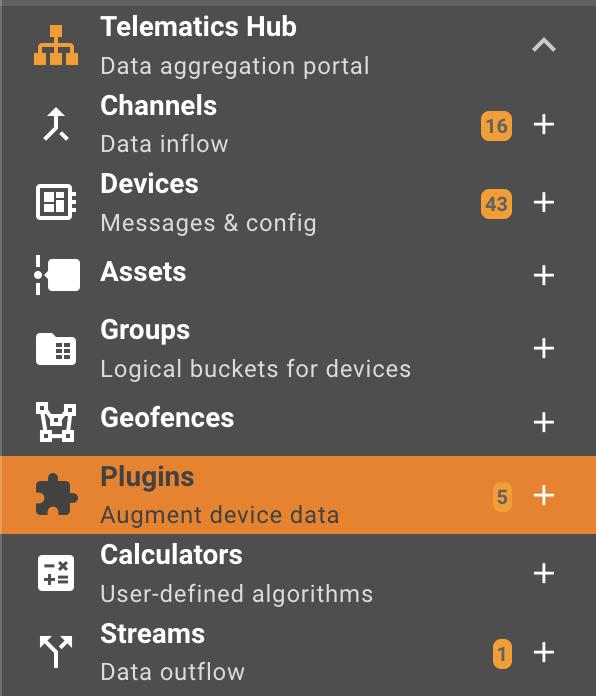
Click on the "+" button in the Telematics Hub -> Plugins section to create a new plugin:
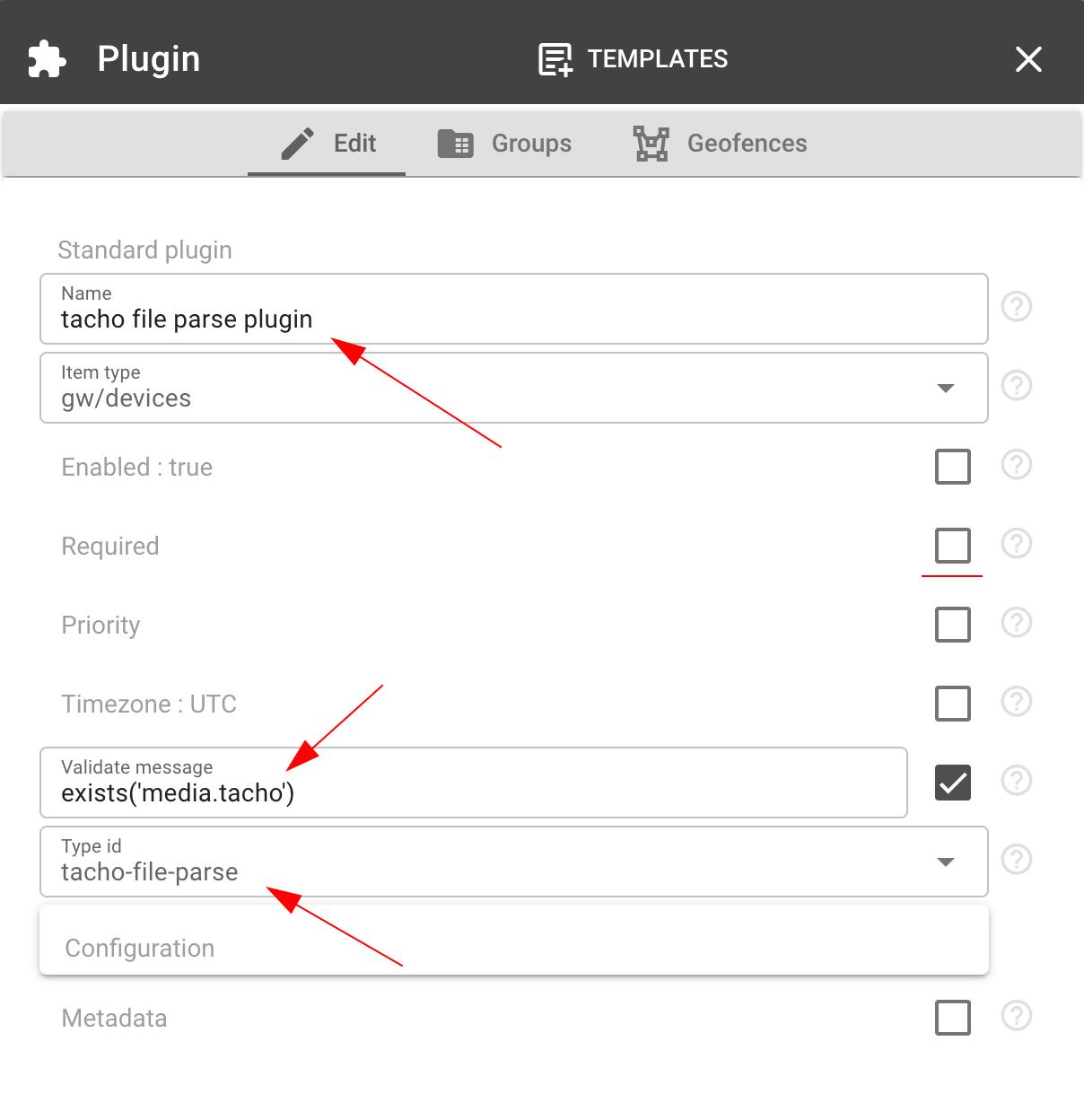
In the window that appears, enter the name of the plugin in the Name field. In the Type ID field, select tacho-file-parse.
Good practice recommendations:
- We recommend adding the exists('media.tacho') filter to the Validate message field. This will reduce the load on the plugin and eliminate false positives for all device messages.
- It is advisable to leave the required flag unchanged (false), since if a parsing error occurs, the file message will not be registered.
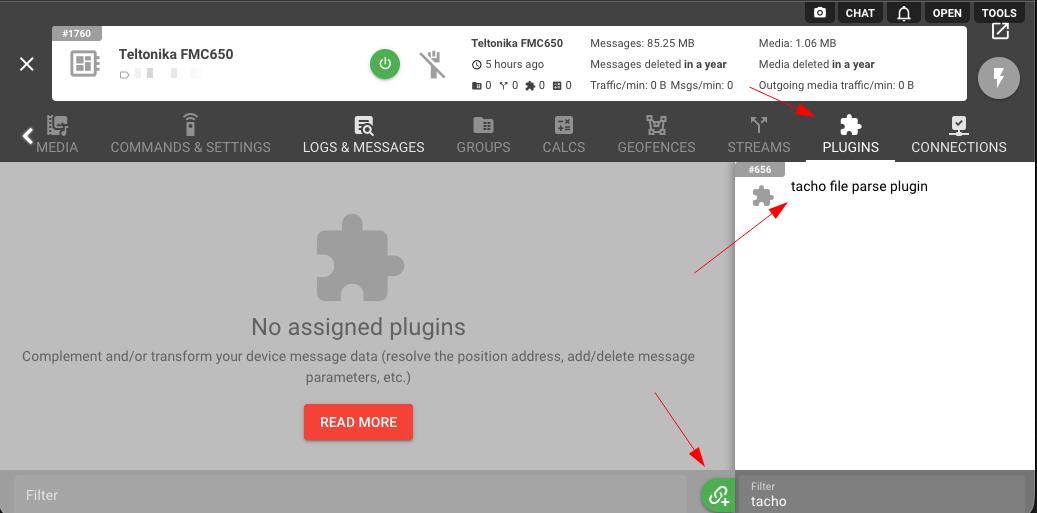
Then we need to assign this plugin to the right devices. Go to the Plugins tab for the required device and click the "+" button:
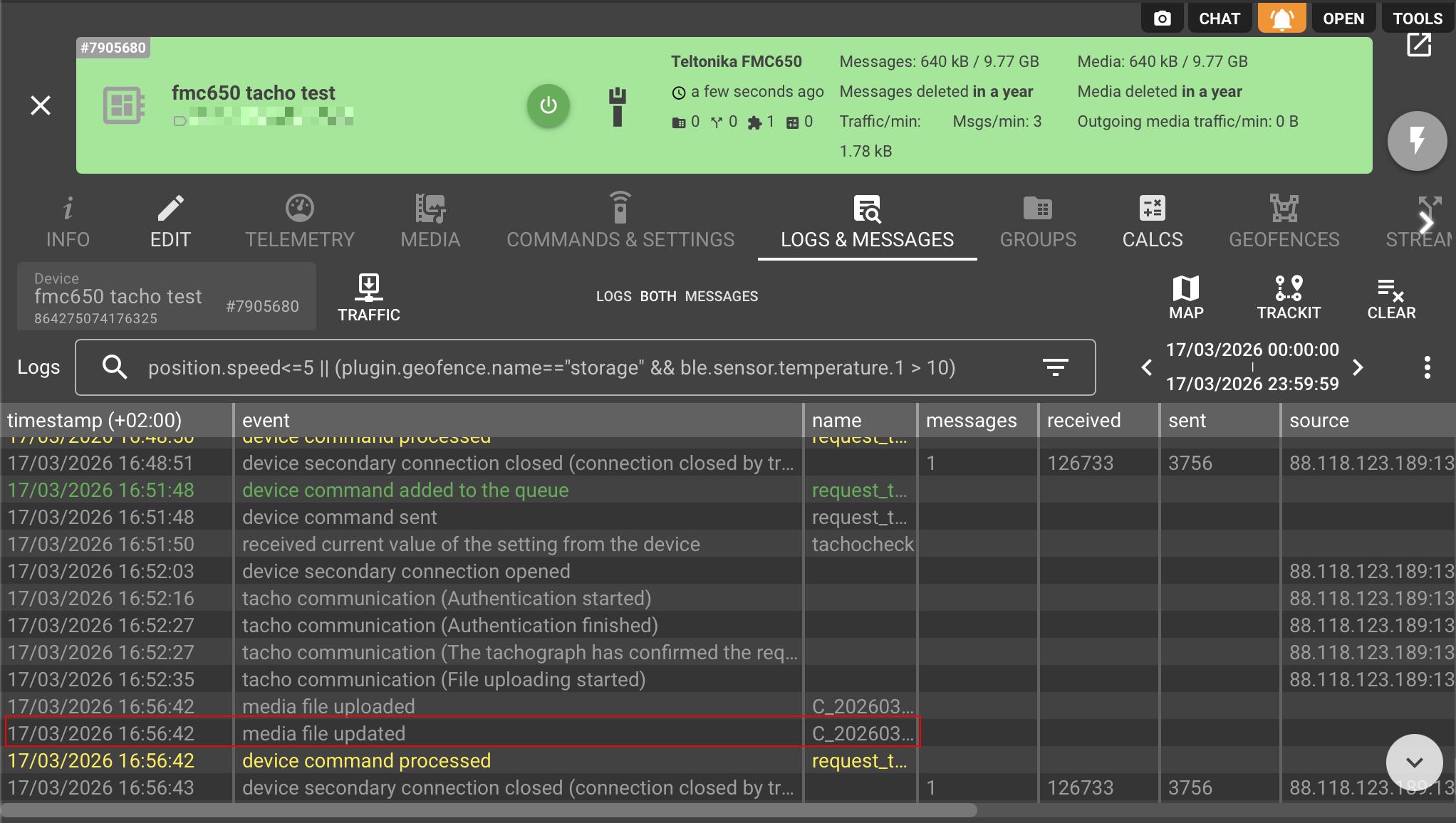
Once the file is uploaded, the plugin processes it automatically. Head to the Logs & Messages tab — a "media file updated" entry confirms successful processing. The parsed output is stored in the content field of the corresponding file entity in flespi. The content field is returned with the file in the device media listing and is not displayed in the log object. A parsed file adds a megabyte or more to the listing, so request only the fields you need.
How to get extracted data from a plugin via API
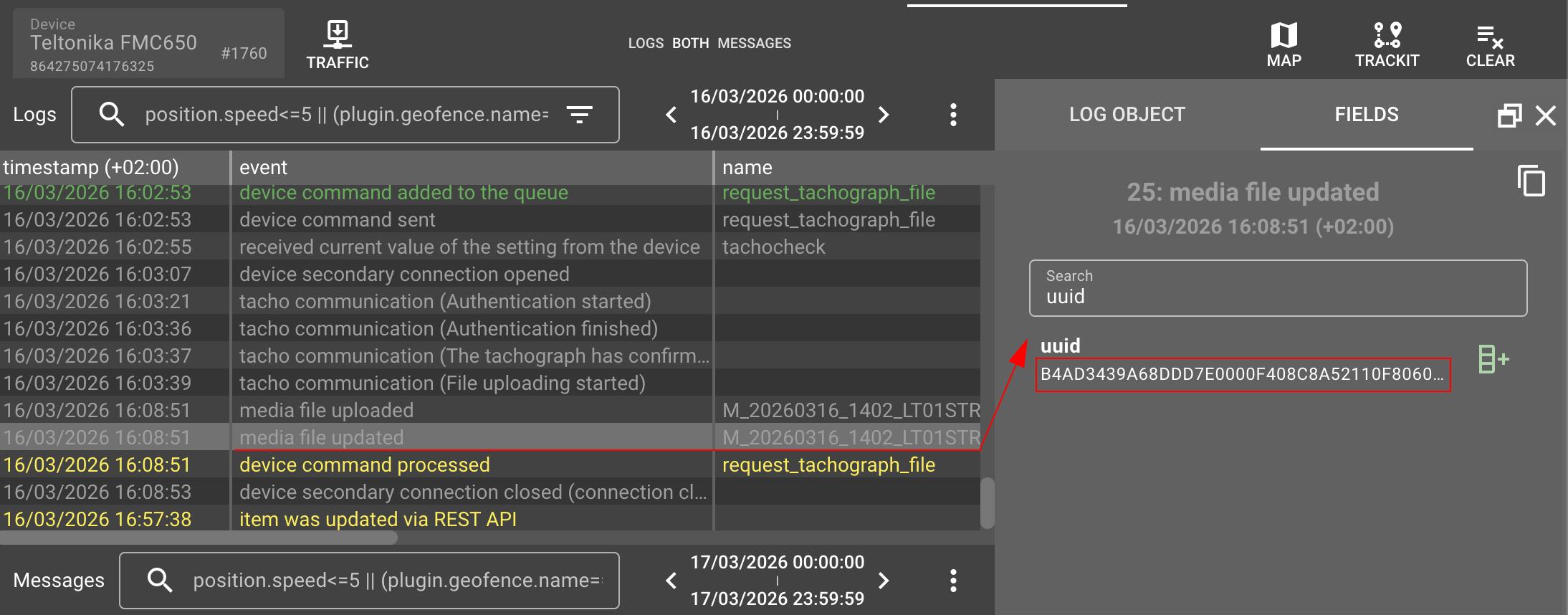
The file's output can be obtained using the REST API request with specific file UUID. To find specific file UUID you can look device logs for media file updated events:
Data structure:
The plugin processes tachograph files and produces structured JSON data fully compliant with EU Regulation 2016/799, covering all generations of driver cards (G.1, G.2v1, G2.v2) and vehicle unit memory files (G.2v1, G2.v2) temporarily not fully supported.
The plugin has a mechanism for merging data of similar structures. This is because the tachograph, when sending data to the tracker, breaks large data sets into many smaller parts due to low bus bandwidth. The plugin carefully collects and combines them into a single record for easy consumption by the end user.
The approximate size of driver data is currently 650-850 kb (approximately 19k lines). This size depends on the nesting level of elements and the tachograph generation.
Here is the driver file example as a demonstration with sections missing from the GEN 2v2 Stoneridge tacho.
{
  "DF_Tachograph": {
    "EF_ICC": {
      "CardIccIdentification": {
        "cardApprovalNumber": "",
        "cardExtendedSerialNumber": {
          "manufacturerCode": 18,
          "monthYear": "0325",
          "serialNumber": 2,
          "type": 1
        },
        "cardPersonaliserID": 18,
        "clockStop": 0,
        "embedderIcAssemblerId": "4154001812",
        "icIdentifier": 14085
      }
    },
    ...
    "EF_Vehicles_Used": {}
  },
  "DF_Tachograph_G2": {
    "EF_Application_Identification_V2": {...},
    ...
    "EF_Border_Crossings": {...}
  }
}
Driver file
Driver card file stores data from the driver's perspective — their personal activity, vehicles they used, places they visited. The card travels with the driver between vehicles.
The data is organized into two top-level objects:
- DF_Tachograph`** — Gen1 data (present on all driver cards).
- DF_Tachograph_G2`** — Gen2 data (present on Gen2 cards only).
Each of them containing named sections that correspond to the Elementary Files (EF) defined by EU Regulation 2016/799:
- EF_Identification — card details and driver's personal info (name, date of birth, card number, validity dates, issuing authority)
- EF_Driver_Activity_Data — chronological activity records per day (driving, work, break/rest, availability, distance)
- EF_Places — work period locations (country, odometer, GNSS coordinates for Gen2)
- EF_Vehicles_Used — history of vehicles the driver operated (VIN, registration number, odometer range, first/last use dates)
- EF_Events_Data — recorded events such as speeding or power supply interruptions (type, begin/end time, vehicle)
- EF_Faults_Data — equipment faults logged during operation (type, timestamps, vehicle)
- EF_Driving_Licence_Info — driving licence number, issuing authority and country
- EF_Control_Activity_Data — last control inspection details (type, period, inspector card number, vehicle)
- EF_Current_Usage — current session info (session open time, current vehicle registration)
- EF_Specific_Conditions — special regime records such as ferry/train crossings and out-of-scope periods
- EF_Application_Identification — card type and capacity metadata (number of records slots for events, faults, vehicles, places)
- EF_ICC / EF_IC — chip hardware identification (serial number, manufacturer, IC identifier)
- EF_Card_Certificate, EF_CA_Certificate, EF_Link_Certificate — digital certificates for card authenticity verification
Gen2-only sections:
- EF_Application_Identification_V2 — extended capacity metadata (border crossings, load operations, VU configuration slots)
- EF_Vehicle_Units_Used — vehicle unit hardware records (manufacturer, software version, timestamps)
- EF_Border_Crossings — border crossing events with GNSS coordinates, countries entered/left, and authentication status
- EF_Load_Unload_Operations — cargo loading and unloading operations with GNSS location and odometer
- EF_Load_Type_Entries — cargo type entries logged by the driver
- EF_GNSS_Places — accumulated driving GNSS waypoints recorded every ~3 hours
- EF_Places_Authentication — authentication status records for each place entry
- EF_GNSS_Places_Authentication — authentication status records for each GNSS accumulated driving point
Memory file
Vehicle unit (VU) memory file stores data from the vehicle's perspective — every driver who used this vehicle, speed data, detailed technical events, calibration history, and sensor records. It stays with the vehicle.
Currently extracted structures from VU memory files (Gen1):
- VehicleIdentificationNumber — VIN of the vehicle
- VehicleRegistrationNumber — registration plate and registering member state
- VehicleRegistrationIdentificationRecordArray — extended vehicle registration records (array — multiple entries if the plate was changed)
- CurrentDateTime — date and time at the moment of download
- OdometerValueMidnight — odometer reading at midnight for each recorded day (array — one entry per day)
- ActivityChangeInfo — driver activity status changes with timestamps: driving, rest, work, availability (array — hundreds of entries over the storage period)
- CardSlotsStatus — status of card slots at each activity change (card inserted/withdrawn, which slot)
- VuCompanyLocksData — company lock-in/lock-out history (array — one entry per lock event)
- VuControlActivityData — records of roadside inspections and enforcement controls (array — one entry per control)
- VuDownloadActivityData — history of VU memory downloads: who downloaded and when (array — one entry per download)
- MemberStateCertificateRecordArray — EU member state digital certificates
- VuCertificateRecordArray — vehicle unit's own digital certificates
- Signature — digital signatures for data integrity verification
Gen2 VU memory structures follow the same pattern but use record arrays by default — for example, VuBorderCrossingRecordArray, VuGNSSADRecordArray, VuLoadUnloadRecordArray. Gen2 VU support is in progress.
Change log
Subscribe to the tacho-file-parse plugin change log to stay in sync with any updates.
More plugin types
Find a comprehensive list of available plugin types here.