TachoBox is a web-based viewer for tachograph DDD files parsed into JSON. It works with both driver card and vehicle unit (VU) daily data, supporting Gen1 and Gen2 formats.
Note: VU file parsing is currently under development. When loading VU data, the application displays only a minimal set of information (daily activities). Full VU support - including detailed events, faults, speed data, and vehicle-specific records -is planned for future releases. Driver card files are fully supported.
Getting data in
There are four ways to load data:
- From flespi - log in, pick a device with the tachograph plugin, and browse its DDD files. You can add multiple devices and load files from each.
- From disk - upload one or more JSON files directly.
- From URL — pass ?jsonurl=https://example.com/data.json to load a JSON file from an external URL.
- Demo data - one click loads a realistic sample with 62 days of activity, 5 vehicles across Europe, violations, events, faults, and GNSS coordinates.
Multiple files can be loaded simultaneously. Incompatible files (e.g. different drivers) prompt you to choose which one to display.
Overview
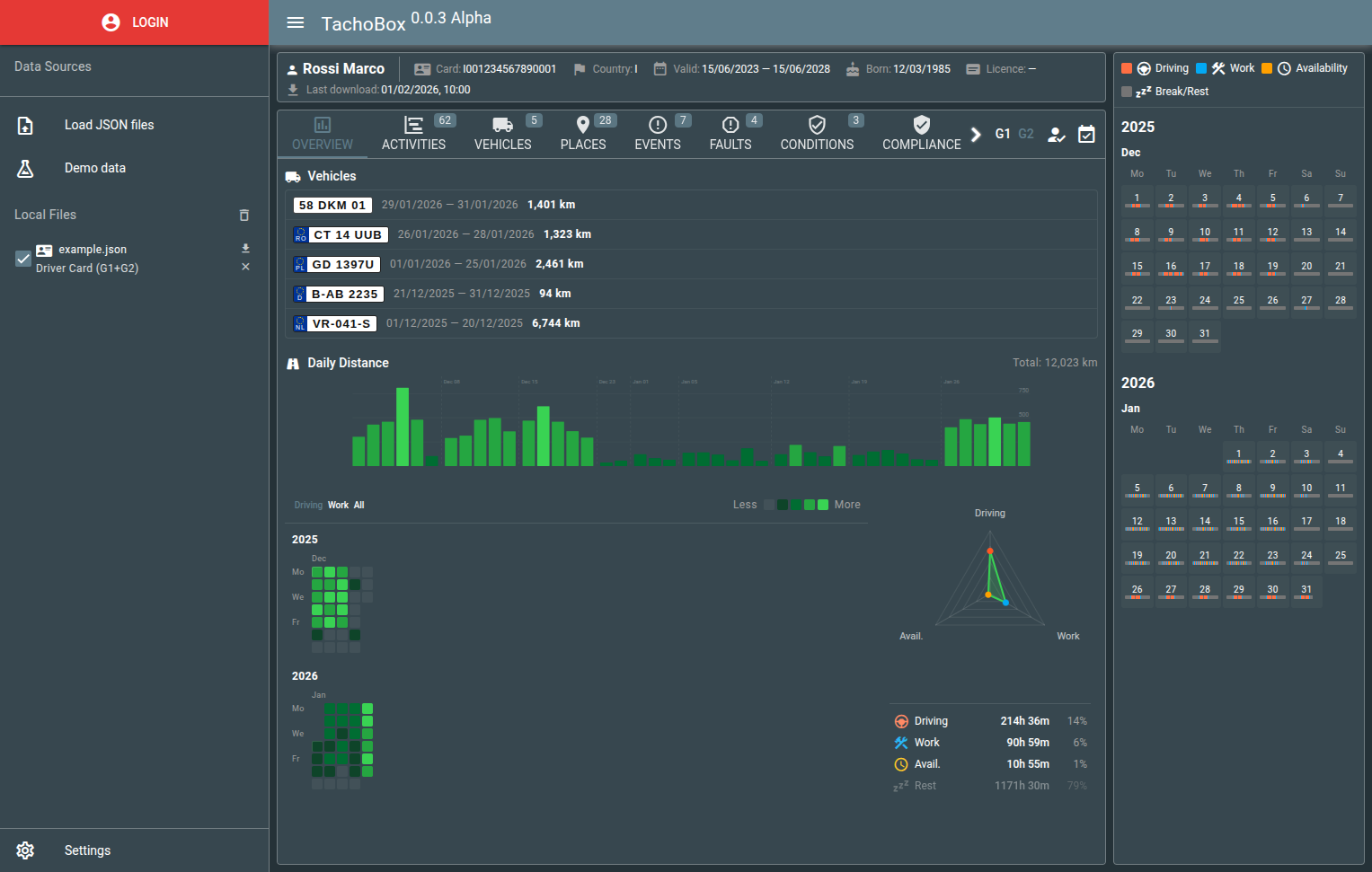
The first tab gives you the big picture at a glance:
- Vehicles - all vehicles used by the driver, with license plates, time periods, and odometer readings.
- Daily distance chart - bar chart with week separators. Click any bar to inspect that day.
- Activity heatmap - grid showing driving intensity across weeks and months.
- Driver profile radar - chart breaking down time spent driving, working, and on availability.
Date Range Filter
A timeline bar at the bottom of the page allows filtering all data by date range. Click to select a day, double-click for a month, triple-click to reset. Drag to select a custom range, or use the calendar picker. Preset buttons (7d, 14d, 30d) are available for quick selection. The filter applies across all tabs.

Activities
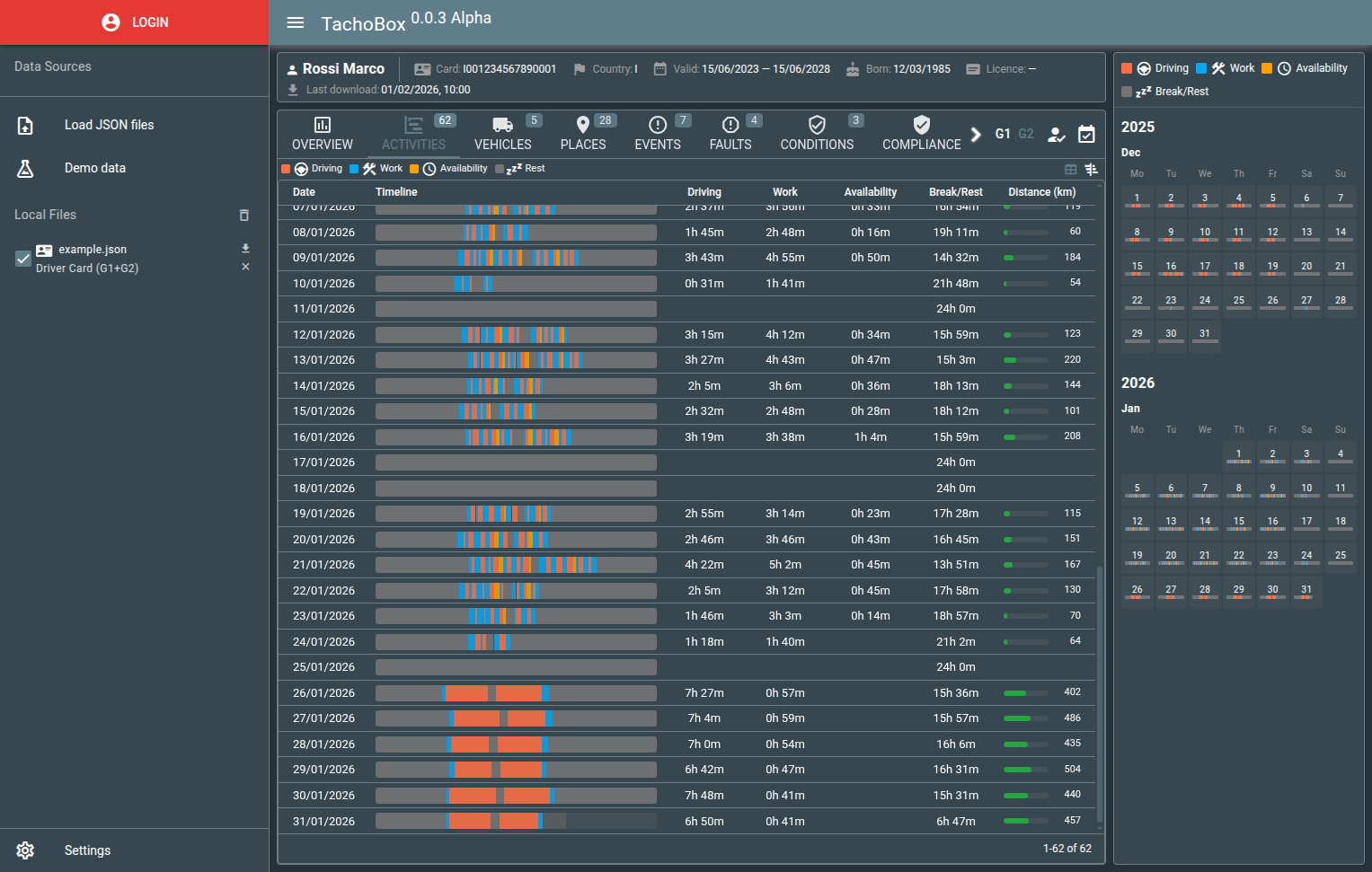
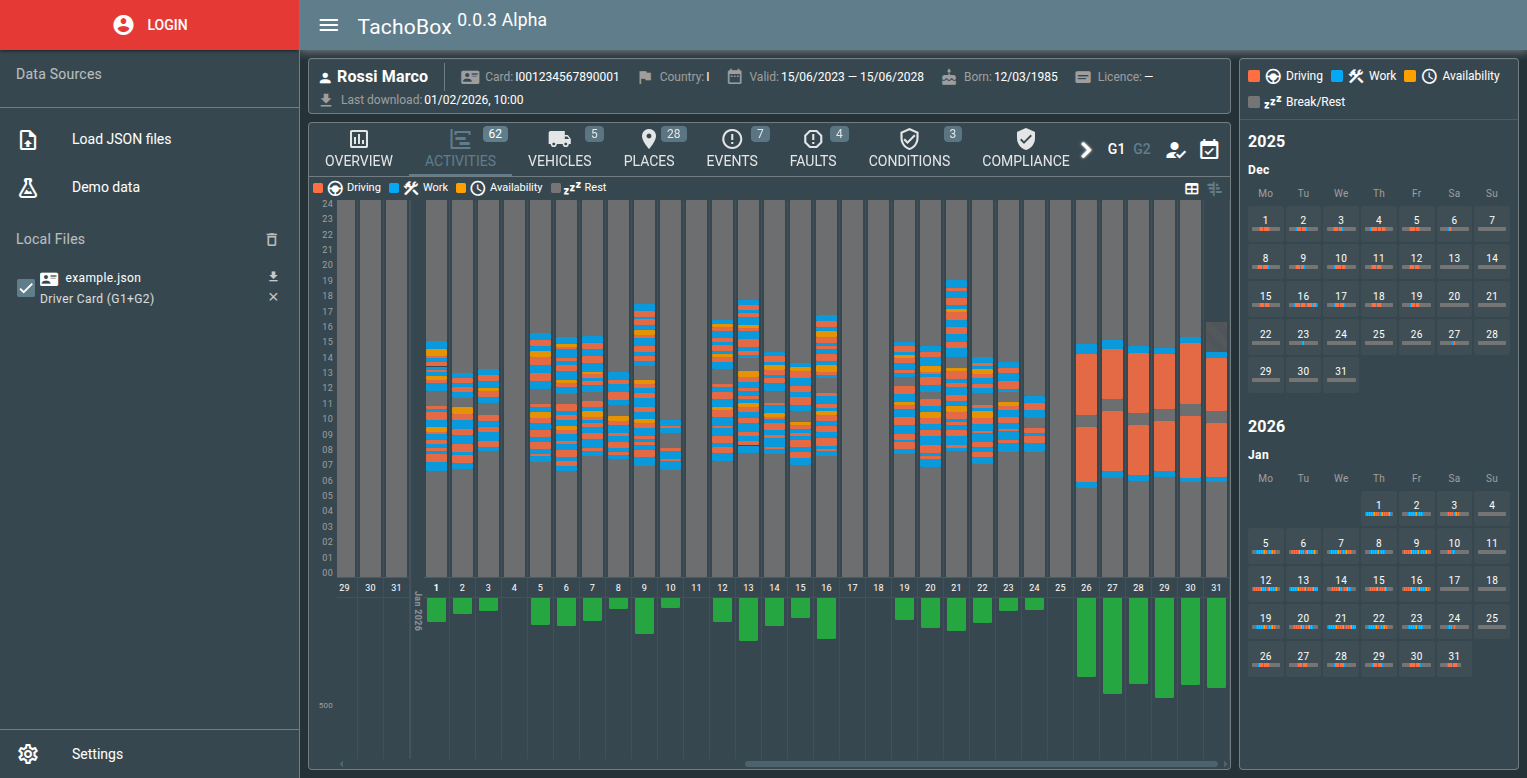
Two view modes:
- Table - each day as a row with an inline timeline bar, driving/work/rest/availability durations, and a distance progress bar. Also displays per-day icons for border crossings, cargo operations, and inspections. Hovering over an icon shows a time marker on the activity timeline bar.
- Timeline - vertical gantt chart with days as columns, distance bars below each day, and a kilometer scale. Scroll horizontally with the mouse wheel.
A collapsible calendar sidebar shows months with color-coded activity bars. Click any day in any view to open the day detail dialog.
Day detail
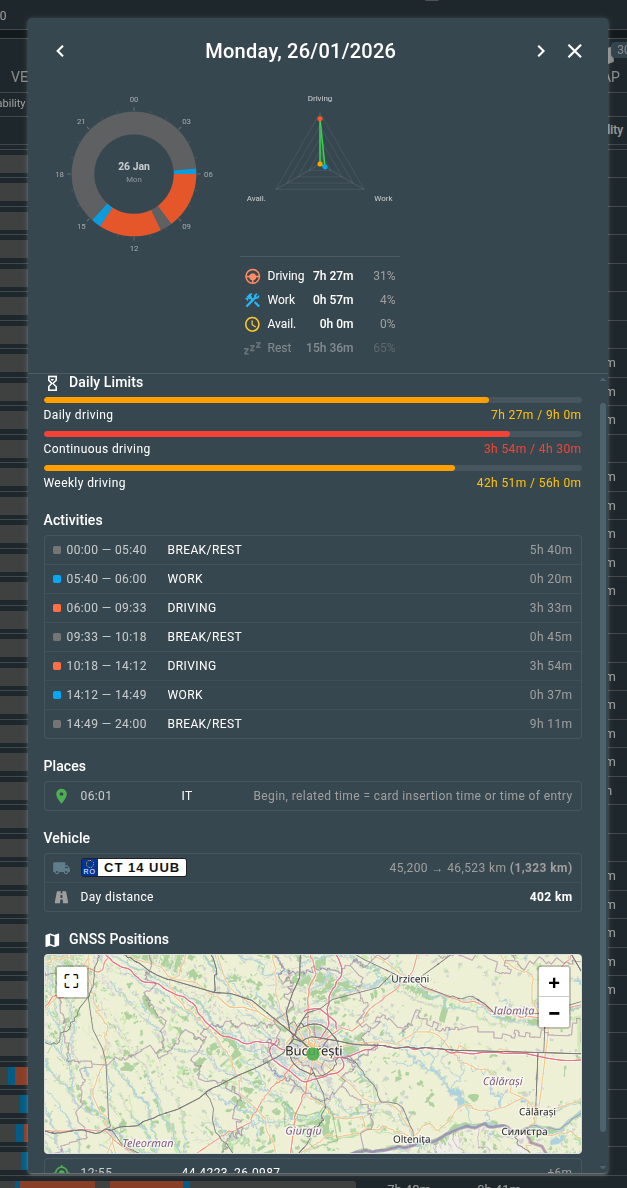
A comprehensive breakdown of a single day:
- 24-hour clock disc - hover over an activity in the list and the corresponding sector highlights on the disc.
- Activity radar - distribution of driving, work, and availability for that day.
- EU 561/2006 limits - progress bars for daily driving (9h), continuous driving (4.5h), and weekly driving (56h).
- Violations - if any limits were exceeded.
- Activity list - every activity change with times and durations.
- Events, faults, places, special conditions - everything recorded for that day.
- Vehicle - registration plate with odometer begin/end and distance.
- GNSS map - if coordinates are available, a map with the day's route.
- Navigation - arrows to step through days without closing the dialog.
The last day in the file is marked as "Incomplete" since the download may have happened mid-day - violation checks are skipped for it.
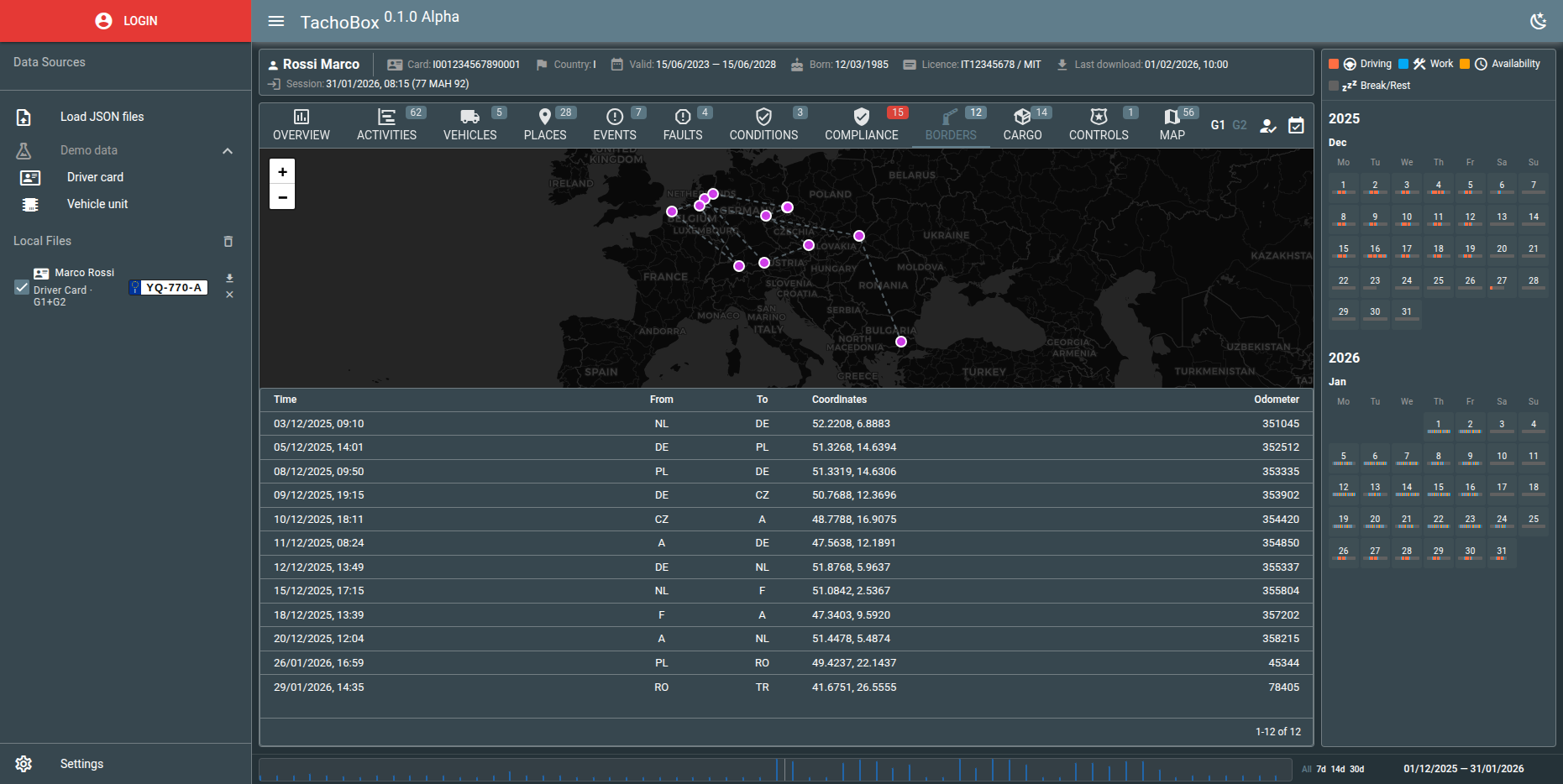
Border Crossings
Available when Gen2 data contains border crossing records. Shows country-to-country transitions with GPS coordinates on an interactive map. Table includes timestamp, countries, coordinates, and odometer values.
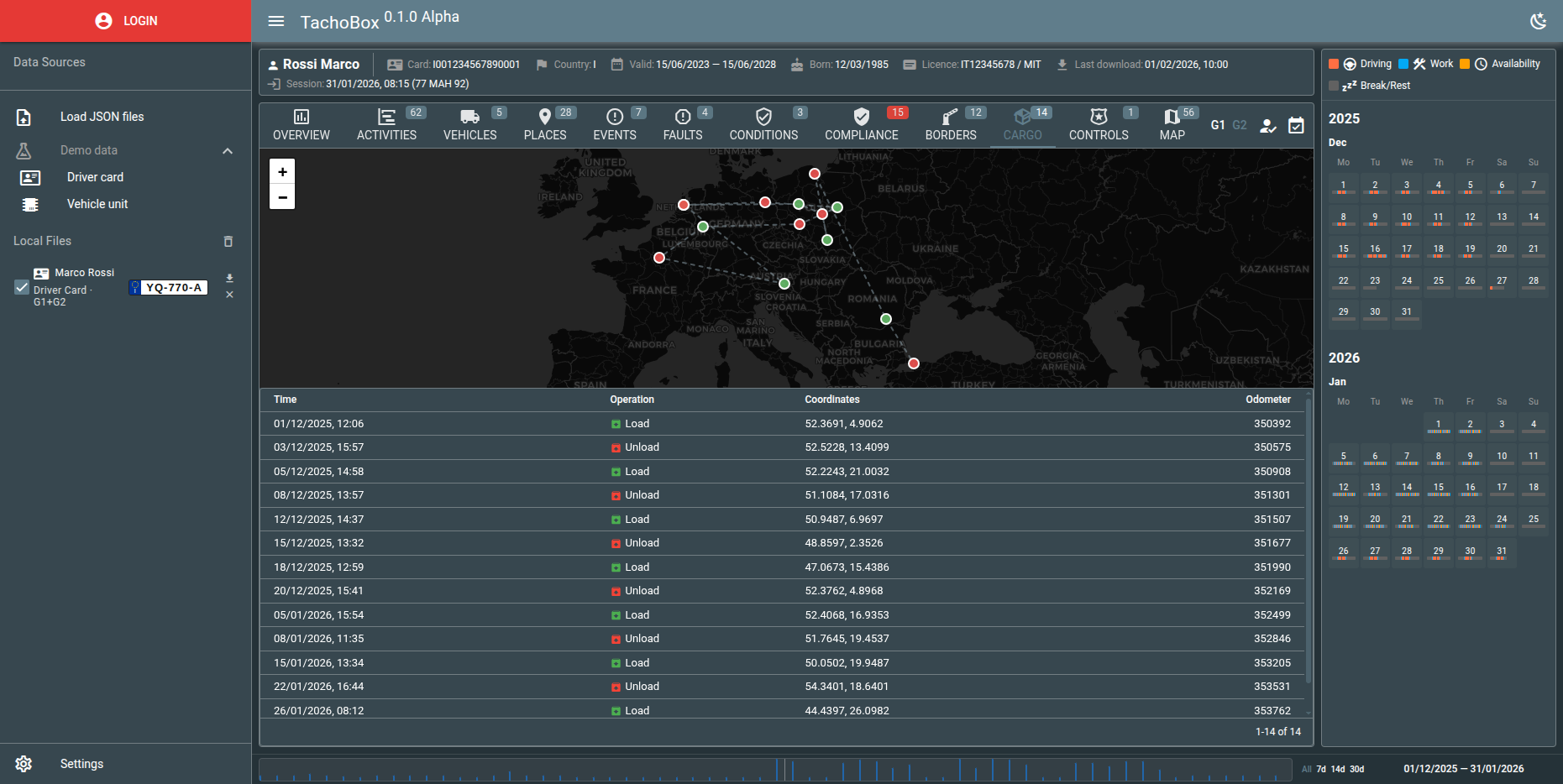
Cargo Operations
Load and unload events with GPS coordinates (Gen2v2). Dedicated icons distinguish between loading and unloading. Map view shows all operations with color coding.
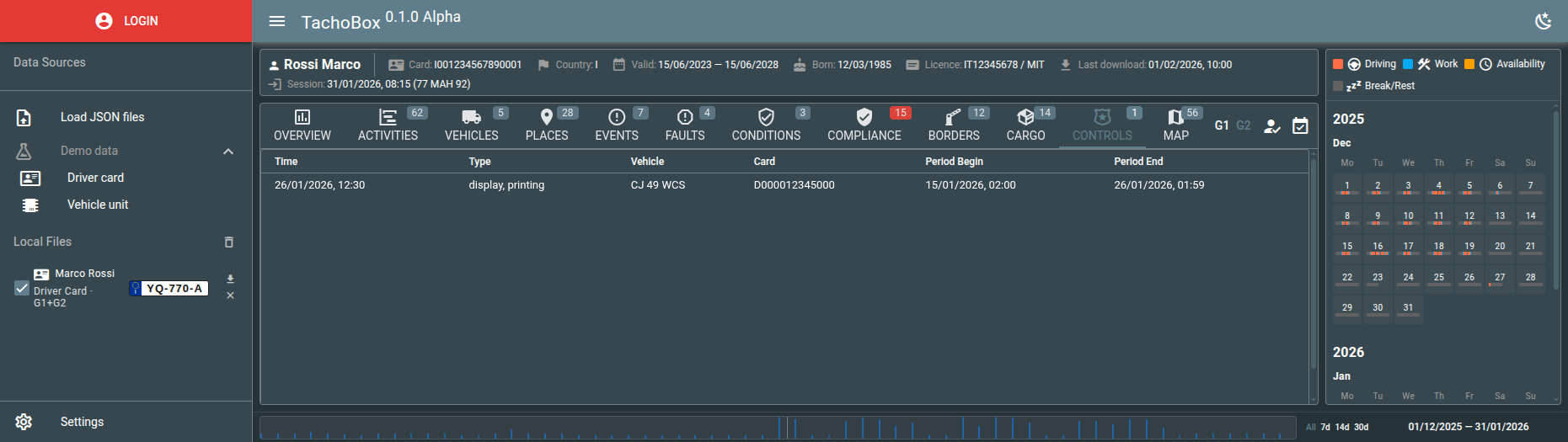
Controls
Roadside inspection records showing control type, inspector card details, vehicle, and the inspection time period.
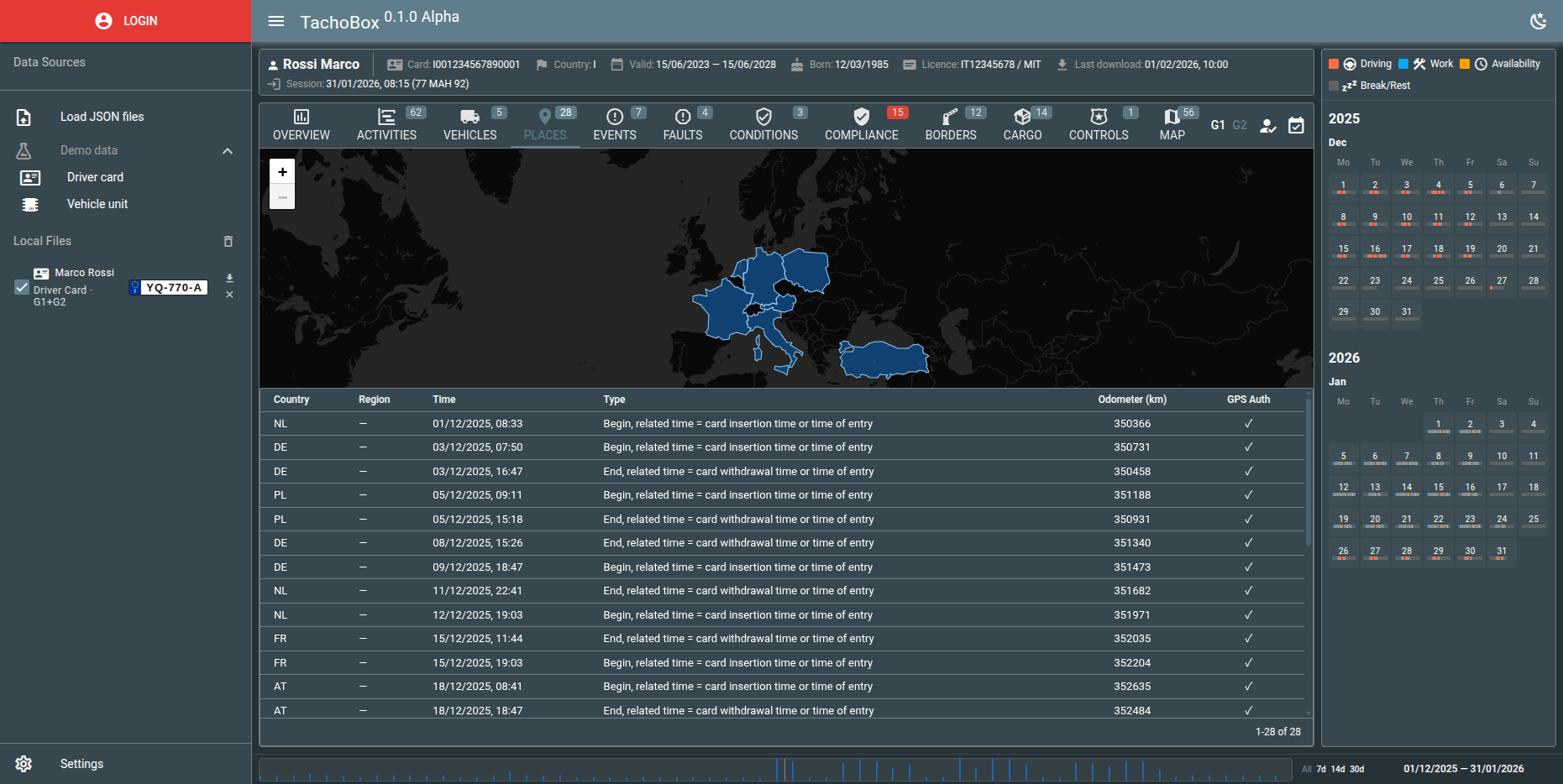
Places
Vehicles, Events, Faults, Conditions
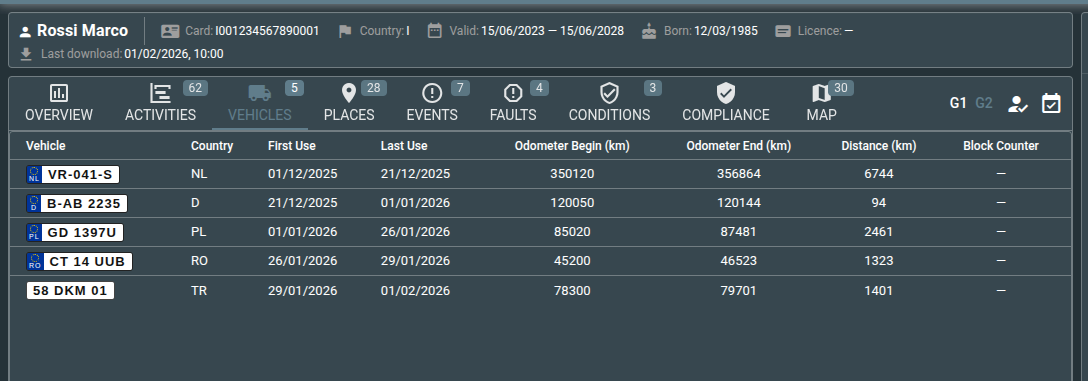
Each has its own tab with a table. Click any row to jump to that day's detail view.
Map
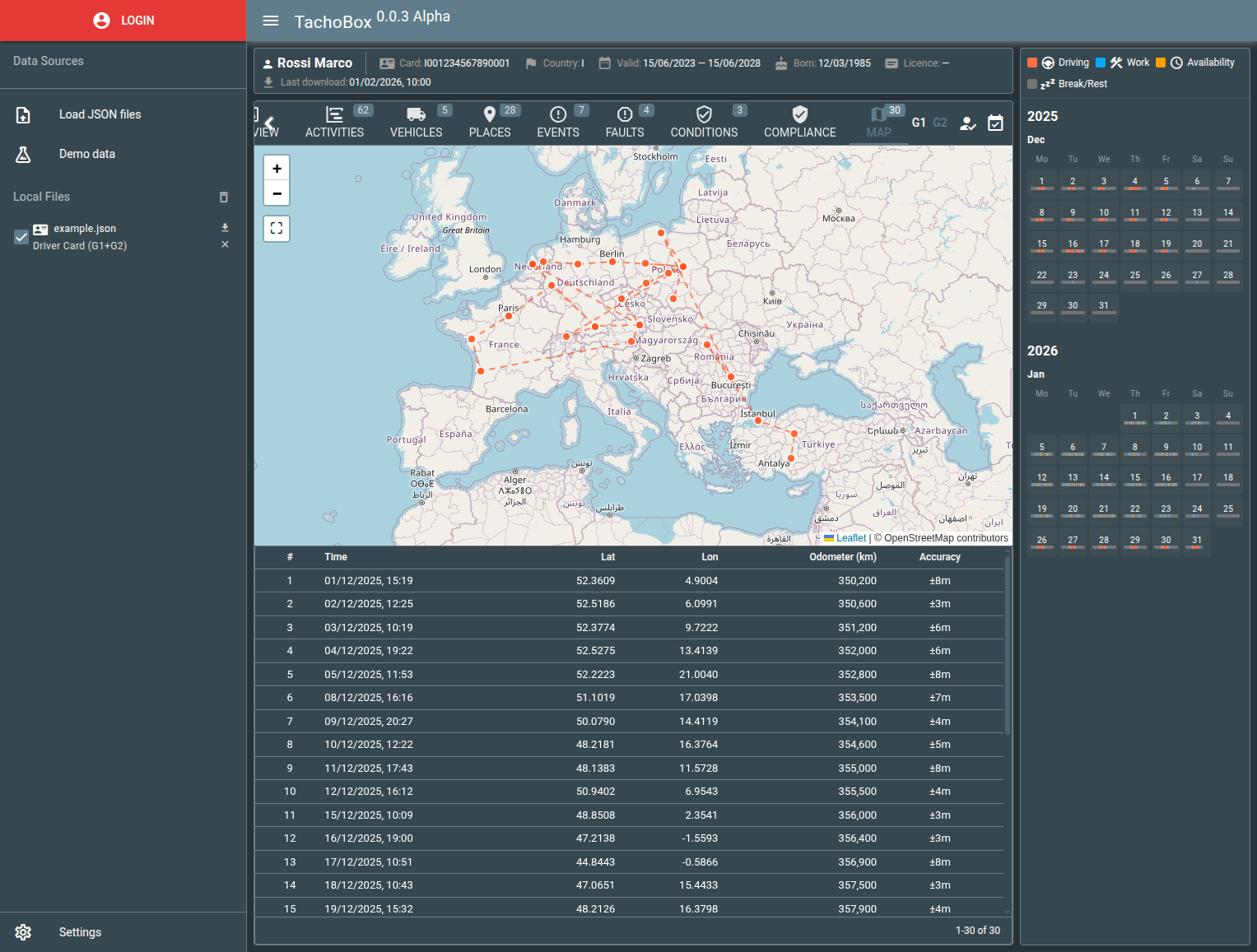 Available when Gen2 GNSS data is present. The Map tab now displays a unified chronological track combining all GPS sources: GNSS waypoints, work period locations, border crossings, and cargo operations. An interactive legend allows toggling each data type.
Compliance
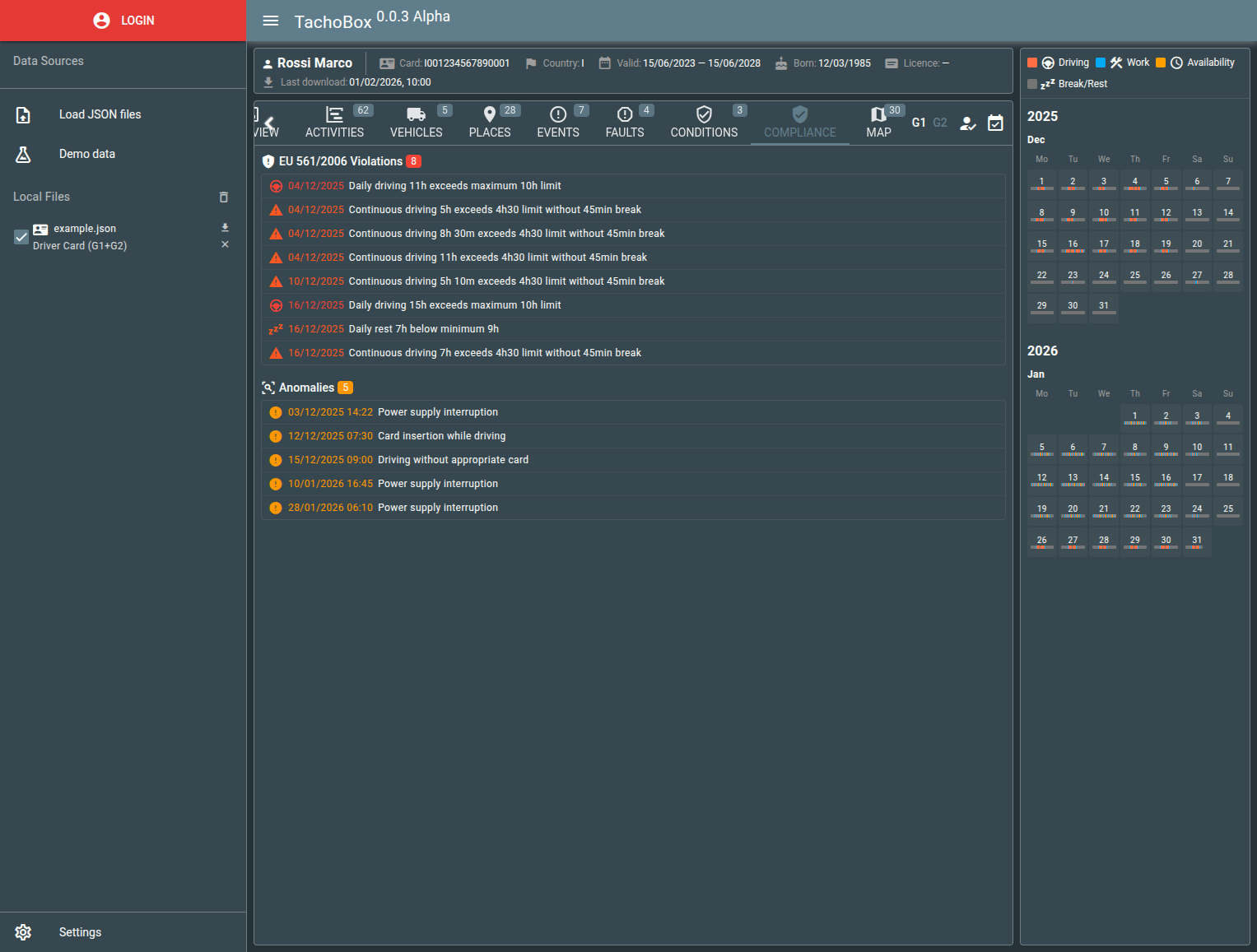
- EU 561/2006 violations - daily driving, rest, continuous driving, weekly and bi-weekly limits. Click any violation to see the day.
- Anomalies - missing days, suspicious events (power interruptions, security breaches, card conflicts), unaccounted time gaps. Each entry shows date and time, clickable.
- Cross-reference - when both driver card and VU data are loaded, compares them for discrepancies.
Other details
- Gen1/Gen2 toggle when both generations are available.
- Download the original JSON for any loaded file.
- Responsive layout - works on desktop and mobile.
- Not an official DDD viewer - intended for data exploration only.
Embedding TachoBox via iframe
TachoBox can be embedded into any web application via iframe. Use URL query parameters to control the appearance and behavior.
Basic embed
<iframe src="https://tachobox.flespi.io/#/device/DEVICE_ID/file/FILE_UUID?token=FLESPI_TOKEN" width="100%" height="800"></iframe>
URL parameters
| Parameter | Values | Description |
| token | flespi token | Authentication token for API access |
| theme | `light` / `dark` | Force light or dark theme |
| hidepanels | true | Hide the left sidebar and header |
| hidecalendar | true | Hide the right calendar panel |
| hidedisclaimer | true | Hide the "not an official viewer" disclaimer banner |
| jsonurl | https://example.com/data.json | URL to a JSON file — loads and displays the data on page load |
| tab | `overview`, `activities`, `vehicles`, `places`, `events`, `faults`, `conditions`, `compliance`, `borders`, `cargo`, `controls`, `map` | Open a specific tab on load |
| tabs | comma-separated list | Show only specified tabs, e.g. `tabs=activities,map,compliance` |
| day | unix timestamp | Open the day detail dialog for a specific day |
| lang | "lang=en-US" Supported: "en-US", "bg-BG", "cs-CZ", "de-DE", "es-ES", "fr-FR", "it-IT", "lv-LV", "lt-LT", "nl-NL", "pl-PL", "ro-RO", "fi-FI", "sv-SE" | Locale code - set the UI language |
URL routes
- /#/ - empty viewer, load data manually or via demo
- /#/device/DEVICE_ID - load all tacho files from a device
- /#/device/DEVICE_ID/file/FILE_UUID - load a specific file from a device
Example: minimal embedded view
<iframe src="https://tachobox.flespi.io/#/device/123456/file/abc123?token=YOUR_TOKEN&hidepanels=1&hidecalendar=1&tabs=activities,compliance,map&theme=dark" style="width:100%;height:600px;border:none;"></iframe>
Languages
TachoBox is available in 14 languages:
English, Bulgarian, Czech, German, Spanish, French, Italian, Latvian, Lithuanian, Dutch, Polish, Romanian, Finnish, and Swedish. The language can be changed in the Settings panel.
Open source
TachoBox is open source under the MIT license - the code is at GitHub. You can run it locally, host your own copy.
Contributions are welcome: bug reports, translations, and pull requests alike. If you find a rule we read differently from the enforcement practice in your country, please open an issue - compliance edge cases are exactly where more eyes help.