Inexpensive dashcams raise a lot of false ADAS and DSM alarms. The ai-driving-events plugin checks an alarm against the footage the device uploads for it: when a message with a video or an image is registered, the plugin passes the file to the AI classification of driving events, adds the review to the message and resets the alarms that the footage rejects. Streams, webhooks and calculators receive a message that is already verified.
The plugin works with messages that carry a file of the device media storage in a media.video.X or media.image.X parameter, other messages pass through untouched. For a message with footage the plugin:
- Finds the alarms: the raised
adas.*.eventanddsm.*.eventparameters of the message, or itsadas.event.nameanddsm.event.name. Most devices report the alarm and upload the clip in separate messages, so when the media message has no alarm, the plugin takes the alarms the device registered during the clip: from one second before the timestamp of the media message to one second after the end of the video, and within 5 seconds of an image. A clip whose parameter reports no duration is assumed to last 15 seconds. - Reviews the footage: each file is reviewed together with the alarms and the speed: the one of the media message, or the one at the alarm when the media message has none. Up to 4 files of one message are reviewed in parallel, the first four by the parameter name.
- Finalizes the message: the review is added as the
driving.events.reviewparameter, the event parameters are corrected according to the mode. In theverifyandclassifymodes the alarms found in the device storage are copied into the message together with the otheradas.*anddsm.*parameters of their message, such as the alarm level, unless all the alarms of that group are rejected.
The alarm message is already registered by the time the clip arrives and stays as the device sent it. Treat it as the claim of the device and the media message as the verified event: build notifications and reports on messages with driving.events.review. A calculator that counts events in all messages sees such an event twice, exclude one of the two with a media check in the selector.
How to use
To create a new plugin, navigate to the Telematics Hub > Plugins section and click on the '+' button. Name the plugin, select 'ai-driving-events' as the 'Type id'. Fill in the 'Validate message' field with the expression 'media==true', so that only messages with media reach the plugin and its log. The expression can be narrower, for example 'exists('media.video.1')'.
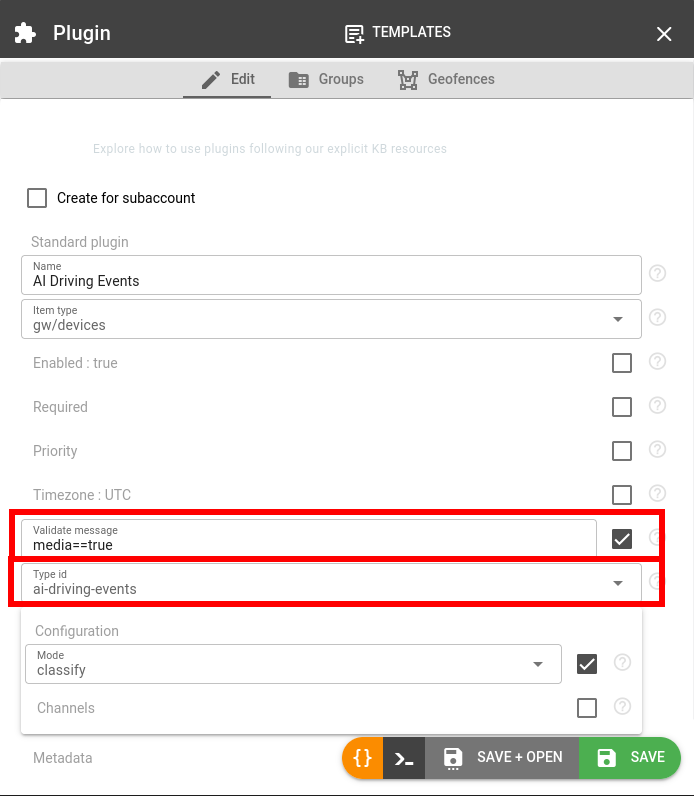
The Configuration section of the plugin has two options:
- Mode: what footage is reviewed and what is changed in the message.
- 'Verify alarms' (
verify, default): footage that comes with an alarm is reviewed, and an alarm with therejectedverdict is reset tofalse. Footage without an alarm is not reviewed and costs nothing. - 'Verify alarms and detect events' (
classify): all footage is reviewed. Rejected alarms are reset, and each of the detected events with a high or medium confidence is raised as its standard parameter, for exampledsm.driver.phone.event=true, unless the review rejected it as an alarm. A plain camera without ADAS and DSM functions then produces the messages of an ADAS and DSM device. - 'Report only' (
report): footage that comes with an alarm is reviewed and the review is added, nothing else is changed. Use it to decide on your own, for example in a msg-pvm-code plugin with a lower priority.
- 'Verify alarms' (
- Channels: camera channels to review, all channels if empty. A multi-channel device uploads a clip from every camera for one alarm: list the channel of the cabin camera to verify DSM alarms, or of the road camera for ADAS alarms.
An alarm with the undetermined verdict is never changed, for example a seatbelt alarm checked against the clip of the road camera. With several files an alarm is reset only when at least one file rejects it and none confirms it. The adas.event.name or dsm.event.name parameter is removed when it is rejected itself, or when all the raised events of its group are rejected. The original claim of the device stays visible in the reported list of the review.
Now assign the plugin to a device: navigate to the Devices tab of the plugin, click on the '+' icon and select the device from the list. Leave the required flag of the plugin off, otherwise a message with footage that cannot be reviewed is not registered at all.
As the device uploads footage, the messages are processed by the plugin. A message of a cabin camera that reported a distraction and an unfastened seatbelt looks like this after the verify mode:
{
  "timestamp": 1789926449.924622,
  "media": true,
  "media.video.1": {"url": "https://media.flespi.io/XXXXXXXX", "mime": "video/mp4", "size": 154955, "meta": {"channel": 1, "duration": 10}},
  "position.speed": 40,
  "dsm.distraction.event": true,
  "dsm.seatbelt.event": false,
  "driving.events.review": [
    {
      "media": "media.video.1",
      "view": "cabin",
      "quality": "good",
      "summary": "The driver is driving while wearing his seatbelt, but looks down away from the road for several seconds.",
      "events": [
        {
          "parameter": "dsm.distraction.event",
          "at": 3,
          "confidence": "high",
          "evidence": "The driver looks down away from the road for more than 3 seconds."
        }
      ],
      "reported": [
        {
          "parameter": "dsm.distraction.event",
          "verdict": "confirmed",
          "evidence": "The driver looks down away from the road from about second 03 to second 06."
        },
        {
          "parameter": "dsm.seatbelt.event",
          "verdict": "rejected",
          "evidence": "The driver has a seatbelt visibly fastened across his chest."
        }
      ]
    }
  ]
}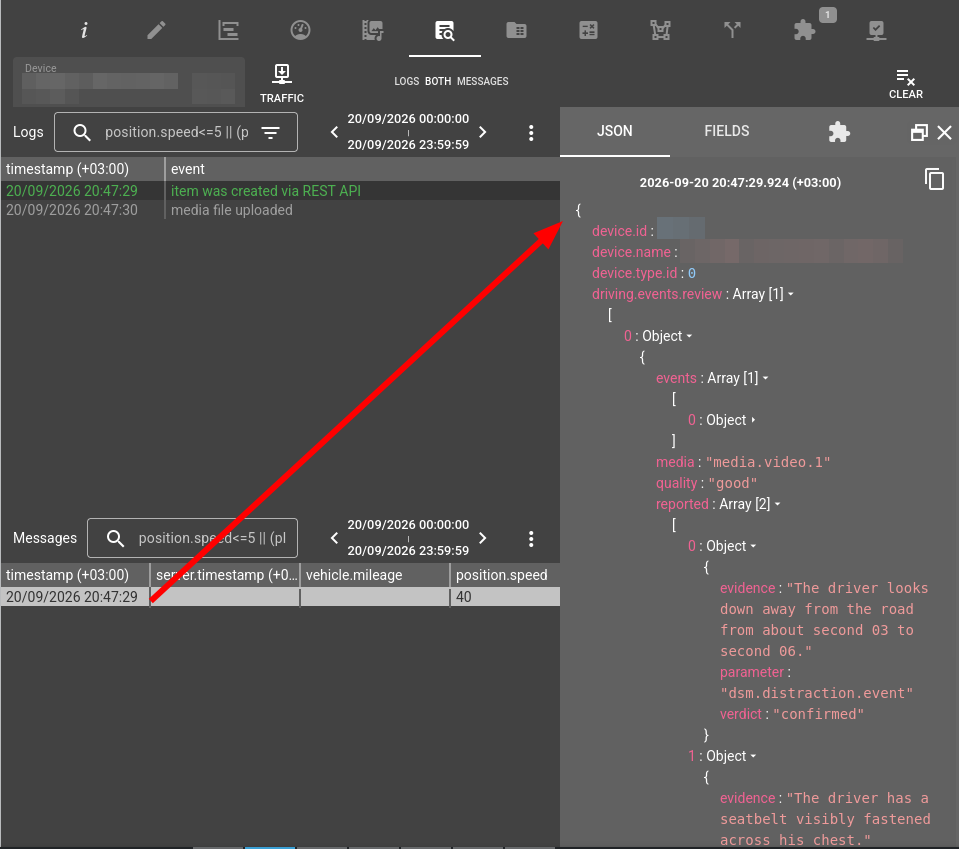
The clip confirms the distraction and shows a fastened seatbelt, so dsm.seatbelt.event is reset. The driving.events.review parameter is an array with one item per reviewed file, media names the parameter of the file. It is absent when nothing was reviewed. The fields of the review are described in AI classification of driving events.
Cost
Each reviewed file consumes AI credits of the account that owns the plugin: 1 credit for an image, 2 credits for a video of up to 20 seconds, 4 credits up to a minute and 10 credits up to 5 minutes. The duration is read from the header of an MP4, MOV or 3GP file: a video in another container, or one that declares no duration, costs 10 credits. A refused file and a failed review are not charged. The calls of the plugin are listed in /ai/logs with tg.plugin.ai-driving-events.ID in the app field, where ID is the ID of the plugin.
Troubleshooting
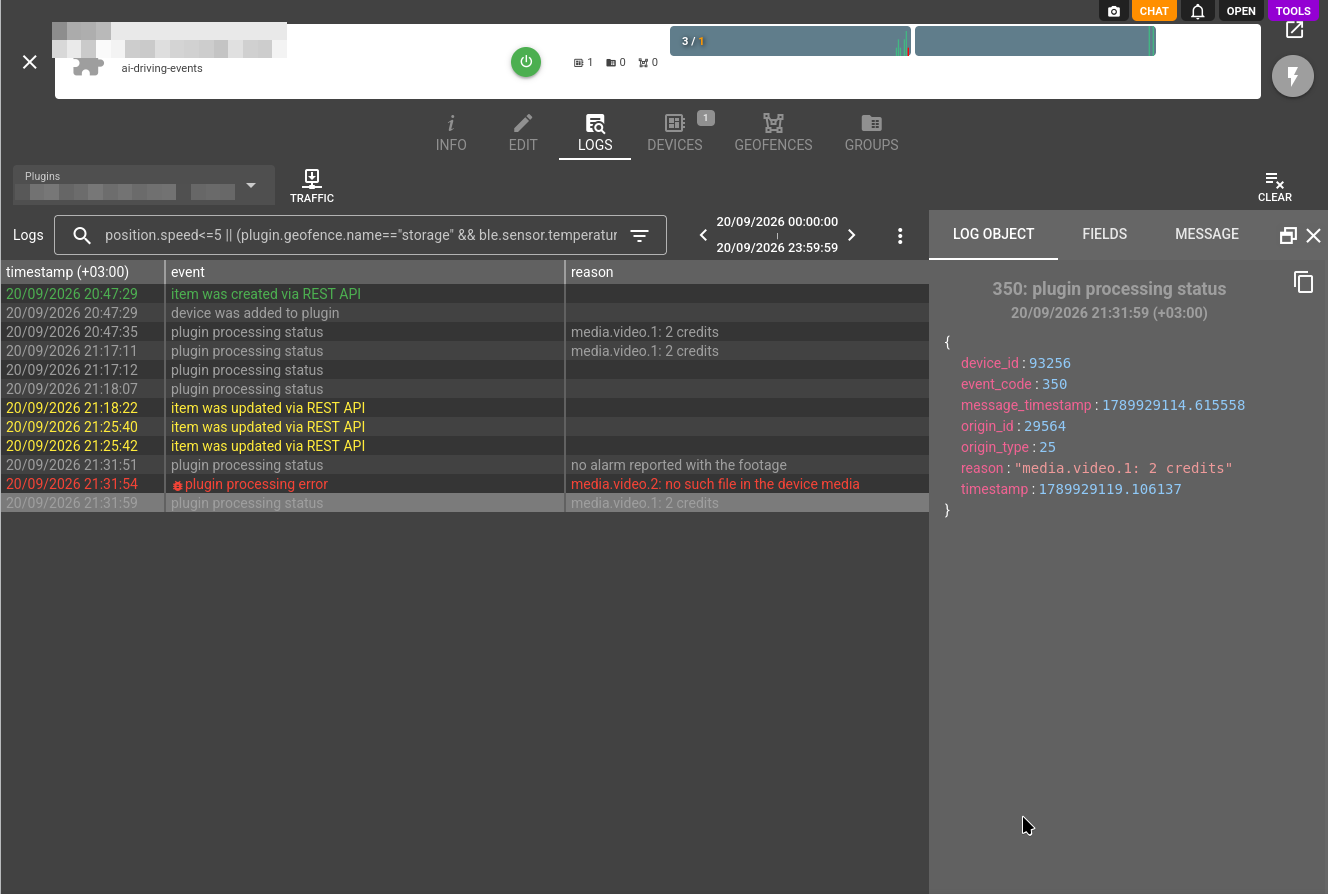
What happened to each message is written to the Logs tab of the plugin with the reason:
| Reason | What it means |
| media.video.1: 2 credits | The file is reviewed and charged, the review is in the message. The log record also carries the ai_credits parameter: the credits charged for the reviews of the message as a number, ready for calculations. The full accounting of the AI credits is in /ai/logs. |
| no alarm reported with the footage | The verify or report mode found no alarm in the message or in the device storage during the footage. Nothing is reviewed or charged. The alarms are looked up in the device storage, so the messages_ttl of the device must not be zero. |
| media.video.1: no such file in the device media | The link does not point to a file of this device: the file is already deleted or rotated out, or it belongs to another device. |
| media.video.1: Video of N seconds exceeds the 300 seconds limit | The tool refused the file, see the reasons of the tool. |
| media.video.1: Footage is empty | The file has no content, usually because the upload from the device has failed. |
| media.video.1: error: failed to classify the footage | A reason that starts with error: is a review that failed on the side of the tool. It is not charged. |
| alarm lookup failed | The device storage did not answer in 2 seconds. The verify and report modes leave the message as is, the classify mode reviews the footage without the alarms. |
| media.video.5: over the limit of 4 files | The message carries more than 4 files. List the needed cameras in channels. |
| media.video.1: ai credits limit exceeded | The AI credits of the account are exhausted. A call needs room for 10 credits at the moment it is made. |
| media.video.1: ai calls rate limit exceeded | The account makes more AI calls per minute than its plan allows. Narrow the footage with channels or the validate message expression. |
| media.video.1: timeout | The review did not finish in 45 seconds and its result is dropped. Such a review may still be charged. The timeout reached reason means the same for the whole message. |
| media.video.1: connection error media.video.1: server error media.video.1: failed to check the file |
The tool or the device media storage did not answer. Nothing is charged. |
Performance and stability considerations
- The registration of a media message waits for the review, which typically takes 4 to 15 seconds.
- When nothing is reviewed, the message is registered as the device sent it. With the required flag set, such a message is rejected instead.
- Only the alarms that come with footage are verified. Devices upload footage for a part of their alarms, and an alarm without footage stays as reported.
- The review is an opinion of an AI model. Events in the cabin are recognized more reliably than road events, which depend on estimating a distance: the verdict on a close following or a collision warning may differ between two reviews of the same clip.
Change log
Subscribe to the ai-driving-events plugin change log to stay in sync with any updates.
More plugin types
Find a comprehensive list of available plugin types here.