July 2026 was the toughest month for us. On July 10, 2026, a 10-minute DDoS attack triggered a cascading reaction in our system that resulted in a disastrous four hours of flespi downtime. The full incident report is available here. As a result, our monthly uptime dropped to a historic low of 99.3847%, and we automatically penalized ourselves by applying 30% and 70% discounts to the monthly flespi bills of our Enterprise and Ultimate customers, respectively.
The downtime had a significant impact on our work, pushing back the development of some new features and shifting our engineering focus back to refactoring. In the three weeks since the incident, we've already completed a substantial amount of work that had accumulated over the past year – improving internal components, server configuration, service distribution across servers, adding various fuses to data flows, and more.
The system is now much more stable and better prepared for the next prolonged DDoS attack. Or at least we think so, because we've already addressed and improved everything we were able to identify during this incident. And of course, if anything new shows up next time, we're ready to respond quickly and efficiently.
If you look at the May and June 2026 changelogs, they were rather concise. Not because we had nothing to do, but because a large amount of work on new functionality was happening behind the scenes. In July, it finally started landing in production, with most of the major new features becoming available in August.
So the first part of the work is related to video telematics:
For the playback and live streaming commands, we added a new record parameter. When enabled, it automatically records the stream or playback and stores it in the device media.
Today, more than 15,000 Streamax video devices are connected to the platform. They often struggle to deliver parallel video streams over dedicated connections due to the device returning a "lack of resources" error. To address this limitation for the leading video telematics manufacturer, we implemented dedicated commands –
playback_video_batchandstart_videostream_batch– to activate playback or live streaming from multiple channels in parallel over a single TCP connection. Our users can now start live video feeds from all cameras connected to a device with a single mouse click.As part of this implementation, and for consistency in the connection metadata, we're replacing the
mediastreamparameter with themediastreamsarray. Please keep an eye on this changelog if your integration relies on it.
The next portion of changes is all about another high-complexity area – tachograph support:
TachoBox is now open source. You're welcome to clone, fork, adapt, extract the application logic, or build your own version. Just keep in mind that we continue improving it every day to keep up with country-specific EU regulations, so any forked version will become outdated within weeks.
We added support for Lisle Design smart card racks, available on both Linux and Windows. The integration is still experimental, and we're improving it daily, but it's already stable enough to offer to customers. A single Tacho Bridge Application can now handle thousands of company cards, making any flespi-based solution Enterprise-ready for fleet management services.
Tacho Bridge Application now supports automatic upgrades, simplifying maintenance on customer sites.
We implemented a complete remote management system for this Tacho Bridge Application, including settings to monitor the current application version and status, as well as remote log file downloads for in-depth troubleshooting.
As a side project, we also developed and released TrackBox as an open source application. It's a full-featured GPS tracking device simulator built specifically for flespi. You can run it in a web browser or as a standalone application. Or fork it and implement your own simulation scenarios – adding video, tachograph, crash events, or whatever else you need. With AI-assisted coding tools, it's now a matter of days, if not hours, to build and run your own scenarios.
Jan showed an interesting combination of device settings and webhooks that not only automatically provisions devices when they connect to a channel, but also automatically reconfigures them to the correct device type. See this blog post for more details about the use case.
Based on our support experience, an incorrectly configured device type is one of the most common mistakes users make. It often leads to telematics data being parsed incorrectly, especially for major manufacturers such as Teltonika, Queclink, and Jimi IoT. This webhook-based automation may finally close that gap for good.
Thanks to using various AI systems, our team's productivity has increased substantially this year. But at the same time, the number of signals we deliver to you has increased as well. Take our forum changelogs, for example, where we publish every change made to flespi and where you can subscribe to updates for any thread – it's now around a dozen posts per working day, and some of them are probably just noise for you.
To simplify your information flow – helping you stay informed without being overloaded – we'll soon release a dedicated AI-based service that will automatically read all changelogs, reconcile them with your account data, and notify you only about changes relevant to your specific integration, filtering out everything else.
But even today, without AI, you can already process these messages automatically – forwarding only the ones that matter to email or your internal messaging systems, such as Slack. To make this easier, all platform, broker, telematics, and AI changelogs are now available via MQTT and REST.
At the same time, all stream, plugin, and protocol changelogs that we publish on the forum are also available via MQTT and REST, so you can always understand what messages like "channel restarted due to protocol update" actually mean and how they may affect your system.
We made a couple of adjustments to flespi expressions:
A new
inoperator, mostly useful for selecting dozens or even hundreds of devices by their ident in REST selectors – for example:configuration.ident in ('354017111111111', '868324022222222').Backslash escaping in string literals. This may affect your existing expressions if you previously used
\\, as one backslash now escapes the other.
We also implemented the ability to migrate containers and CDNs between subaccounts.
Finally, we added support for two new protocols – a-telematics and geotab-feed. And, of course, I'm not even trying to count the numerous enhancements we made to existing protocols, but you can judge the amount of work yourself. By the way, 15 new device types were supported in July.
In August, we expect to release at least three exciting new features:
Live video streaming over WebRTC. This will also enable bidirectional voice communication between the driver and the dispatcher.
The ability to log in to flespi directly from AI tools such as ChatGPT, Claude, and others. We've already implemented a realm-powered OAuth server API and are now adapting it for these tools.
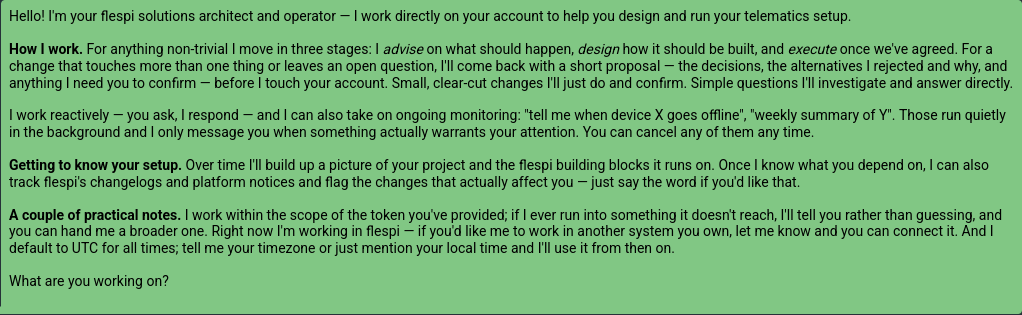
Powerful AI agents that can safely operate your flespi account – monitor, diagnose, adjust, and do virtually everything you may need. Unlike Codi, these agents can use the flespi REST and MQTT APIs and process large amounts of data while investigating problems. They can also design and implement actual changes to your flespi account. Compared to other external AI agents, however, every action is protected by your explicit permissions, making it safe to use them even with your master token and to allow account changes. These AI agents are available via API and can live in your Slack or Telegram. With access to email, they can even communicate with device manufacturer support on your behalf. In short, everything you might need to operate a modern telematics system.
Stay tuned! And to wrap things up, let me share the opening message from one of these agents so you can see how it sees its role in helping you: